Beginner's Guide
The definitive companion for Dynasty Warriors Online — weapons, gear, lieutenants, quests & more.
Pick a face, voice and starting weapon. Your weapon choice sets your moveset — see the Weapons section to plan ahead. You can change weapons later.
The first quest runs automatically after character creation. Courtyard NPCs give quick quests that build your Domestic Skills, gold and Honor.
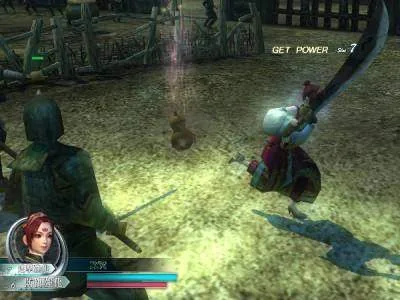
Public battles are the core loop. Defeat officers and lieutenants, capture bases, and protect your supply depot. Lieutenants drop a Lieutenant Soul you can collect to recruit them.
Forge and train weapons to raise their rank (1→7). Strengthen the Advance+ (究極強化) slot, collect Emblems (刻印) for charge-attack effects, and chase the per-rank stat growth.
Equip head/body/arms/legs/back pieces. Dye and tailor them, or fuse two pieces to keep the look of one and the stats of the other.
Your personal bodyguards — humans, animals and mountable animals. Level them, raise Affinity & Motivation, and teach skills.
Additional Guides (Legacy Wiki)
Beginner's Guide
Open the Launcher, select the server corresponding to your account, then click confirm to enter the game. Enter your account and password on the login screen to confirm.
Some error messages that beginners may encounter:
30101.
Account registered but not activated for Dynasty Warriors Online on the Tianxi service platform
32333.
Login to a server other than the account activation server
If you encounter other issues or login error messages during the process, please contact customer service staff promptly for inquiry or assistance.
Customer Service Channelhttp://bbs.wushuangol.com/showforum-13.shtml


Character creation can be completed by following the system prompts step by step. Once confirmed, some parts cannot be modified later.
Before creating a character, Zuo Ci will appear with an introduction to guide players through the character creation process.
Create name and select birthplace. Once the name and birthplace are confirmed, the new character will display as 'Name + Birthplace' in the game.
Names can contain up to 5 full-width characters (or 10 half-width characters)
Character appearance, voice, and other selections.
Gender
Character appearance, voice, and other selections.
MaleBody Type
Face
Facial Features
Hairstyle
Hair Color
Skin Color
Eye Color
Voice
Normal/Muscular/Slender/Short
Young/Deep/Handsome/Calm/Strict/Martial/Rational/Youthful
Normal/Strategist Beard/Long Beard/Tiger Whiskers/Eye Mask/Battle Scars/Paint/Tattoo
Tied Hair/Bald/Clean/Steady/Front Style/Swept Back/Long Hair/Messy/Elegant/Three Braids
Customize character hair color
Custom character skin color
Custom character eye color
Martial Faction:Bold/Classic/Loyal/Rogue/Divine Power/Brave/Tough
Rational Type:Intelligent/Obsessive/Gentle/Skilled/Serious/Calm/Diligent
Passionate Faction:Cheerful/Unyielding/Virtuous/Brave/Hot-blooded/Righteous/Pure
Technique Faction:Stubborn/Arrogant/Truth-seeking/Carefree/Eccentric/Ruthless/Showing Off
Unique Type:Optimistic/Wild/Proud/Competitive/Mischievous/Willful/Child of the Tiger
FemaleBody Type
Face
Facial Features
Hairstyle
Hair Color
Skin Color
Eye Color
Voice
Normal/Muscular/Charming/Petite
Healthy/Gentle/Handsome/Serious/Glamorous/Tough/Proper/Youthful
Normal/Paint/Warrior/Eyepatch/Battle Scars/Curse Mark/Tattoo
Facial Hair/Elegant/Lively/Hair Buns/Animal/Short Hair/Straight Hair/Natural/Tied Hair/Ponytail
Customize character hair color
Custom character skin color
Custom character eye color
Martial Faction:Experienced/Resolute/Cheerful/Fearless/Fierce
Rational Type:Scholarly/Reserved/Dignified/Calm/Intelligent
Passionate Faction:Wild Girl/Glamorous/Noble/Bold/Aloof
Pure Type:Steady/Acting Cute/Childish/Virtuous/Quiet
Unique Type:Impatient/Strong-willed/Dignified/Unrestrained/Child of the Bear
If you need to modify the above features in the game, you can visit theNPCbeautician for modifications or beauty treatments.


After determining character features, you can select scenario and faction.
In the game, you can use Rebirth Jade toRebirthto other factions.


After confirming everything is correct, click confirm to successfully create the character. If unsatisfied, you can choose to modify and recreate.


Starting the Game
When entering the game for the first time, the current strategy is displayed first, including your faction's main cities and strategic target cities.


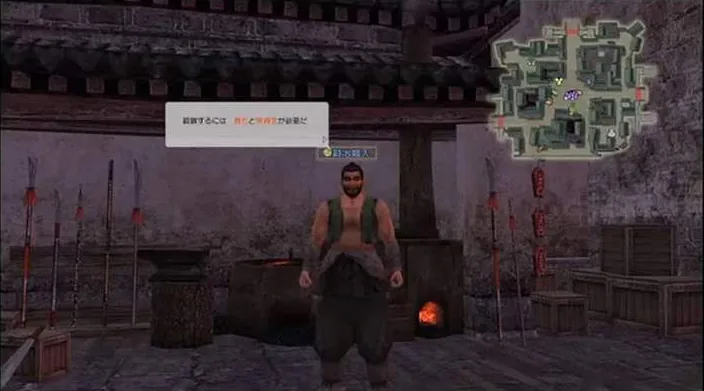
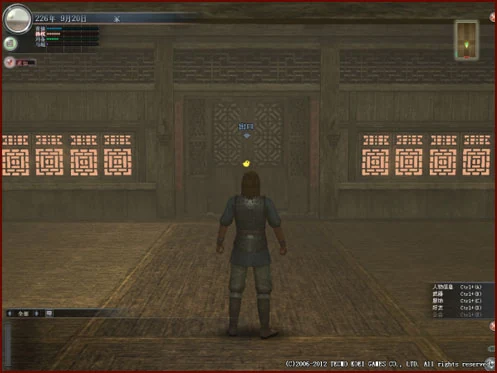
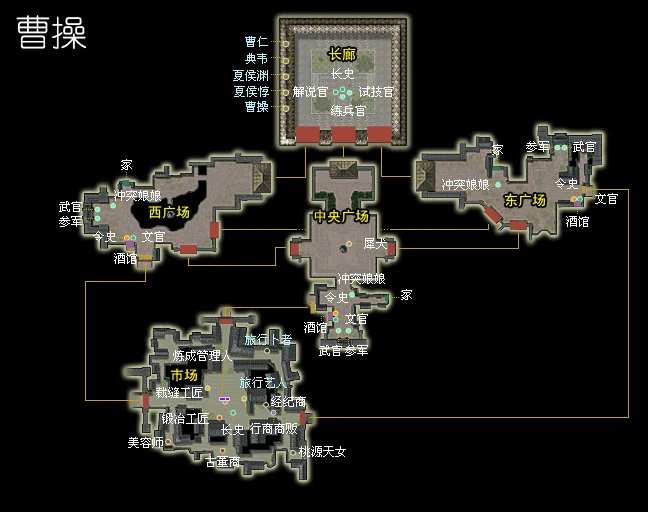
The debut system will equip the character with a home, courtyard and some furniture. You can move using the W, S, A, D keys on the keyboard. Hold down the W key to walk straight out the door to reach the Plaza.
Approaching the exit allows you to select the exit, pressing Enter will display three options: Move, Select, Set.
Move
Move to the set Plaza
Select
Select a destination and move there, options include West Plaza, Central Plaza, East Plaza
Set
Change the destination in [Move], options include West Plaza, Central Plaza, East Plaza
If you don't open the options at the exit, the system default setting is to move to Central Plaza.


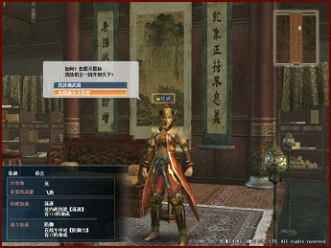
After going out, you cannot move freely yet. The first meeting with the faction lord cutscene will occur. After the lord and training officer finish speaking, you will directly enter the tutorial quest.


Registration and Activation
New players should first register for a "Tianxi Pass". Click on the official website homepageAccount Management. For first-time users, select registration and accurately fill in all required information according to the prompts to complete registration.

After registration is complete, log in again or directly click "Enter My Pass" to jump to the Tianxi service platform login status page. In the "Game Services Provided by Tianxi" list, select in the Dynasty Warriors Online sectionAccount Activation. You can jump to activation region selection, and select after the corresponding regionActivate Gameand the account will be successfully activated.
Note: Each Tianxi service platform account can only activate one region. It is recommended to select a game region suitable for your network environment for activation.


Successful operation will display an activation success prompt page.


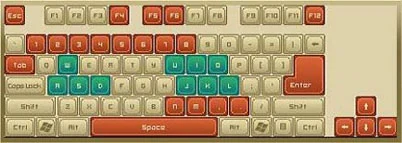
Controls

MovementAdvance
Retreat
Move Left
Move Right
【W】【↑】【Num8】
【S】【↓】【Num2】
【A】【←】【Num4】
【D】【→】【Num6】
Chat Reply
【R】
Rear View
【U】
Map Display/Map Hide
【M】
Mount Sub-Officer/Dismount
[, (Comma)] (Sub-Officer Nearby)
Help
【F1】
Answer
【F4】
Information Box Display Toggle
【F5】/【F6】
Open Main Menu
【F12】
Open Chat Input Mode
[Space]
Target Switch
【Tab】
Cancel
【Esc】
Camera ControlDown
Up
Left
Right
Zoom Out
Zoom In
【Num3】
【Num9】
【Num/】
【Num*】
【Num-】
【Num+】
Expression
【1】~【8】

MovementAdvance
Retreat
Move Left
Move Right
Horizontal Movement
【W】【↑】【Num8】
【S】【↓】【Num2】
【A】【←】【Num4】
【D】【→】【Num6】
Movement Key + [U]/[O]
Defense/Rear View
【U】/【O】
Enhancement
【I】
Normal Attack
【J】
Charge Attack
【K】
Musou Rage
【L】
Jump
[N]/[. (Period)]
Battlefield Map/Mini Map Switch
【M】
Sub-Officer Recall/Sub-Officer Attack
[, (Comma)] (Deployed Sub-Officer is Normal Type)
Mount Sub-Officer/Dismount
[, (Comma)] (Deployed Sub-Officer is Mount Type and Sub-Officer Nearby)
Vice Officer Musou Attack
[, (Comma)] (Vice Officer Musou gauge full and in attack state)
Help
【F1】
Open Chat Input Mode
[Space]
Camera ControlDown
Up
Left
Right
Zoom Out
Zoom In
【Num3】
【Num9】
【Num/】
【Num*】
【Num-】
【Num+】
Voice
【1】~【8】

Confirm
【Enter】
Cancel
【Esc】
Cursor Movement
【↑】【↓】
List Switch
【←】【→】
List Category Mode Toggle
【S】
Cursor Movement (Forward)
【Tab】
Cursor Movement (Reverse)
【Shift】+【Tab】
Tab Switch (Left)
【End】
Tab Switch (Right)
【Home】
Page Switch (Up)
【Page Up】
Page Switch (Down)
【Page Down】
Help
【F1】

Control Interface
Click on the official website homepageDownload Center, where you can find the latest client and patch downloads respectively.
If the client is already installed on your computer, depending on the version of the client installed on your local computer, you can also select your current client version from the dropdown menu in "Historical Patch Downloads" to get the corresponding patch download options for that version.

Click on the downloaded client file to enter the installation option process shown in the image below.


After successful normal installation, a shortcut for the "Shin Sangoku Musou Online" client will be created on your desktop. Click it to begin your Musou journey.
Please follow the installation prompts during the installation process. If you encounter any issues during installation, please contact our customer service staff.


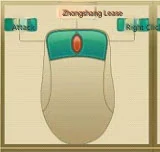
Mouse

Target/Confirm
【Left Click】
Cancel
【Right Click】
Move
【Left+Right Click】
Camera Movement
【Right Click+Drag】

Normal Attack
【Left Click】
Charge Attack
【Right Click】
Musou Rage
【Left+Right Click】
Enhancement
【Middle Drag】

Confirm
【Left Click】
Cancel
【Right Click】

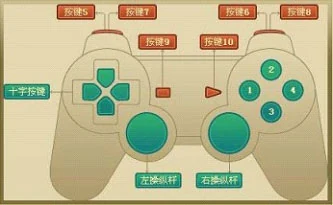
Gamepad

Movement
【D-Pad/Left Analog Stick】
Camera Movement
【Right Analog Stick】
Emotion Switch
【Right Analog Stick (Press)】
Reply
【Key 1】
Open Main Menu
【Key 2】
Cancel
【Key 3】
Confirm
【Key 4】
Rear Viewpoint
【Key 5】
Target Switch (Forward)
【Key 7】
Target Switch (Back)
【Key 8】
Help
【Key 9】
Open Chat Input Mode
【Key 10】

MovementNormal Movement
Horizontal Movement
【D-Pad/Left Analog Stick】
【D-Pad/Left Analog Stick】+【Key 5】
Camera Movement
【Right Analog Stick】
Dialogue Switch
【Right Analog Stick (Press)】
Normal Attack
【Key 1】
Charge Attack
【Key 2】
Jump
【Key 3】
Musou Rage
【Key 4】
Defense/Rear View
【Key 5】
Enhancement
【Key 6】
Sub Officer Recall
【Key 7】
Mini Map Switch
【Key 8】
Help
【Key 9】
Open Chat Input Mode
【Key 10】

Cursor Movement/List Switch
【D-Pad/Left Analog Stick】
List Category Mode Toggle
【Key 2】
Cancel
【Key 3】
Confirm
【Key 4】
Page Switch (Back)
【Key 5】
Page Switch (Forward)
【Key 6】
Tab Page Switch (Forward)
【Key 7】
Tab Page Switch (Back)
【Key 8】
Help
【Key 9】

Settings
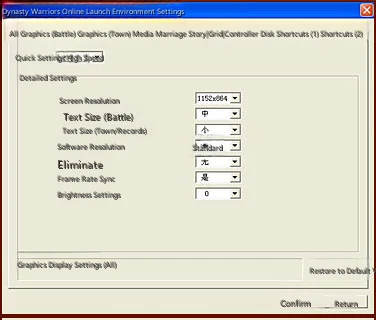
Click the client to open the launcher, where you can configure your environment settings according to your gaming preferences before experiencing the game.

Simple Settings
Quick settings for prioritizing graphics quality or processing speed, providing three system presets and one custom setting option.
Detailed Settings
Customize the balance between graphics quality and processing speed.
All
Set the graphics display for all scenes.
Graphics (Battle)
Set the graphics display for battle scenes.
Graphics (Home)
Set the graphics display for home scenes.
Media Playback
Set various volume levels and whether to play videos.
Network
Set patch downloads.
Controller
Set controller function assignments.
Keyboard
Assign game function keys and hotkeys.
Shortcuts
Set function shortcut display keys within the game. After setting, press Ctrl and the assigned key simultaneously in-game to display that function.
Reset to Default
Reset settings to the system default configuration.

Screenshots and Hotkeys
1. Screenshot
Pr.int Screen All screens (This key is on standard101Keyboard F12to the right ofInsertkey above)
Ctrl+Shift+N No text
Ctrl+Shift+Pr.int Screen Pure screen
Screenshots are saved in: Game installation directory\KOEI\Zhen Sanguowushuang Online Sc\ScreenShot
2. Hotkeys
/tell Private message (Hotkey T)
/reply Reply (Hotkey R)
/party Team chat (Hotkey P)
/guildsay Guild chat (Hotkey G)
/say Speak in current area (Press space to input directly, this is it. Hotkey Y)
/shout Speak to everyone in the city (Speak to entire battlefield during training) (No hotkey currently)
Hotkeys can be set in Client→Environment Settings→Keyboard in settings.
In the city, upper left icon, Function Settings, Common Information Settings you can also set some shortcut information.
These corresponding hotkeys are the 8 number keys 1~8 on the main keyboard.
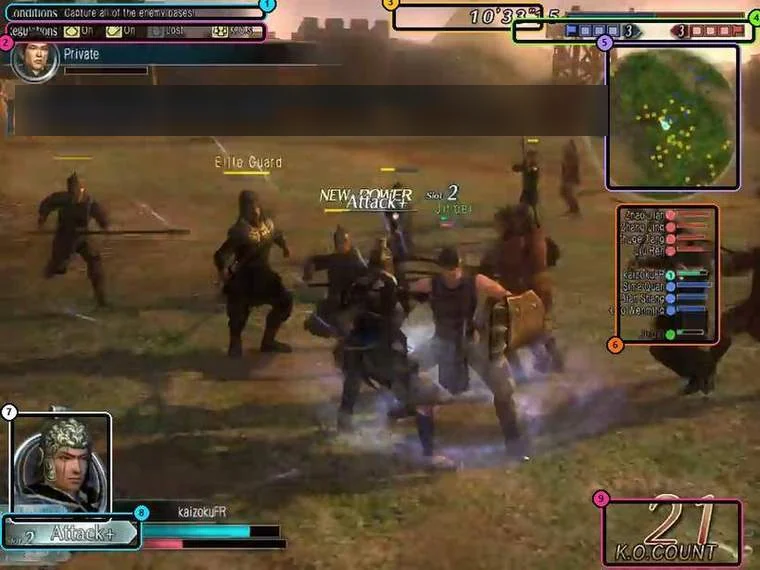
Interface Overview
Non-combat state scene display.

Display the game world's season, which changes with seasonal variations.
Shows the current time in the game world when cursor is moved over it.
Display the game world's date and the map area where the character is located.
The time displayed in game is the game world time, which does not match current real world time. Please note.


The national power of each faction in the current server. The higher the national power, the longer the corresponding colored bar after the faction name. The highlighted faction is the current character's faction.


View various in-game information and make settings within the game. Move cursor to click and open selection.
Some functions can only be used in specific situations. When currently unavailable, they are displayed in gray.
Information
Display your own or faction information.
PersonalCharacter
Weapon
Costume
Gem
Consumable Items
Ancient Coins
Furniture
Lieutenant
Quest
Title
Musou Disc
Synthesis Method
Tailoring
Display your own information.
Display name, status, and settings.
Display owned weapons.
Display owned costumes.
Display owned gems.
Display held consumable items.
Display owned ancient coins.
Display owned furniture.
Display information of Vice Generals following you.
Check accepted quests.
Display owned titles.
Check the status of owned Musou Orbs.
Check owned recipes.
Confirm available tailoring content.
FactionLord's Command
Benevolent Government
Chronicle
Faction Information
City Information
Battlefield Information
Faction Power Balance
Display faction-related information.
Display Lord's Orders.
Display benevolent governance information.
Display chronology recording events up to now.
Display information for each faction.
Display information of each city.
Display information for each battlefield.
Display the power balance between various factions.
RankingComprehensive
Contest
Quest
Challenge
Guild
Martial Arts Tournament
Valor
Skirmish
Display various rankings.
Display comprehensive ranking items.
Display rankings related to territory disputes.
Display quest-related rankings.
Display rankings related to challenge quests.
Display rankings related to guilds.
Display the win rate ranking for the Martial Arts Tournament.
Display rankings related to Valor.
Display rankings related to Melee battles.
GuildGuild Information
Reward History
Claim
Display guild information.
Check information of affiliated guild.
Check reward history of guild rewards.
Confirm rewards obtained from guild rewards.
Martial Arts Tournament
Display Martial Arts Tournament group information.
Garden Garden Information
Plant Management
Visit History
Check garden-related information.
Check garden information and care history from friends.
Check the status of plants cultivated in the garden.
Check friend status and time of visiting friend's garden.
Communication
Commands related to relationships with others.
PartyTransfer
Expulsion
Disband
Leave
Actions to take on party members.
Transfer leader position to another member.
Remove specific members from the party.
Disband party.
Leave the team.
Friend ListConfirm
Information Privacy Settings
Information
Delete
Apply friend list.
Display friends list.
Set the publicity of your friend list.
Send message to friend.
Remove specific people from friend list.
BlacklistConfirm
Add
Cancel
List of quests you don't want to deal with.
Display current blacklist.
Add specific people to the blacklist.
Remove specific person from blacklist.
Communication SettingsAway Settings
Seeking Recruitment
Mark as Master Status
Reception Settings
Time Period
Weapon
Self Introduction
Recruitment Information
Friendship Information
Set communication status.
Set temporary leave.
Set desired recruitment to join teams or sortie.
Display as available for guidance and will be listed in the mentor introduction list.
Configure settings to limit conversation targets.
Display login time periods. (Master only)
Display specialized weapons. (Masters only)
Set self-introduction information.
Set recruitment information for joining teams
Set information for applying to become friends.
Guild Member List
Display the list of guild members.
Group Member List
Display list of group members.
Game Help
Help you solve problems in the game.
Notice Board
Display official notices.
Frequently Asked Questions
Search for problem-solving hints from the question collection.
GM Report
Report problems found in the game to GM.
Exchange Ticket
Enter code to add Musou Coins etc.
Latest Information
Open official website to display latest information.
Game Manual
Display game manual from official website.
Version Information
Display the current game version.
Musou Coins
Confirm and replenish Musou Coins.
Function Settings
Set various functions when playing the game.
Graphics Settings
Set image-related functions. (Enter to switch between All/Battle/City)
Sound Settings
Set functions related to sound.
Display Settings
Set various displays for gameplay.
Common Information SettingsBattle
City
Set commonly used information for chat or shouts.
Set battle cry content during combat.
Set frequently used chat messages in town.
Chat SettingsCustom Log Settings
Text Color Settings
Set chat-related functions.
Set items displayed in the log window.
Set the text color for chat.
Camera and Vibration Settings
Set controller camera operations and vibration function on/off.
Keyboard Settings
Set keys corresponding to various functions.
Hotkey Settings
Set hotkeys corresponding to various functions.
Response
Response


Displayed in the upper left corner of the screen under specific circumstances. Clicking this icon during gameplay may prompt players to collect military salary, unread messages, guild information, faction information, battle information, etc.


Game information display area. Click the left and right function buttons to selectively switch between "All/Nearby/Party/Event/System/Custom/Inquiry/Recruit". After selection, the information display area will only show content from the selected category.


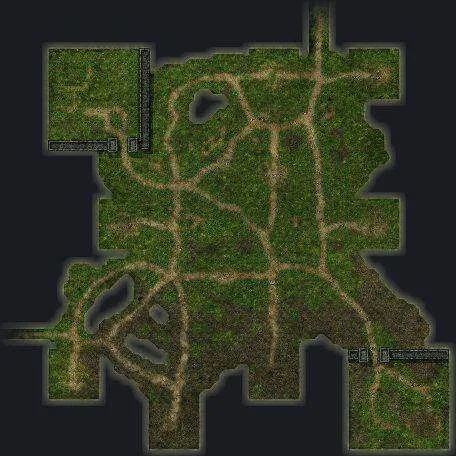
Flat map of the area where the character is located, with arrow showing yourself. Each area has its unique flat map. The flat map shows fixed NPCs, lieutenants and entrances to other areas. Moving cursor over these positions on the map will show text prompts.


Shows information panels that can be displayed via hotkeys and their corresponding shortcuts. Hotkeys can be modified in 'Information Confirmation and Various Settings → Function Settings → Hotkey Settings'.


End game button. Click and select "Yes" to exit login.


The World of Musou
In the world of Musou, players can choose to join their preferred Faction, and can charge into battle, conquer cities and territories, and build achievements for their Faction.
According to scenario changes, some Officers in the game will be in 'Unaffiliated Forces', and players can determine Officer allegiance through 'Competition'.
Players can change Factions through Rebirth.

The chronicle displays records of events that have occurred so far.
Competition Ranking
Confirm the competition ranking status of Faction players.


Enter Faction Information to view detailed information between all Factions, including each Faction's population, domestic policies and other basic values, strategic target cities and main Faction cities.


Enter City Information to view information about all cities.
Barbarian Battlefields can only be fought against NPCs.


Enter City Information to view information about all Battlefields.
Conflict Level: The total offensive value of both armies.


Enter to view the hostility levels between all Factions in the current scenario.


Enter to view the hostility levels between all Factions in the current scenario.
Lord's Command Content
The objective content that needs to be completed for this Lord's Command.
Target Amount
The most basic target value.
Completion Amount
The quantity already completed.
Completion Rate
Completion ratio achieved.
Completion Deadline
The start and end time for this Lord's Command.
Reward
Reward after achieving the most basic target value.


Benevolent Governance is a type of domestic policy benefit command applied to players. From start to finish, all players of the target Faction can enjoy the beneficial effects brought by Benevolent Governance.


Dynasty Warriors Online Reborn Encyclopedia
Note:Some functions of this e-book require network access to download attachments and view links. If blocked by firewall, these functions cannot be realized, but it will not affect normal use of the e-book.
If you need to download e-book attachments, please scan for viruses yourself.
The only official release QQ group for the new e-book:Dynasty Warriors Online Alliance 290060477 Recognize the official QQ group, beware of trojans
If you have good materials, welcome to contact me and share with all players!
Declaration
This guide is not absolute. Perhaps you complete quests better than me and know more than me.
Quests are one of the joys of Dynasty Warriors Online. Deeply researching quests and constantly finding shortcuts to complete them is a very happy thing.
Only by constantly challenging your limits can you truly experience the joy of quests, rather than finding quests burdensome.
If you find quests too difficult, you can first improve your rank. High-level weapons will make quests somewhat easier.
Generally, quest enthusiasts choose R2 or R3 weapons as dedicated quest weapons, such as Flying Twin Swords, Iron-Cutting Sword, Dragon Fang Hook, etc., because they have sufficient power to make quests easier and save stones when repairing. Or like me, after becoming skilled, using basic or pseudo-basic weapons for general quests. This completes quests, saves gems (since quests don't drop gems... except VIP), and trains weapons - three benefits in one.
Beginner quests can only be done once. After completion, they cannot be accepted again. Even after reincarnation, they cannot be done.
This quest guide series with illustrations is created byDuowan Gaming NetworkmemberYun MaoPersonal creation.
Since Yun Mao has already left Musou, and the Musou Encyclopedia hasn't been updated by anyone for 3 years
Therefore, the e-book revision work is handled byServer 4-Heydson·JiaozhiTaking the liberty to take over, upgrading based on the original version 5.20.
This version upgrade mainly makes minor modifications to domestic server quests and optimizes completion methods for individual quests.
This references extensive online materials. Here I extend my gratitude to those material publishersHeartfelt thanks. Their achievements make everyone's quest experience increasingly easier.
I also received great help from other members of Duowan Gaming Network. Thanks to them as well.
Due to my limited abilities, the guide inevitably has errors, so the guide is for reference only. Corrections and additions are welcome.
If possible, I will continue updating the e-book based on everyone's corrections and additions.
Thank you for your support.
Since Xiahou Ji from Server 1's Cloud Shadow Musou guild has lost interest in updating the e-book, it's now handled by me, one of the quest kings from Telecom Server 4,“Heydson·Jiaozhi”to help update and improve some outdated data and quest guides. Please support me! I'm often on Duowan forums in various Dynasty Warriors sections. My forum ID is 'Heydson'
A new beginning,A new Musou.Musou has now reached the 'Jin-Wu War' scenario


Character Stats
In the world of Musou, characters grow as time progresses.
Characters can gain righteousness through various battles and other methods. When righteousness reaches specific values, corresponding official rank promotion quests can be accepted. After completing the quest, the corresponding official rank can be achieved.
Example: Character reaches 20 righteousness → Accept Squad Leader promotion quest → Complete Squad Leader promotion quest → Submit promotion.
Increasing official rank can remove usage restrictions forWeaponLevel restrictions, available battle types, and battle level participation limits.
After completing promotion quests for specific official ranks, you can obtain faction-exclusive back equipment.
The higher the official rank, the more powerful the back equipment attributes and the more unique the appearance.
The required righteousness for each official rank and the effects after promotion.
Achieving S-rank evaluation in beginner quest completion allows direct promotion from Recruit to Guard.
Official ranks marked with '*' have no promotion quests - simply speak with the affiliated officer to advance.
After a character meets certain conditions, they can add a floating official rank after their fixed official rank. Floating official ranks have necessary conditional restrictions.
1. Official rank of General or above.
2. All domestic administration values reach 50 or above.
A character can have both fixed official rank and floating official rank simultaneously.


Various titles can be obtained in the game, each with different completion conditions. When a certain condition is met, the system will automatically notify the character that they have obtained the XX title.
Each title has different value based on the difficulty of obtaining it, and they are categorized by how they are obtained.
A 'Medal Box' furniture must be placed in your home to equip titles. The 'Medal Box' can be purchased from NPC antique dealers.
After equipping a title, you can choose whether to display the title above the character's head.


Follow Officers
Guards and officers of Guard rank or higher can use recommendation letters to select a followed Officer among the Musou Officers of this faction. After following an Officer, you can regularly collect military pay for participating in battles at the Officer's location, and also gain stat bonuses provided by that Musou Officer.
In the corridor, there are rooms for all current Musou Officers of this faction. Enter each room and speak with each Officer to see the stat bonuses that Officer provides. After confirming, select to serve under that Officer.
Changing your followed Officer can be achieved by completing that target Officer's quests to increase intimacy or throughReincarnationto achieve this.

NPCs
var imgWidth = caimg.width; var imgHeight = caimg.height; // window.onresize = adjustImageSize; caimglink.href = caimg.src; // adjustImageSize(); function adjustImageSize() { var browserWidth = document.body.offsetWidth - 30; var browserHeight = document.body.offsetHeight - 30; // if (browserWidth <= 0) browserWidth = 1; if (browserHeight <= 0) browserHeight = 1; // if (imgWidth > browserWidth || imgHeight > browserHeight) { var xrate = imgWidth / browserWidth; var yrate = imgHeight / browserHeight; // var rate; if (xrate > yrate) rate = xrate; else rate = yrate; // if (rate!= 0) { caimg.width = imgWidth / rate; caimg.height = imgHeight / rate; } } }

Social Interaction
Options that appear when clicking near other players' characters
Training Officer
NPCs for combat training and accepting various battle challenges.


Friends
Friend registration can be done through 2 methods.
Meet and Register
Approach other players' characters to execute the befriend option for friend registration.
After sending a friendship message, the other player will receive a notification, and once they confirm, you can mutually register as friends.
Friend Recruitment Registration
Executing recruit friends at the NPC Chronicler will display players who are currentlyRecruit Friendsplayer list, click on names to view detailed information.
After confirmation, you can apply, and once the other player confirms, you can mutually register as friends.
Players can atConfirm information and various settings—Communication, set the recruit friends option to 'Yes', and the character's name will be displayed in the friend recruitment list at the Chronicler.
You can delete friends through the friend list in the communication options.


After registering as friends, communication between both parties will be much more convenient.
>Directly open the friend list to chat.
>You can enter friends' homes.
>You can send letters to friends.
>The friend list will be permanently displayed in the garden entry list.

Severing ties can be completed by selecting the sever ties option near the target player or by adding names to the severed ties list in the communication options.
>After severing ties, messages sent by that character will not be displayed.
>After severing ties, battles that player participates in will no longer appear in the battle list.
You can remove severed players through the severed ties list.

Mentor System
Players with all domestic values above 20 and holding the rank of Front General or higher can obtain master qualification from the NPC Chief Clerk.
Players who become masters indicate their willingness to nurture new players in their communication settings, and their names will be recorded in the master list.
After indicating master status, you may receive contact from new players.
Training newcomers as a master will reward you with military salary and other rewards.
After obtaining master status, you can enter the beginner-exclusive chat channel.

New players who need guidance from veteran players can execute introductions at the NPC Chief Clerk, which will show a list of all players willing to become masters. Clicking on a name will display detailed information.

Emote Data
| [Data] Emote Data V4.0 |
|---|
| Usage Methods: --------------------------------------------------------------- 1. Direct Input: In town, press space, type and press enter. 2. Indirect Input: In town, upper left icon->Function Settings->Common Message Settings->Town->Common*->Common Selection/Manual Input, after setting use number keys 1~8 on main keyboard. Built-in Selectable Expressions: ------------------------------- /angry Get Angry /laugh Laugh /surprised Surprised /deny Deny /cry Cry /joy Joy /cheer Cheer /sit Sit Down/Lean /shy Shy /toast Toast /think Think /thank Thank /tsukkomi Interrupt /salute Bow with Hands /wave Wave /guts Clenched Fist Celebration /sstand Strike a Pose /shrug Shrug /depress Depressed /nod Nod /point Point with Finger /bow Give Thanks /dance Dance /bye Say Goodbye /sorry Apologize /booing Criticize /clap Applaud Built-in Manual Input Emotes: ------------------------------- /stand Stand Up /stuck Move to Safe Location (In Town) /trick Vice Officer action while strolling (Fox - Transform Officer, Panda - Test Jump) Emotes Obtained Through Quests and Biographies: ------------------------------- /burning Burning (Complete Wandering Minstrel's Troubles, Calming Hermit, Enemy in the City, Song of Revival) (Quest Period: December 19, 2007 17:00~January 16, 2008 14:00) /passion Burning Passion (Complete Wandering Minstrel's Troubles, Calming Hermit, Enemy in the City, Song of Revival) (Quest Period: December 19, 2007 17:00~January 16, 2008 14:00) /bakuchiku Firecracker (Market Upper Right-Traveling Fortune Teller-Summon Happy Spirits) (Quest Period: January 22, 2009 18:00~February 5, 2009 18:00) /welcome Welcome (Market Center-Traveling Artist-Dragon Boat Festival "Five" Questions) (Quest Period: May 28, 2009 18:00~July 2, 2009 19:00) /thunder Summon Thunder (Civil Officer-Scorching Earth) (Quest Period: July 16, 2009 18:00~September 3, 2009 07:00) /spotlight Spotlight (Chief Clerk-Looking Up at the Moon) (Quest Period: August 20, 2009 08:00~October 8, 2009 08:00) /praise Great Praise (Tavern-Forest Elder-Forest Where Birds Rest) (Quest Period: September 17, 2009 08:00~October 29, 2009 08:00) /swear Oath of Loyalty (Tavern-Historian-Dian Wei to Xu Zhu/Little Conqueror of Jiang Dong/Peach Garden Oath/Chain Stratagem) (Requires Biography Platform) /spring Raise Hand (Tavern-Historian-Ambush at Hua Rong Dao/One-Eyed Tracker/Attack and Defense of Nan Jun/Fierce Battle at Ding Jun Mountain) (Requires Biography Stage) /snow Invite Snow (Gallery-Trial Official-Winter General Descends) (Quest Period: December 24, 2009 10:00~January 19, 2010 8:00) /cracker Gorgeous Firecracker (Tavern-Rinrin-Happy New Year! Great Assembly) (Quest Period: January 21, 2010 10:00~February 18, 2010 10:00) Note: After major updates or scenario changes, these emotes may become unusable. If quests and biographies are still available, you can redo quests to obtain these emotes. |