Interface Overview
Non-combat state scene display.
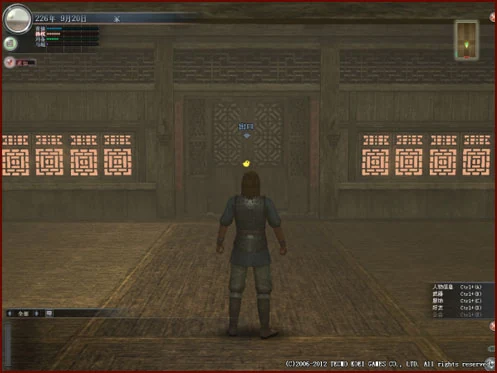
Display the game world's season, which changes with seasonal variations.
Shows the current time in the game world when cursor is moved over it.
Display the game world's date and the map area where the character is located.
The time displayed in game is the game world time, which does not match current real world time. Please note.



The national power of each faction in the current server. The higher the national power, the longer the corresponding colored bar after the faction name. The highlighted faction is the current character's faction.


View various in-game information and make settings within the game. Move cursor to click and open selection.
Some functions can only be used in specific situations. When currently unavailable, they are displayed in gray.
Information
Display your own or faction information.
PersonalCharacter
Weapon
Costume
Gem
Consumable Items
Ancient Coins
Furniture
Lieutenant
Quest
Title
Musou Disc
Synthesis Method
Tailoring
Display your own information.
Display name, status, and settings.
Display owned weapons.
Display owned costumes.
Display owned gems.
Display held consumable items.
Display owned ancient coins.
Display owned furniture.
Display information of Vice Generals following you.
Check accepted quests.
Display owned titles.
Check the status of owned Musou Orbs.
Check owned recipes.
Confirm available tailoring content.
FactionLord's Command
Benevolent Government
Chronicle
Faction Information
City Information
Battlefield Information
Faction Power Balance
Display faction-related information.
Display Lord's Orders.
Display benevolent governance information.
Display chronology recording events up to now.
Display information for each faction.
Display information of each city.
Display information for each battlefield.
Display the power balance between various factions.
RankingComprehensive
Contest
Quest
Challenge
Guild
Martial Arts Tournament
Valor
Skirmish
Display various rankings.
Display comprehensive ranking items.
Display rankings related to territory disputes.
Display quest-related rankings.
Display rankings related to challenge quests.
Display rankings related to guilds.
Display the win rate ranking for the Martial Arts Tournament.
Display rankings related to Valor.
Display rankings related to Melee battles.
GuildGuild Information
Reward History
Claim
Display guild information.
Check information of affiliated guild.
Check reward history of guild rewards.
Confirm rewards obtained from guild rewards.
Martial Arts Tournament
Display Martial Arts Tournament group information.
Garden Garden Information
Plant Management
Visit History
Check garden-related information.
Check garden information and care history from friends.
Check the status of plants cultivated in the garden.
Check friend status and time of visiting friend's garden.
Communication
Commands related to relationships with others.
PartyTransfer
Expulsion
Disband
Leave
Actions to take on party members.
Transfer leader position to another member.
Remove specific members from the party.
Disband party.
Leave the team.
Friend ListConfirm
Information Privacy Settings
Information
Delete
Apply friend list.
Display friends list.
Set the publicity of your friend list.
Send message to friend.
Remove specific people from friend list.
BlacklistConfirm
Add
Cancel
List of quests you don't want to deal with.
Display current blacklist.
Add specific people to the blacklist.
Remove specific person from blacklist.
Communication SettingsAway Settings
Seeking Recruitment
Mark as Master Status
Reception Settings
Time Period
Weapon
Self Introduction
Recruitment Information
Friendship Information
Set communication status.
Set temporary leave.
Set desired recruitment to join teams or sortie.
Display as available for guidance and will be listed in the mentor introduction list.
Configure settings to limit conversation targets.
Display login time periods. (Master only)
Display specialized weapons. (Masters only)
Set self-introduction information.
Set recruitment information for joining teams
Set information for applying to become friends.
Guild Member List
Display the list of guild members.
Group Member List
Display list of group members.
Game Help
Help you solve problems in the game.
Notice Board
Display official notices.
Frequently Asked Questions
Search for problem-solving hints from the question collection.
GM Report
Report problems found in the game to GM.
Exchange Ticket
Enter code to add Musou Coins etc.
Latest Information
Open official website to display latest information.
Game Manual
Display game manual from official website.
Version Information
Display the current game version.
Musou Coins
Confirm and replenish Musou Coins.
Function Settings
Set various functions when playing the game.
Graphics Settings
Set image-related functions. (Enter to switch between All/Battle/City)
Sound Settings
Set functions related to sound.
Display Settings
Set various displays for gameplay.
Common Information SettingsBattle
City
Set commonly used information for chat or shouts.
Set battle cry content during combat.
Set frequently used chat messages in town.
Chat SettingsCustom Log Settings
Text Color Settings
Set chat-related functions.
Set items displayed in the log window.
Set the text color for chat.
Camera and Vibration Settings
Set controller camera operations and vibration function on/off.
Keyboard Settings
Set keys corresponding to various functions.
Hotkey Settings
Set hotkeys corresponding to various functions.
Response
Response


Displayed in the upper left corner of the screen under specific circumstances. Clicking this icon during gameplay may prompt players to collect military salary, unread messages, guild information, faction information, battle information, etc.


Game information display area. Click the left and right function buttons to selectively switch between "All/Nearby/Party/Event/System/Custom/Inquiry/Recruit". After selection, the information display area will only show content from the selected category.

Flat map of the area where the character is located, with arrow showing yourself. Each area has its unique flat map. The flat map shows fixed NPCs, lieutenants and entrances to other areas. Moving cursor over these positions on the map will show text prompts.


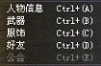
Shows information panels that can be displayed via hotkeys and their corresponding shortcuts. Hotkeys can be modified in 'Information Confirmation and Various Settings → Function Settings → Hotkey Settings'.

End game button. Click and select "Yes" to exit login.

