
Settings
Click the client to open the launcher, where you can configure your environment settings according to your gaming preferences before experiencing the game.
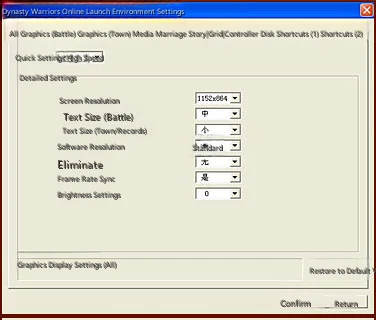
Simple Settings
Quick settings for prioritizing graphics quality or processing speed, providing three system presets and one custom setting option.
Detailed Settings
Customize the balance between graphics quality and processing speed.
All
Set the graphics display for all scenes.
Graphics (Battle)
Set the graphics display for battle scenes.
Graphics (Home)
Set the graphics display for home scenes.
Media Playback
Set various volume levels and whether to play videos.
Network
Set patch downloads.
Controller
Set controller function assignments.
Keyboard
Assign game function keys and hotkeys.
Shortcuts
Set function shortcut display keys within the game. After setting, press Ctrl and the assigned key simultaneously in-game to display that function.
Reset to Default
Reset settings to the system default configuration.
