Control Interface
Click on the official website homepageDownload Center, where you can find the latest client and patch downloads respectively.
If the client is already installed on your computer, depending on the version of the client installed on your local computer, you can also select your current client version from the dropdown menu in "Historical Patch Downloads" to get the corresponding patch download options for that version.

Click on the downloaded client file to enter the installation option process shown in the image below.

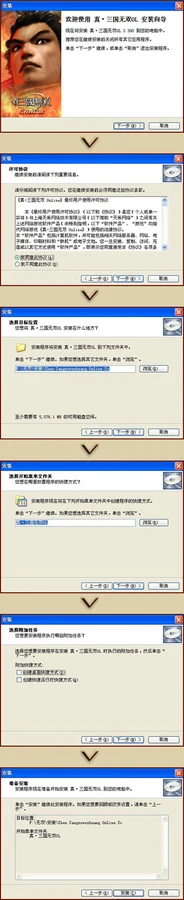
After successful normal installation, a shortcut for the "Shin Sangoku Musou Online" client will be created on your desktop. Click it to begin your Musou journey.
Please follow the installation prompts during the installation process. If you encounter any issues during installation, please contact our customer service staff.