The screen and the menus
What every part of the screen means in town and in battle, the main menu, Character Information, your Miso Koins, mail and notices.
- In battle: how to win at the top left, the map at the top right, your Life and power-ups at the bottom left.
- The Menu button opens your items, character information, settings and more.
- Letters arrive at the Writing Desk in your house; the Notices button lights up.
Tap an underlined word to see what it means.
The screen tells you a lot once you know where to look. This chapter goes around it corner by corner, first in battle, then in town, and then through the main menu.
The battle screen
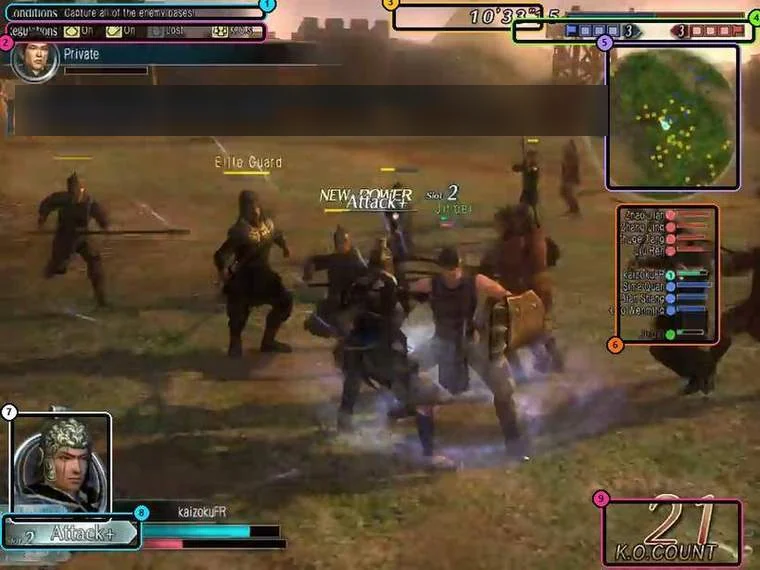
| # | Where | What it tells you |
|---|---|---|
| 1 | Top left: Conditions | How this battle is won, for example capture all enemy bases or defeat 10 enemy commanders. |
| 2 | Top left: Regulations | The room's rules, such as what happens to your power-ups when you are defeated. |
| 3 | Top centre: clock | Time left in the battle. |
| 4 | Top right: base counters | How many bases each side holds. |
| 5 | Top right: minimap | The battlefield around you: bases, allies, enemies. M switches its view. |
| 6 | Right: officer list | Every commander in the battle with their Life bar, your side and theirs. Stars under a bar show how many flask upgrades that player has fired. |
| 7 | Bottom left: portrait | Your character. |
| 8 | Bottom left: flask ring | Your flask counter, the enhancement in that slot, and below it your Life bar and the red Musou gauge. |
| 9 | Bottom right: K.O. count | How many enemies you have defeated. |
Along the very bottom runs the control strip with every key. Messages about the battle (an enhancement fired, a base captured, a commander defeated) scroll in the message area at the top left.
Watch your Life bar's colour: blue is safe, yellow means below half, red means below a quarter. In the red your Musou gauge refills by itself and your Musou becomes a True Musou.
The town screen
| Where | What it is |
|---|---|
| Top left | The date, the district you are in, your rank and progress, Fame and gold. Below it, a line telling you what to do next (during the tutorial and quests). |
| Left buttons | The Menu button (opens the main menu) and the button that takes you to battle. |
| Notices button | Lights up and chimes when you have an unread letter, a Broker sale or a friend request. |
| Top right | The district minimap with the non-player characters. People you need to visit next blink. |
| Above heads | Name plates. Players show their name and origin; staff show Name.GM. |
| Bottom left | The chat log. |
On payday a salary icon appears; clicking it reminds you to collect your salary from your general in the Courtyard.
The main menu
Open it with the Menu button on the screen. It has these parts:
| Menu | What you find there |
|---|---|
| Equipment | Your inventory: weapons, gear, gear sets, items (battle items, support items, town items, materials), titles and gems. This is where you change what you wear and carry. |
| Missions | The quests you have accepted. |
| Receive Box | Things sent to you by the game. |
| Information | Personal (Character Information, your house's furniture, lieutenants, the Musou Board, recipes), your faction's news, rankings, your guild and team. |
| Social | Party, Friend List, Ignore List, social settings, guild and team member lists. |
| Miso Koins | Shows how many Miso Koins your account owns. Recharge opens the website; nothing is paid inside the game. |
| Functions | Settings (graphics, sound, display, chat, camera, keyboard, shortcuts) and Support (FAQ, bug reports, Play Manual, version). |
| Logout | Leave the game. |
Character Information
Main menu, Information, Personal, Character. It shows your origin, the general you serve, your guild, rank, Honor, gold, payday, Guild Gems, Ore, Fame, and your domestic and crafting skills.
- The general you serve adds +10 to one domestic skill, shown here.
- The P button posts a link to your dwo.gg profile in chat, and the player menu's DWO.gg Profile option opens another player's profile.
Miso Koins, gold and salary
- Gold shows on Character Information and at the top left of the town screen.
- Miso Koins belong to your account, shared by all its characters. The Miso Koins entry of the main menu shows the balance, and so does the Antique Dealer.
- Your salary is paid by the general you serve, in his office in the Courtyard. Your payday is shown on Character Information.
Mail and notices
Letters arrive at the Writing Desk in your house. When one arrives the chat tells you and the Notices button lights up.
- Go home and click the Writing Desk.
- Choose Inbox to read letters, New Letter to write one, Outbox to see what you sent.
- You can also click your lieutenant in town and choose Letter Check.
- Letters can only be sent to and from friends, in any faction. Each box keeps 100 letters.
- You can attach items. Delivery costs 100 gold per weapon rank or gear rank, 10 gold per consumable, and 5 Miso Koins to send Koins. A friend can only have one unopened delivery from you at a time.
The chat box
The chat log sits in the bottom-left corner. Press Space to start typing in the current channel; Y, T, R, P and G jump straight to Say, Tell, Reply, Party and Guild chat. Messages from the game itself (a letter arrived, a quest step, a battle report) also appear here, so glance at it after every battle.