Modding
Full Client Modification Guide
Regarding client modifications, they are purely for adding more fun to the game.
Regardless of what modifications you make, they only take effect on the client on your machine, meaning only you can see or hear your modified results, while others in the game will still see you in your unmodified appearance.
Modifications cannot bring performance improvements to your weapons or outfits.
For example, changing a Minor General's cloak to look like a Major General's cloak only changes the appearance - the attributes remain +1, not the Major General's +5
The official stance strictlyprohibitsfor client modifications. After modification, you may encounter situations where you cannot enter the game or experience various bugs in the game.
Therefore, please be mentally prepared before modifying. I takeno responsibility。
(At least I've always modified everything and never had any problems, hehe)
Before modifying any files, first backup the target filesbackupIt is a good habit to do this, so you can quickly restore when your modifications fail.
Each time the client is updated, modifications may cause update failures and other issues. (I've never encountered this, but others say it happens)
Music Modification (Modding)
Musou Online background music replacement tool - method for Jingzhou version and later, simplified (thanks to Green Swallow from Ranger Network)First, download a kvs2ogg tool(Required tools are in the attachments below) After opening, click Tools, select kvs(S), then choose the song you want to modify
Then select save location
Happened to check the forum, and an old repost caught my eye. Oh, so Green Swallow from Ranger Network also made a foolproof BGM converter.
Thanks to Green Swallow for cracking the latest background music replacement method.
This software is one of the Dynasty Warriors Online background music replacement tools, requires use with kvs2ogg software (search and download online yourself).
First use kvs2ogg to convert mp3 to kvs,
Place 'kvs2bin_for_35OL.exe' and 'New KVS Header.bin' in the same folder.
Place the kvs files that need to be converted into the program's folder.
Run the exe, the program will convert all kvs files in this folder to bin files with the same name, and delete the original kvs files.
Converted bin files can be directly renamed to replace files in the game.
Then rename the bin properly and put it in the game folder, and you'll have sound.
Multiple selections allowed during conversion.
If a bin file with the same name already exists, the software will skip conversion. To reconvert, please delete or rename the old bin first.
\loaddata\0016 File List:
Then you can enter the game to experience the thrill of new BGM~
0016 internal bin file corresponding BGM:
02000002 Stronghold - Day
02000102 Stronghold - Night
02000202 Plains - Day
02000302 Plains - Night
02000402 River Port - Daytime
02000502 River Port - Night
02000602 Mountain Path, Mountain Range - Daylight
02000702 Mountain Path, Mountain Range - Night
02000802 River Island, Narcissus Village - Day
02000902 River Island, Narcissus Village - Night
02001002 Marsh - Day
02001102 Marsh - Night
02001202_New BGM_Capital, Adjacent - Day
02001302_New BGM_Capital, Adjacent - Night
02001402_New BGM_Dense Forest, Linked Ships - Day
02001502_New BGM_Dense Forest, Linked Ships - Night
02001602_New BGM_Fortress, Fortress Revised - Daylight
02001702_New BGM_Fortress, Modified Fortress - Night
02010002 Early Battle_Multiplayer Special Mission
02010102 Special Mission Music
02010202 Battle
02010302 Base Assault Battle
02010402 Base Battle 1
02010502 Musou Officer Encounter Battle
02010602 Lu Bu Opening Music
02010702 Base Dispute Battle 2
02010802_New BGM_3rd Gen-Battle of Yiling
02010902_Peach Blossom Valley Zones 1, 2, 3
02011002_Peach Blossom Spring Areas 1, 2, 3
02011102_Peach Blossom Valley Fourth Zone
02020002 Battle - Advantage
02020102 In Battle - Disadvantage
02020202 Battle - Crisis
02020302 Encounter with Enemy General in Dispute
02020402 Battle Our Officer Encountered
02020502_New BGM_3rd Gen-Battle of Jianye
02020602_New BGM_3rd Gen-Assault
02020702_New BGM_4th Gen-Battle of Yiling
02020802_Peach Blossom Valley Zones 1, 2, 3
02030002 Victory, Quest Complete
02030102 Defeat, Quest Failure
02030202 Dispute Victory
02030302 Dispute Defeat
02030402_Peach Blossom Valley Victory
02040002 Standby Before Entering Battlefield
02040102 Battle Report
02040202_Peach Blossom Spring Pre-Battle Standby
02050002 Town (Spring March~May)
02050102 Town (Summer June~August)
02050202 Street (Autumn September-November)
02050302 Town (Winter December~February)
02050402 Town (Eve of Battle)
02050502 Town (During Battle)
02050602 At Home
02050702_Town Night
02050802_Peach Blossom Valley 1
02050902_Peach Blossom Valley 2
02051002_New BGM_Unknown
02060002 Login Screen
02070002 Opening Animation
02070102_Unification Screen
02070202_New Character - Story Presentation Music
02070402_Shin Sangoku Musou 2 Ending Theme
02080002_Shin Sangoku Musou BB-Movie "Chronicles of the Wind and Clouds"
02080102_Chronicles of Musou (Instrumental)
This directory list was updated on the evening of April 27, 2011
Above, thanks for reading<(_ _)>
Original Post:http://bbs.duowan.com/thread-16536009-1-1.html http://bbs.17173.com/thread/174/394/20100713/4c3b5f5fb4953ff13-1.html
Weapon Modification (Modding)
Weapon Code
Battlefield weapon model: \LoadData\0006\od\ea
Weapon rack weapon model: LoadData\0012\ws
Modification method is to swap file names between source file and targetFile name swap
For example, if you want to experience Guan Ping's great sword, use the Chain Whip to change it to a great sword, you would swap the file names of ea000016.bin and ea000121.bin.
The key point to emphasize here is that the only change after your modification is the weapon model in the battlefield, meaning only the appearance changes, while the moves and actions remain the same as the previous weapon.
Therefore, when modifying, please consider the match between weapon appearance and moves as much as possible, otherwise it will be quite awkward when actually fighting, hehe.
Click to view original post address
Outfit Modification (Modding)
Are you already tired of the costumes that GF has currently opened?
Have you been looking forward to the beautiful clothes that RF has opened but GF hasn't opened?
Are you troubled by the panda costume you bought at high price having no attributes?
If you say yes to the above, OK, I suggest you read this article carefully.
This tool is transferred from 173 Who·East Sea post,True Mantou·WulingProduction; Due to file capacity, no attachment added, please download through the following links.
For the R10 version tool, I've also copied the Baidu space link of Who·East Sea Auntie, it's at the bottom; students who need it can go to his space to get materials.
Topic: True Mantou R10 costume replacement tool v3.3.0.1 cape has no problems (same version as the national server Cang Lang Zhu Lu)
Original post:http://bbs.17173.com/thread/174/394/20120113/4f0de1bd93d5c4613-1.html
| Who·East Sea | Posted: 2012-01-12 03:23:41 Top Thread starter ▪ Delete ▪ Quote Reply ▪ Modify |
|---|
| Level 3 Player Your Experience: 2364 Current level is: 16 Experience acquisition and explanation>> TABLE1 Post 902 Online 213 hours Gender Join 2008-11-06 | Attempt failed... When fixing 3.3b bug, used wrong variable Update: 3.3.0.1 Fixed the bug of cape replacement errors (error before replacement, fortunately didn't damage the client). Testing again Adjust volume first The above media does not represent the views of this site Upgrade steps: 1. Restore all with Mantou 3.2 2. Upgrade game client 3. Backup new la 4. Use 3.3 new mantou, discard 3.2 mantou Manual restoration method: 1. Overwrite with backed up la file. 2. Delete the file loaddata\0006\od\bk. If the program errors and cannot restore game files (sorry), please restore manually, And try to let me know about this bug, describe it clearly, give more conditions. If you updated the game first and it was successful, you can only reinstall or get a correct new la to overwrite, and also delete bk The Mantou version number must match the game version number. What version of model files you have, you need to use what version of Mantou. After client upgraded to 3.3, Mantou 3.2 becomes a destructive tool, must use Mantou 3.3 Attempted to fix the bug where certain capes in 3.3b reported errors 【Attention】Note backup la! Real Mantou's Dynasty Warriors Online Costume Replacement Tool v3_3_0_1.7z (4.54MB) Download link: SkyDrive [basically permanently valid if no problems] (revised, look in the list, see filename above): Must use IE-7 or higher level IE browser or third-party browser to open, recommend using 360 Speed Browser, fewer problems, fast speed. Will use a little memory, but the browser won't crash https://skydrive.live.com/?cid=E801A4DB23BAFF50&id=E801A4DB23BAFF50!106&sc=documents# 115 (115 changed rules, link permanently valid): http://115.com/file/bhgplxyg# MD5:7817132C00DD32EA6B1BCF1234DB9185 、 [ This post was edited by Who·East Sea on 2012-01-13 01:36! ] http://hi.baidu.com/whodonghai |
Voice Modification (Modding)
Tired of listening to the Chinese voice acting from the Chinese server? Want to try something different?
Alright, let's try itJapanese server voice actingthen
Usage: Copy all 1017 and 1015 folders to overwrite the same named 1017 and 1015 folders in the Chinese server's \LoadData directory
Click to download Japanese server voice pack(Battle of Tongguan scenario, Blue Wolf Hunt version)
This voice pack is provided for download by [Cloud Shadow·Musou] Forum
Korean server voice
Korean voice files.rar
Size: 226232382 bytes
Modified time: February 24, 2009, 16:08:49
MD5: 8FF0594FE54872D6C67BEA61903E68B5
SHA1: A2E3CF2BB4B02938811C8FF214F6DC89EFDAB089
CRC32: 4DCCCDC0
Click to go directly to 115 disk download address
This voice pack isDuowan Gaming NetworkMemberCloud Dream ClothesAvailable for download
Character Animation Modification
Original author: Network One - Who·East Sea
Original post address:http://bbs.17173.com/thread/174/394/20100328/4bae5a38908983213-1.html
When I first learned that client files could be replaced, I worked on this folder.
I was such a noob back then, didn't understand anything, played around a bit then dropped it.
A few days ago, to continue cosplaying Luffy, I picked up action modification again.
By the way, organized a complete action list and recorded a tiger Lieutenant mini video.
Understanding model skeletal actions a bit more...
Self-gratification actions have no use for individual users.
But for cutscene video masters, it still has some use.
With more actions, script content can also be enriched.
As long as the camera client is changed, the captured footage will be different.
During multiplayer cooperation, you can communicate beforehand and change everyone's client to be the same, so everyone sees roughly the same thing.
(Actually there aren't many useful ones anyway.)
Anyway, if there are others who also love to mess around,
See if you can come up with some fun creative ideas, or funny action moments.
For example, using 000093.bin to replace 000000.bin, almost everyone in the city will go crazy, very exciting~ Especially during the current conflict period, there's a large group of NPCs at the city gate. Try it now! Remember to backup
Whoever whoever whoever whoever whoever whoever whoever whoeverMain textWhoever whoever whoever whoever whoever whoever whoever whoever
City action list spreadsheet download: (PS:SkyDriveCannot open with IE6.0 browser)
Click → City Action List (11.5KB)
City model action data: Loaddata\0008 folder
City action filename structure:
00X###.bin
Six digits total, first two are 0, third digit is 'body type', last three digits are natural number sequence.
Body Type:
For character actions section, X corresponds to body type:
0=Male Normal、1=Male Muscular、2=Male Slender、3=Male Short
4=Female normal, 5=Female muscular, 6=Female charming, 7=Female petite
Animal vice officer action section, X corresponds to "Body Type":
0=Tiger, 1=Wolf, 2=Bear, 3=Panda, 4=Fox, 5=Deer
City actions are numbered in sequence and can be divided into the following parts:
Part 1: 00X000~00X050 and 00X170、00X175 (X=0~7)
Most actions are player expressions, the ones we can normally make.
2. 000053~000094 (53~56, 93 these five have female versions starting with 004)
This part of the actions is used by NPCs, only seen a few times normally.
Three, 000094~000103
These two groups of 10 actions total are used by the small cat and small dog NPCs in the city
Part 4: 000104~000143
One group of 4, 10 groups total, used by Musou Officers
5. 00X145~00X165 (X=0~5) and 00X183 (X=0、3)
This part of actions is for animal companions, divided into six sets by X, six types of animal companions
There are also two files: mi000000, mi000001 (don't touch these two files)
mi000000 seems to be action master index + character movement function. Without this file, characters cannot move and cannot change actions.
mi000000 seems to be the index file for expression actions. Without this file, characters can normally 'stand', 'walk', and 'run', but cannot use expression commands for other actions.
Loaddata\0008\fm folder
Contains fd000000~fd000007, fg000000, fp000000~fp000007 and ft000000 four types of files.
Currently only know fp000000~fp000007 relates to head skeleton andFacial expressionsrelated. One body type corresponds to one file (last digit is body type number), which contains all facial expressions including smile and cry.
Facial expression files can be deleted (add suffix _bak or change to other name), but don't replace with files from other body types. This file also contains spatial position data for the head, and after replacement the head will be misaligned with hair and body.
The function of the other three types of files couldn't be guessed.
Some rules for game action calls:
Some actions (Status actions), the game will loop these calls to keep characters in a state, such as standing, sitting, etc.
Some actions (One-time actions) After the game calls it once, it will automatically jump to other actions. For example, after executing the laugh expression, the laugh action will automatically jump to standing action or other actions after being called once.
Some actions, after being called, will automatically jump to another action (A set of actions). The sitting down process is one action file, the sitting state is one file, and standing up is another file. After executing the sit down action, the game automatically switches to and stays in the sitting action state. When executing other actions, the game will call the stand up action once before calling other actions. Animal adjutants' crouching/sitting and lying/prone positions also belong to this type. A complete set of actions consists of two one-time actions with a state action in between.
Some actions (Idle action), the game will automatically call this at regular intervals. Standing still, after a while the character will yawn. Some NPCs also have idle actions, which can be considered for use if needed. Idle actions are all one-time actions
The rules for these actions are all determined by the game program's original action list, not by the action file content. Replacing a state action with a one-time action will make the game loop that one-time action. No matter what action the sit-down action is replaced with, after calling the replaced 'sit-down action' once, it will still jump to the 'sitting' numbered action called by state mode.
State actions that we can actively call include sitting on ground, sitting on chair, leaning, and posing, plus the normal standing state. If we want to keep a character in one unchanging state, we need to replace these few actions. Only with these few will the game loop the same action repeatedly.
Facial expression files and body actions are independent of each other:
For example, when calling the "laugh" action in the game, the game will simultaneously call the facial expression file and the laugh action file. If the facial expression file is missing, the character will perform the action with no expression; if the laugh action is replaced with a cry action, the character will perform the cry action with a smiling face. When necessary, some special effects can be achieved. Generally, there's no need to modify facial expression files.
Facial expression files can be deleted (add suffix _bak or change to other name), but don't replace with files from other body types. This file also contains spatial position data for the head, and after replacement the head will be misaligned with hair and body.
Character movement actions:
One "walking action" for slow movement, one "running action" for fast movement. These two are special, triggered by directional keys, and at the same time, the directional keys also control character movement. In the game, when characters move, they use walking or running actions, which looks very "normal". Of course walking and running actions can be freely replaced, changed to sitting on the ground and sliding to move, or dancing while walking (NPCs can too), all possible.
There are several walking actions with upper body movement in official actions, which can be modified for use. Need to exploit walking bug.
Don't swap actions across species, otherwise the appearance will be very cute and distinctive.
To preview a certain action conveniently: rename the action file to the corresponding body type's 00X000, then change scenes to see the effect.
Some actions are "with props", but currently no one in the city seems to be holding anything. So they can only gesture with empty hands.
Regarding modification methods for replacement files, I've wanted to say this for a while, those not interested in self-pleasure can skip:
Game program → Through an index list → Find corresponding filename → Execute file content
The game program calls game resources, roughly this process. Now, for all the previous steps, we can't intervene. The only thing we can do is change the last step—the content of the files the game program wants to run. Dynasty Warriors Online's resource files are all loose, you can directly replace filenames, this is a relatively simple method. (Index files, if found and understood, can also be changed. Not as straightforward as file replacement.)
Although we cannot modify the index list, we still need to understand its patterns. Only by knowing which file the game program is going to run can we replace it. Which specific file the game calls depends on many factors, such as costumes - different costume models and textures have different rules. The game also has different calling methods for different actions.
So,Finding out which file the game program is currently calling is the core of the file replacement modification method.
Fortunately, there are always some lovely people who organize parts of the content, converting numeric filenames into readable text or image descriptions. The remaining work is just finding the corresponding descriptions based on what the game calls, and you can determine the files. This part of the work requires the person doing the replacement to familiarize themselves and understand it. Some rules can be mastered by trying more.
Appendix: City Action List Preview(Description not vivid, make do with it)
Below X=0~7, 0 male normal, 1 male muscular, 2 male slim, 3 male short, 4 female normal, 5 female muscular, 6 female charming, 7 female short, each action slightly different
00X000 Standing
00X001 Low speed movement (small displacement, walking, turning in place)
00X002 Full speed movement (running)
00X003 Sit down (ground) process/sit
00X004 Sitting (on ground)
00X005 Process of standing up (from ground)
00X006 Laugh/laugh
00X007 Joy/joy
00X008 Anger/angry
00X009 Cry
00X010 Discouraged/depress
00X011 Nod/nod
00X012 Denial/deny
00X013 Helpless/shrug
00X014 Surprised
00X015 Shy/shy
00X016 Think/think
00X017 Farewell/bye wave/wave
00X018 Fist pump celebration/guts
00X019 Point
00X020 Clap/clap
00X021 Thank you/bow
00X022 Bow/salute
00X023 Sit down (chair)/sit
00X024 Sitting (chair)
00X025 Standing up (chair)
00X026 Gesturing (NPC action when talking to NPCs)
00X027 Cheers/toast
00X028 Posing/sstand
00X029 Striking a pose
00X030 Put away pose
00X031 Dancing/dance
00X032 Raise wine cup high, drink
00X033 Cheer
00X034 Criticism/booing
00X035 Interrupting/tsukommi
00X036 Jumping process (entire jumping action set, all one-time actions, hard to replace)
00X037 Jumping airborne process
00X038 Jumping up then falling (a static action, hands raised high with feet touching ground, can be used as a pose)
00X039 Landing process (action like pulling someone's pants down)
00X044 Leaning action (feels like leaning against something higher than the leaning action below, but this has no follow-up action, possibly deprecated?)
00X045 Lift left leg, throw "baseball" (or snowball, shoe, etc.)
00X046 Leaning action
00X047 Leaning
00X048 Leaning and getting up
00X049 /thank gratitude/sorry apology
00X050 Idle action (action that automatically appears after standing for a while, yawning, tiptoeing, etc.)
00X170 Both arms crossed above head
00X175 Human wave? Half squat, stand straight with both hands raised above head
Below only has X=0 male normal, 3 male short
000040 Right hand "holding fishing rod" horizontally sweeps from right waist height to front (like kendo preparation stance) 003040 Fishing, struggling, action before raising rod
003041 Fishing rod casting action, hand swings from overhead to behind, like doing a backflip
003042 After raising rod, left hand grabs fish, raises forward to display
000043 Fishing rod casting action, swinging hands from overhead to the back, like doing a flip 003043 Lifting left leg, throwing a "baseball" (or snowball, shoe, or other object)
The following only has X=0 (some have X=4, female actions), mostly used by NPCs. (All female actions have feet sinking below ground level)
000053 Slow walk, arms crossed bent over, cold 004053 Female action, slow walk, arms crossed bent over, cold
000054 Walking slowly, right hand stretched forward shaking like a cramp, fanning - 004054 Female action, walking slowly, using hand to shade eyes from sun
000055 Standing, hugging arms rubbing hands breathing warm air, cold 004055 Female action, standing, hugging arms rubbing hands breathing warm air, cold
000056 Sitting, right hand fanning to wipe sweat, hot 004056 Female action, sitting, fanning
000058 Female action, left hand carrying bucket, right hand scooping water to water the ground
000059 Sitting cross-legged on ground with right hand fidgeting with something in front, clipping into ground
000060 Standing with spear in right hand, like a guard
000061 Following the previous, left hand suddenly points, discovering a bad guy, stabbing with spear.
000062 Hand reaching forward to chest-high platform, looking around everywhere, then straightening waist, very evil...
000063 Hands reach forward to chest-high platform, waving left and right to beckon people over
000064 Talking to person on the right, showing something, gesturing
000065 Looks ahead twice, nods, small shrug (talking gesture)
000066 Celebrate with fist pump three times in a row
000067 Spreading hands (What do you want me to do? You tell me! What do you want me to do!)
000068 Arms crossed and folded, standing with arms crossed over chest (very cool)
000069 Tired of standing, moving neck
000070 Female action, feet sunk into ground, hands clasped together in front of body, ladylike pose (like urinating...)
000071 Arms crossed talking, also pointing at person opposite with finger
000072 Standing and nodding, yes, understood.
000073 Same as 70, with nodding added
000074 Crosses arms and hugs chest while talking, also waves hand and shakes head, expressing negation (hand waving pose is very stylish)
000075 Standing and shaking head
000076 Same as 70, swaying head left and right dramatically, acting cute
000077 Arms hang weakly, shake head, confused
000078 Drunk, walking (very stylish)
000079 Sitting, hands on table shaking head, drunk
000080 Same as previous, right hand holding wine cup
000081 Same as previous one, this time starts drinking
000082 Same as above, this time starting to drink heavily
000083 Same as above, drink up! Gulp gulp, then wipe face
000084 Sitting, both hands on table, shaking head, finally resting head on back of hands
000085 Static action of the previous one, lying on table with hand as pillow
000086 Getting up, wiping face a few times to wake up
000087 Right hand holding sword at side, head down, striking a cool pose
000088 Turns out it's not a sword, it's a hoe... digging action, after digging a few times, bending over to look
000089 Female action, sitting with legs together, sewing something
000090 Sitting, writing
000091 Left hand shading eyes looking around
000092 Sitting cross-legged on ground polishing sword, checking if it's straight, swinging once with backhand horizontal slash
000093 Outrageous dance, ending position is original position, will teleport - 004093 Female version dance
The following are kitten and puppy actions
000094 Small cat crouching and sitting (game default)
000095 Small cat walking
000096 Kitten from crouching to lying down
000097 Kitten lying down
000098 Kitten going from lying to crouching
000099 Puppy crouch (game default)
000100 Puppy walking
000101 Puppy going from crouching to lying down
000102 Small dog lying down
000103 Puppy from lying to crouching
The following are Musou Officer actions: 1st is standing action; 2nd is talking action; 3rd is idle action; 4th is disappointed action
000104 Stands sideways, left foot forward - general Officer
000105 Following previous, right hand spreads to the right
000106 Following the previous one, right hand clenched into fist, cheer up
000107 Following previous, turning head back to the right, disappointed
000108 Arms and legs spread wide, appearing mighty - Mighty General type officers like Xiahou Yuan, Xu Zhu, Pang De, Zhang Fei, Cao Ren, etc.
000109 Following the previous one, left hand reaching forward, hmm, nodding once
000110 Following the previous one, right fist pounds left palm, showing momentum
000111 Following the previous one, right hand on forehead, shaking head, disappointed
000112 Female officer standing pose - General female officers like Sun Shang Xiang, Yue Ying, etc.
000113 Following the previous, nodding while bringing spread hands to the front and clasping them together
000114 Following the previous one, bow with hands in front of mouth, nod nod
000115 Following previous, head down, left hand pulling two fingers of right hand, placed above left thigh
000116 Officer stance with legs straight and body sideways Guan Yu
000117 Following the previous one, stroking beautiful beard
000118 Following the previous one, nodding
000119 Following the previous, head turning to the left back and down
000120 Stance like sumo wrestler or gorilla Zhang Jiao? Pang Tong?
000121 Following the previous one, nods
000122 Following the previous one, crouch again, look up, arms spread
000123 Following previous, shake head
000124 Standing sideways, left foot extended more - Zhang He
000125 Right hand draws a large arc clenched fist cheering, then spreads to the right, then clenches fist, very gentle
000126 Spread wings, then take a step forward with clenched fist
000127 Right hand on forehead with elbow bent inward, stepping back half a step, about to lose balance
000128 Hunched back mighty stance Wei Yan
000129 Following previous, small neck movement
000130 Following the previous, right hand clenched into fist
000131 Following previous, right foot stomping heavily, shaking head
000132 Loli stance Sun Shang Xiang
000133 Following previous, hands clasped around head slightly raised to chest, talking
000134 Following the previous one, jumping up with heel kicking butt
000135 Following previous, acting coy
000136 Right elbow bent, hand across waist front Zhen Mi
000137 Following the previous one, body twisting many bends, talking.
000138 Following the previous one, right hand on cheek left hand on elbow, swaying
000139 Following the previous one, right hand covering mouth, left hand covering mouth, head turned to right rear
000140 Standing with left side facing forward Sima Yi
000141 Following previous, spreading hands left and right horizontally, like measuring length
000142 Following previous, left hand raised to chest, clenched fist, raised to right ear, swing hand down left
000143 Following the previous one, turns body slightly right and turns head, left hand makes a horizontal backhand swing, like slapping face
The following are animal companion actions (X=0~5, 0 Tiger, 1 Wolf, 2 Bear, 3 Panda, 4 Fox, 5 Deer)
00X145 Sitting (lying) down
00X146 Sitting (lying)
00X147 Standing up from sitting (lying) position
00X148 Walking
00X149 Sitting (lying) and acting cute
00X150 Sitting (lying) and washing face or scratching
00X151 Sitting (lying) licking and grooming fur
00X152 Sitting (lying) and getting up to show dominance, then sitting (lying) back down
00X153 Getting up from sitting (lying) to move around, then sitting (lying) back down
00X154 Sitting (lying) start→lying (prone) down
00X155 Lying (prone)
00X156 Getting up from lying (prone) → sitting (reclining)
00X157 Getting up from sitting (reclining) to show friendliness, then sitting (reclining) down again
00X158 Lying (crouching) and stretching lazily
00X159 Sitting (lying) and yawning
00X160 Standing state
00X161 Run
00X162 Standing with head tilted looking at person (reaction action for dialogue)
00X163 Standing and moving around
00X164 Idle action
00X165 Standing in defiant pose (possibly got fired)
00X183 Only Tiger's 000183 (standing version 000149) and Panda's 003183 (standing version 003157)
The following are specific descriptions
000###Tiger
000145 Tiger lying down
000146 Tiger lying down
000147 Tiger getting up from lying position
000148 Tiger walking
000149 Tiger lying down, extending left front paw forward to catch yarn ball, lying down while catching
000150 Tiger lying down, licking paws, washing face
000151 Tiger lying, licking paws, yawning
000152 Tiger getting up from lying position, opening mouth to intimidate, then lying down again
000153 Tiger gets up from lying position, roars once, then lies back down
000154 Tiger going from lying to resting position
000155 Tiger lying down
000156 Tiger getting up from lying position to resting
000157 Tiger rising from lying down, lowering head once, then lying back down
000158 Tiger lying down stretching
000159 Tiger lying down yawning
000160 Tiger normal standing state
000161 Tiger running
000162 Tiger standing looking up at person, opening mouth and blinking eyes, curious look (action when selected/confirmed)
000163 Tiger stands and roars in a circle, lowers head once
000164 Tiger standing and yawning in a circle, stretching lazily (arching back) (automatically appears after long periods)
000165 Tiger standing with both claws striking forward, lifting upper lip to show fangs
000183 Tiger starts standing, lies down to play with yarn ball, then stands back up
001###Wolf
001145 Wolf sits down
001146 Wolf sitting
001147 Wolf getting up from sitting
001148 Wolf walking
001149 Wolf sitting and extending left front paw, handshake?
001150 Wolf starting from sitting, lying down scratching then getting back to sitting
001151 Wolf starting from sitting, lying down licking front paws then getting up to sitting
001152 Wolf starts from sitting position, stands up and stretches lazily then sits back down
001153 Wolf starting from sitting, stands up and howls repeatedly then sits down
001154 Wolf starting from sitting position, lies down and closes eyes
001155 Wolf lying with eyes closed
001156 Wolf starting from lying down, yawning, then sitting
001157 Wolf starting from sitting, getting up opening mouth and wagging tail, then sitting back down
001158 Wolf starts from lying down, gets up and stretches lazily, then lies back down
001159 Wolf sitting and yawning
001160 Wolf normal standing state
001161 Wolf running
001162 Tilting head and wagging tail, this is the selected and confirmed action when viewing wolf status
001163 Barking, opening mouth and wagging tail
001164 Standing and yawning, shaking fur
001165 Body shrinks back, mouth slightly open, tail stretches straight back, could it be startled from being dismissed?
002###Bear
002145 Bear sits down
002146 Bear sitting
002147 Bear gets up from sitting position
002148 Bear walking
002149 Bear sitting, licking forward three times
002150 Bear sitting, using hind paw to scratch neck
002151 Bear sitting, licking back of right paw
002152 Bear standing up from sitting, using both hind legs to stand up, raising arms and cheering, then sitting down
002153 Bear getting up from sitting, standing on hind legs to dance, raising arms and cheering three times right-left-center, then sitting back down
002154 Bear going from sitting to lying down
002155 Bear lying down
002156 Bear getting up from prone to sitting
002157 Bear getting up from sitting, opening mouth and wiggling bottom
002158 Bear lying down stretching, front legs straight with butt up and whole body twisting
002159 Bear sitting and yawning
002160 Bear normal standing state
002161 Bear running
002162 Bear turning head left, turning head right
002163 Bear right-left-center arm raising triple cheer
002164 Bear stands yawning, scratches neck with left front paw
002165 Bear raising arms and cheering
003###Panda
003145 Panda sitting down
003146 Panda sitting
003147 Panda stands up from sitting
003148 Panda walks
003149 Panda sitting, leaning forward with front paws on ground, swaying
003150 Panda sitting, washing face with both paws together
003151 Panda sitting and licking its right paw
003152 Panda starting from sitting, lunging forward, bowing down, then sitting down
003153 Panda sitting, raising arms left-right-center in triple cheer
003154 Panda starting from sitting position, lying down
003155 Panda lying down
003156 Panda starting from lying position, getting up to sitting
003157 Panda starting from sitting, lunging forward, wiggling butt, then sitting back down
003158 Panda lying down, lifting head to yawn, continuing to lie down
003159 Panda sitting, yawning, scratching
003160 Panda normal standing state
003161 Panda running
003162 Panda tilting head left
003163 Panda shaking its butt
003164 Panda head circling while yawning, rubbing eyes
003165 Panda with front paws spread apart, crouching down, shaking
003183 Panda starting from standing, sitting down, action 157, then standing
004Fox
004145 Fox sits down
004146 Fox sitting
004147 Fox stands up from sitting
004148 Fox walking
004149 Fox turning around, tail forward playing
004150 Fox sitting and scratching neck with hind paw
004151 Fox sitting and licking tail fur
004152 Fox gets up from sitting, crouches down ready to dash, then sits back down
004153 Fox sitting learning wolf howl? Also vigorously wagging tail
004154 Fox turns in place, curls up in a circle and lies down
004155 Fox lying down
004156 Fox gets up from lying position to sitting
004157 Fox starts from sitting position, upper body lunges forward slightly, crouches down, mouth open, vigorously wagging tail
004158 Fox lying down, stretching lazily, then continuing to lie
004159 Fox sitting and yawning
004160 Fox normal standing state
004161 Fox running
004162 Fox looks up, tilts head
004163 Fox after 157, then lifts head, continues wagging tail
004164 Fox turning around and playing with its own tail
004165 Fox crouching forward, about to charge, then retreating
005Deer
005145 Deer lies down
005146 Deer lying
005147 Deer getting up from lying position
005148 Deer walking
005149 Deer lying down, eyes closed nuzzling person's leg with head
005150 Deer lying down, looking to the right, turning head back with a call (startled?)
005151 Deer lying down, licking hind leg fur, washing face with front legs
005152 Deer gets up from lying position, paws ground twice with front hooves, ready to charge, then lies back down
005153 Deer getting up from lying down, jumping twice, then lying down again
005154 Deer lying down with head on ground, crouching down
005155 Deer lying down
005156 Deer from lying down to sitting position
005157 Deer jumping up from lying position, bowing, then lying down again
005158 Deer lies down and raises neck, shakes head, then lies back down
005159 Deer lying down, yawning
005160 Deer normal standing state
005161 Deer running
005162 Deer tilting head looking left, flapping ears
005163 Deer jumps twice, then bows
005164 Deer lowering head to graze
005165 Deer vigorously paws ground twice with front hooves, opens mouth and roars
Cloak Modification (Modding)
See costume modification for details.
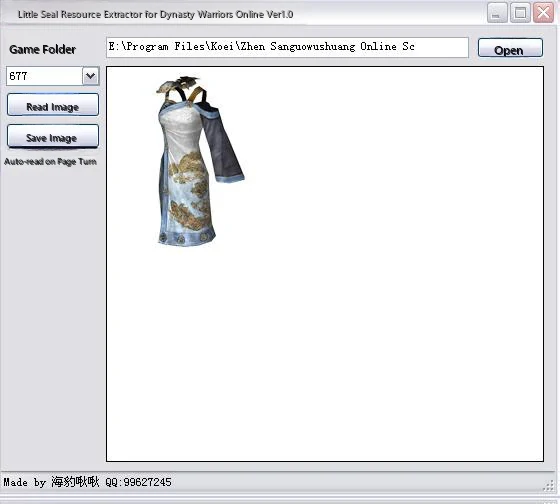
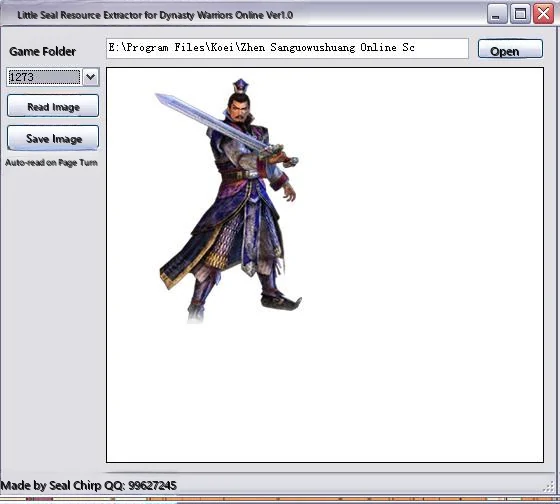
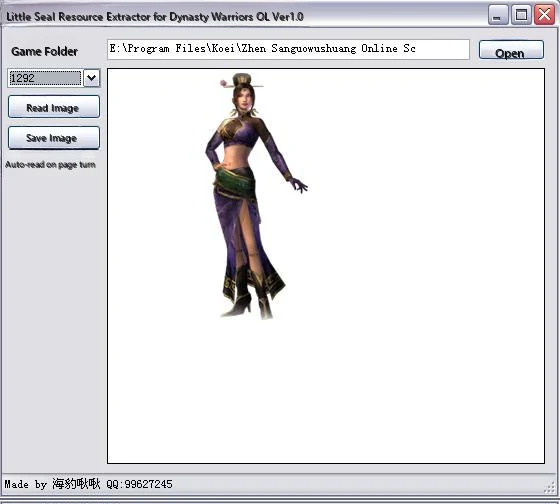
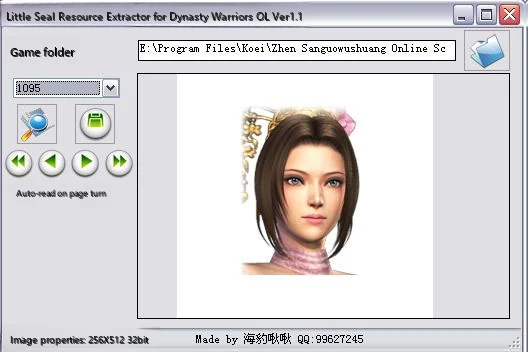
Musou OLZ Image Extractor v1
Dynasty Warriors Online Image Extractor v1.1[Reposted from Ranger BBS]
This program requires installationframework2.0to function properly
After downloading, please place the program in the Dynasty Warriors Online game directory
Ver 1.0 → Ver 1.1 Update Content
1. Fixed memory data unable to unload and excessive usage issues
2. Fixed issues with incorrect image reading
3. Added some practical features like drag and drop, forward and backward navigation
4. Added support for Japanese server client
Related images for this topic: 1.jpg
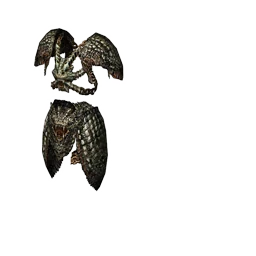
Related images for this topic: 2.jpg
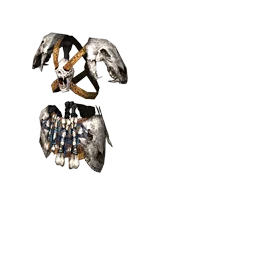
Related images for this topic: 3.jpg
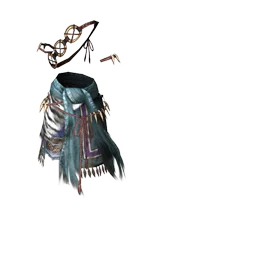
Related images for this topic: 4.jpg
There are many new equipment and costumes not yet available in the game but you can preview them
Here are some new things I've discovered
Note: Original author of this article isDuowan Gaming NetworkMemberliliye
Click to view original post
Game Recording Tutorial
Would you like to record your footsteps in the game, so you can still reminisce about them N years later
Would you like to showcase your exceptional skills more intuitively for more people to appreciate
Then let's start creatingHigh-definition game video recording~
Through game recording, you can capture and record all your heroic moments, friendships, and romances in the game, and share them with more people
Note: Game video recording and conversion requires high system specifications. Low-spec players will experience significant frame rate drops during recording, and video conversion will consume considerable time. Please be mentally prepared.
Due to copyright issues, I won't be providing the various software referenced here. Interested friends can search and download them online themselves.
Since I'm not a professional, this guide may not be the best video recording method. If you have better methods, please share them so more people can benefit.
Recording Game Videos
There are many game recording software options. After trying multiple recording programs, I still preferZD Soft Game RecorderandFraps, andbandicam
Therefore, I'll introduce these three software programs below.These three software have complementary advantages and disadvantages, choose flexibly according to your own needs.
ZD Soft Game RecorderAdvantages are that recorded videos have very small file sizes and built-in encoders.
FrapsThe advantages are high recording video clarity, low system resource consumption during recording, and better compatibility with various games thanZD Soft Game RecorderBetter.
bandicamthen you basically get both (except for the encoder), and the operation is more streamlined compared to the above two software.
ZD Soft Game Recorder
Software Introduction
The biggest feature of this software is that it comes with many encoders built-in. When recording starts, it directly processes screen information through the selected encoderConvert to specified format video files, the resulting video is very compact. About 10M per minute.
Of course, this is also the biggest shortcoming of this software... becauseConversion will consume large amounts of system resources, therefore if your computer configuration is not high enough, the recording frame rate will be very low, or even freeze.
After installing the software,Please register firstWithout registration, you can only record for one minute, and there will be a watermark in the upper left corner of the video.
Now let's officially start the tutorial: (You can also refer tohttp://tieba.baidu.com/p/740888190)
After registration is complete, double-click to open as shown.
In-game, default F9 to start recording, Ctrl+F9 to stop recording (default)
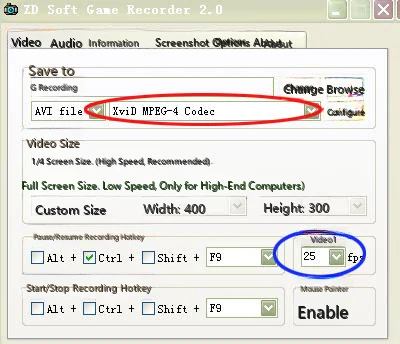
ZD Soft Game Recorder has six tabs, from left to right: Video, Audio, Information, Screenshot, Options, Registration.
In video settings, you can set video save path (default is C:\Game Recordings) and file type (default is avi).
To the right of file type is the encoder, which you can select according to your needs.
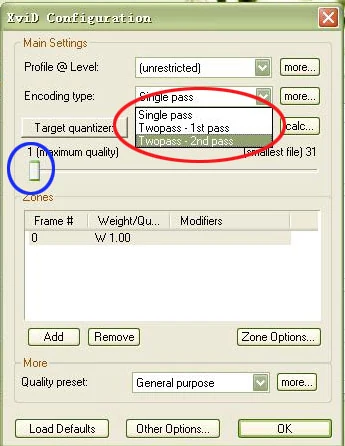
After multiple tests,Xvid MPEG-4 Codec is optimal, the configuration button on the right can fine-tune this encoder.
According to the above imageXvid MPEG-4 CodecAdjust encoder
Below this is the video size options, from top to bottom: 1/4 screen size, full screen, custom size. Generally,Select full screen for best results.
If you select 1/4 screen size, the frame rate can increase about 7 times, but recording file clarity will be much lower. It's a helpless choice for low-spec computers, hehe.
Below you can set start and stop hotkeys, video FPS, and mouse cursor enable.
The FPS frequency doesn't need to be set too high, generally it's25fps.Too high frame rates cannot significantly improve video quality, but greatly increase system resource consumption and recorded video size.
When you go to the cinema now, their film frame rate isn't even 24fps, hehe.
Editing Game Videos
The recorded video is too monotonous, of course it needs editing. You need to cut, merge, add effects, add subtitles, etc. to the video.
Due to the need to ensure video quality, video cutting and merging cannot encode the video. Many video cutting software use encoding cuts, which reduces video quality.
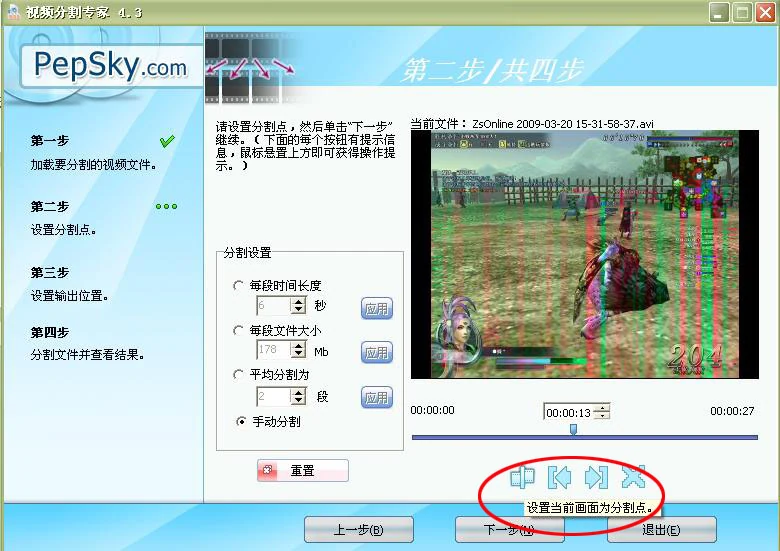
For video cutting I generally useVideo cutting expert VideoSplitter
VideoSplitter
Very simple software
Select video file, set cutting points, next step, and it's done. Extremely fast speed, direct cutting without encoding, ensuring video quality.
Merging is similar, usingVideo merging expert..............
You can even use the COPY command in DOS to merge, which is also lossless merging.
Adding special effects and other complex operations requires the assistance of other software.
For basic video effects, you can useVideoStudio, very simple and easy to learn
For more professional options, you can chooseAdobe Premiere Pro, basically it can do whatever you can think of..
Since I really lack artistic talent, I won't explain these operations that require imagination in detail..... Those who can useAdobe Premiere Proshould all be better than me, no need for me to teach...
Transcribing Game Videos
Due toFrapsThe recorded video is too large, so it must be converted.
There are many video conversion software options with a wide range of choices, but you must choose one withH264Encoder conversion software.
It can be said that today'sH264The video file being encoded has the clearest quality.
Here I will useMediaCoderSpeaking of high-definition video conversion.
MediaCoder
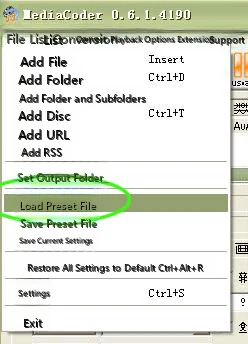
First, download the program, install, register..........
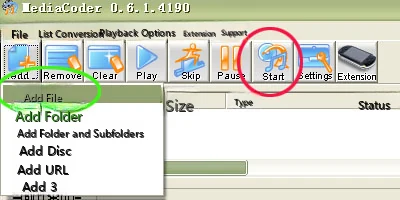
Then select File --- Load preset file. I have already placed the configuration file in the attached file, extract it yourself.
Then add the video files that need to be converted, press start. Then go have tea or go out shopping
If your computer is not good, it will take a lot of time
Last time I converted a D9 disc, the computer ran non-stop for 2 days and a night......
The configuration file I've attached is already basically optimized and doesn't require too many modifications.
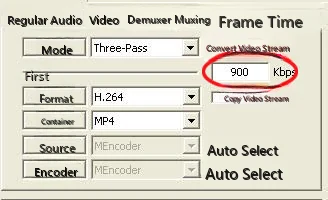
Only the bitrate here can be fine-tuned according to your personal needs.
Generally speaking, for collection purposes, a bitrate of 1500kbps can maintain over 90% of the original video quality. Video at 5000kbps shows no noticeable difference unless you have a critical eye, and going higher has no real meaning.
If uploading to the network for viewing, a bitrate of 900kbps allows users with 2M bandwidth to watch without buffering, with slightly reduced picture quality.
Since domestically most have over 1M bandwidth, if you use a bitrate of 500kbps, it can allow the vast majority of people to watch smoothly. However, the picture quality also drops significantly. (But it's still clearer than 99% of game videos on the network today. Most online game videos nowadays can't even see the player's ID clearly...)
Three-Pass mode is three-pass encoding, taking the longest time. If quality requirements aren't too high, you can select other options in the mode.
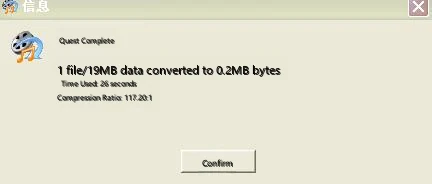
Very satisfied with the compression rate, hehe
The output file from this configuration is in MP4 format.
Of course, this software can also convert other format files, such as converting to 3GP for your phone, just modify the container, and of course, the audio also needs to be modified.
A video file consists of video and audio
AVI generally consists of video format xvid or divx and audio format MP3
MP4 consists of video format xvid and audio format MP3, or consists of video format H.264 and audio format AAC (you can select 3GP AAC+ in mediacoder software)
3GP consists of video format H.263 and audio format AAC (3GP AAC+)
Uploading Game Videos
After making your own video, just keeping it in your collection will make it moldy. You need to upload it online to share your joy with more people.
There are many commonly used video sites, such as Youku, Tudou, etc.
But there are very few that support high-definition videos.
Most video sites forcibly re-encode your videos through their default converters after you upload them (such domineering behavior...), no matter how clear you make your video, it still becomes a mess after uploading and processing.
The best high-definition video site used to be Jiuyou Video, but now for some unknown reason it has closed... what a pity
Now it seems onlyYoutubesupports high-definition videos.
Convert throughMediaCoderChange the converted MP4 video file extension from *.MP4 to *.FLV, this way you can bypass the website's default converter and play directly.
YoutubeThis video site is special - after you upload and pass review, they first release the ordinary version, which is the converted version, then after some time they release the high-definition version. (It used to be 2 days later, now it seems to be about 20 minutes)
Of course, to watch high-definition videos you need to view them in full screen. When you watch your own high-definition videos in full screen and compare them to other ordinary online videos in full screen, you'll definitely feel very proud.
Creating Animated GIFs
Using the interesting videos we recorded, we can make more interesting animated GIF images.
We can turn interesting things in the game into animated GIF images, then use them as forum avatars, signatures, or even make them into QQ emoticons to share with more people.
Or for example, making various weapon seal usage actions in Dynasty Warriors Online into a GIF demonstration image, which makes it more clear at a glance.
Here we need to useUlead GIF AnimatorThis creation software.
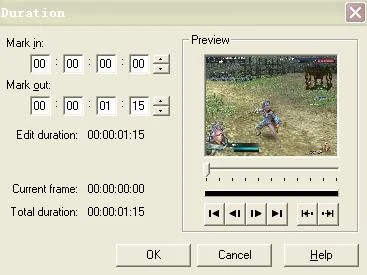
The usage is very simple, just drag the video toUlead GIF AnimatorJust drag it in there, and it will automatically analyze and form continuous screenshots for you to edit.
As shown, you can select a time segment to capture from the video, making it easy to find the segment you need from a large video.
After selecting, click OK, and the software will start analyzing the video, obtaining many continuous images.
At first the image display is incomplete, as shown.
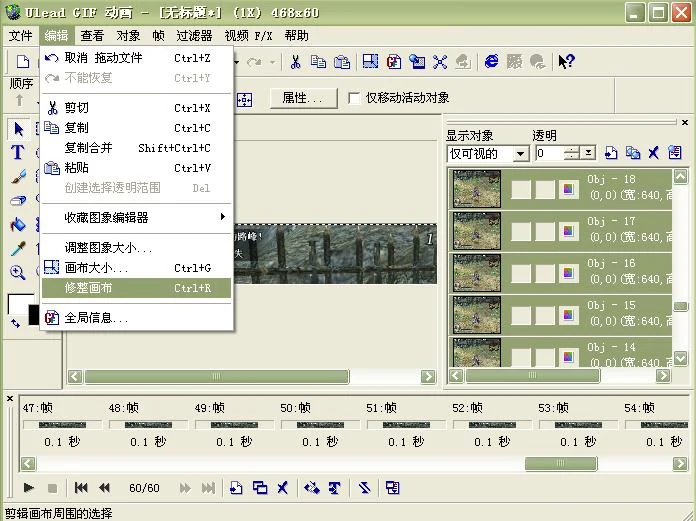
You need to select correct canvas, so it can auto-adapt.
Then use the resize image and canvas size functions to draw out the range you need.
Then delete useless frames. Too many repeated frames will make the file too large, making the GIF not smooth. Generally a GIF image should not exceed 40 frames.
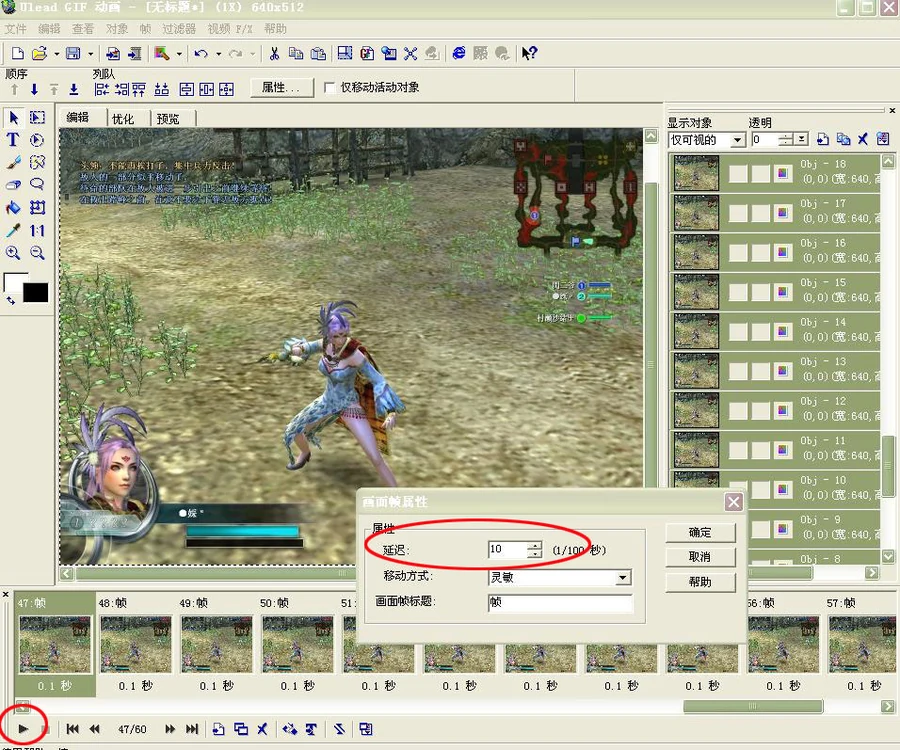
Then adjust the speed of each frame as needed, press the play button in the lower left corner to compare and observe, aiming for overall natural fluency. Key frames can have slightly increased delay time for emphasis.
Generally frame delay is set to 3-5, key frames are usually 10-15, depending on needs.
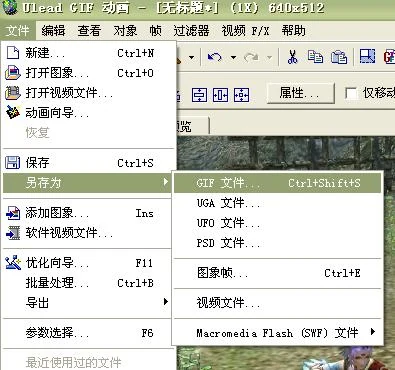
After correction, select Save As----GIF file, and you're done.
Simple finished product
This software can also be used to modify video content.
After importing a video, you can export each frame and modify it with PS, then import it back and save it as a video file.
Therefore recorded videos can no longer be used as evidence in the future, haha.
Update History
I Have Something to Say(For valuable suggestions or materials, please join QQ Group: 290060477 Dynasty Warriors Online Alliance)
Dynasty Warriors Online Encyclopedia E-book v6.02
Updated by Telecom Server 4 - Heydson (Useless Teacher) 2016.05.24
1.Weapon Modification Guide Updated (Updated 2016-5-20)
2.Administration Level (Updated 2016-5-20)
3. Weapon Attribute Synthesis and Attribute Attacks - Organized (Updated 2016-5-21)
4. Weapon Inscription Video Compilation (2016-5-21)
5. New Quest Video Guide (2016-5-21)
6. Beauty Ticket Usage Guide v1.0 (Updated 2015-9-24)
7. Proper Usage of Dressing Room (Updated 2015-9-16)
Dynasty Warriors Online Encyclopedia E-book v6.01
Updated by Telecom District 4---Heydson (Useless Master) 2016.05.19
1. Detailed Weapon Destruction Guide (Updated 2016-4-8)
2. Bibi Quest Guide updated
3. Updated latest weapon Musou critical values (updated to Twin Rods 2016-5-18)
4. Updated latest weapon power coefficient table (Updated to Spinning Blade Disc 2016-4-25 update)
5. Latest Weapon Enhancement Values and Patches (Updated to Spinning Blade Disc 2016-5-11)
6. New background music added: Hasebe Tetsu - MEMORIES - Pure Instrumental Version
Dynasty Warriors Online Encyclopedia E-book v6.00
By Telecom Server 4---Heydson (Useless Teacher) Updated 2016.05.13
Brand new version interface update
1. Updated Beginner Guide Data (for easier reference by new players)
2. Crafting, Cultivation, Titles, Cooking updated
3. Game Simulator Recommendation Update
4. Partial weapon optimal engraving updates (to be improved)
Dynasty Warriors Online Encyclopedia e-Book v5.20
By Telecom Server 4 Liu Bei Army Quest MasterJingzhou Phoenix StormUpdate. 2012.02.21
Updated the Following Content
Data Collection - Weapon Engravings (modified engravings to adapt to Japanese server post-Twin Blade changes, added Wolf Fang Club applicable engravings and reference images)
Complete Data - Sub-Officer Data (modified and added partial content)
Complete Data - Weapon Data - Power, Ascension, Destruction Table (updated to modified Crescent Blade, once again giving grand thanks to (Who·East Sea). Xiang'er went to take graduate entrance exams this year so his gold medal table couldn't keep up)
Client modification complete guide - Costume modification (continues to sync with Chinese server version)
Client Modification Complete Guide - Client Modification - Voice Modification (restored discontinued Korean voice pack download, Japanese voice pack updated to R10 version)
Added the following content
Complete Client Modification Guide - Gold Medal Value Patch
Dynasty Warriors Online Encyclopedia E-book v5.11
By Telecom Server 4 Liu Bei Army Quest MasterJingzhou Phoenix StormUpdated. 2011.10.29
Updated the Following Content
Complete Guide — Weapon Engravings (Modified Sword Engravings to match Japanese server sword modifications, plus complete reference images for all finished products)
Client Modification Complete Guide - Costume Modification (I was careless during the last update and missed this part; I'm really sorry everyone -_-;;;)
Game Recording Manual - Game video recording (added software Bandicam, also an old brand, works quite well)
Dynasty Warriors Online Encyclopedia e-Book v5.10
By Telecom Server 4 Liu Bei Army Quest MasterJingzhou Phoenix StormUpdate. 2011.9.30
Updated the Following Content
Data Collection {Weapon Engravings (further updated and expanded), Officer Data} - Weapon Data - Weapon Table (may already beCharacter Brothers(sosovipp)'s discontinued data), Power, Ascension, Destruction Table (updated to Fang Sword)
Beginner's Guide - Data 3, and Data 7 Item 10 (Cape Data), Item 15 (An Overlooked Issue)
Quest Guide - Four Player Quest, Interrupted Supply Line (Fixed S method), Special Quest, Show Your Skills (Fixed S completion remaining time)
Deleted the following content
Linked Stratagems scenario Japanese voice pack
Dynasty Warriors Online Encyclopedia E-book v5.09
By Telecom Server 4 Dong Zhuo Army Guest General Quest KingJingzhou Phoenix StormUpdate. 2011.7.21
Updated the Following Content
Complete Client Modification Guide - Client Modification - Voice Modification (added Japanese voice pack for Tongguan Battle scenario and updated download link for Linked Stratagem scenario Japanese server voice pack)
MOD
Full Client Modification Guide
Regarding client modifications, they are purely for adding more fun to the game.
Regardless of what modifications you make, they only take effect on the client on your machine, meaning only you can see or hear your modified results, while others in the game will still see you in your unmodified appearance.
Modifications cannot bring performance improvements to your weapons or outfits.
For example, changing a Minor General's cloak to look like a Major General's cloak only changes the appearance - the attributes remain +1, not the Major General's +5
The official stance strictlyprohibitsfor client modifications. After modification, you may encounter situations where you cannot enter the game or experience various bugs in the game.
Therefore, please be mentally prepared before modifying. I takeno responsibility。
(At least I've always modified everything and never had any problems, hehe)
Before modifying any files, first backup the target filesbackupIt is a good habit to do this, so you can quickly restore when your modifications fail.
Each time the client is updated, modifications may cause update failures and other issues. (I've never encountered this, but others say it happens)
Music Modification (Modding)
Musou Online background music replacement tool - method for Jingzhou version and later, simplified (thanks to Green Swallow from Ranger Network)First, download a kvs2ogg tool(Required tools are in the attachments below) After opening, click Tools, select kvs(S), then choose the song you want to modify
Then select save location
Happened to check the forum, and an old repost caught my eye. Oh, so Green Swallow from Ranger Network also made a foolproof BGM converter.
Thanks to Green Swallow for cracking the latest background music replacement method.
This software is one of the Dynasty Warriors Online background music replacement tools, requires use with kvs2ogg software (search and download online yourself).
First use kvs2ogg to convert mp3 to kvs,
Place 'kvs2bin_for_35OL.exe' and 'New KVS Header.bin' in the same folder.
Place the kvs files that need to be converted into the program's folder.
Run the exe, the program will convert all kvs files in this folder to bin files with the same name, and delete the original kvs files.
Converted bin files can be directly renamed to replace files in the game.
Then rename the bin properly and put it in the game folder, and you'll have sound.
Multiple selections allowed during conversion.
If a bin file with the same name already exists, the software will skip conversion. To reconvert, please delete or rename the old bin first.
\loaddata\0016 File List:
Then you can enter the game to experience the thrill of new BGM~
0016 internal bin file corresponding BGM:
02000002 Stronghold - Day
02000102 Stronghold - Night
02000202 Plains - Day
02000302 Plains - Night
02000402 River Port - Daytime
02000502 River Port - Night
02000602 Mountain Path, Mountain Range - Daylight
02000702 Mountain Path, Mountain Range - Night
02000802 River Island, Narcissus Village - Day
02000902 River Island, Narcissus Village - Night
02001002 Marsh - Day
02001102 Marsh - Night
02001202_New BGM_Capital, Adjacent - Day
02001302_New BGM_Capital, Adjacent - Night
02001402_New BGM_Dense Forest, Linked Ships - Day
02001502_New BGM_Dense Forest, Linked Ships - Night
02001602_New BGM_Fortress, Fortress Revised - Daylight
02001702_New BGM_Fortress, Modified Fortress - Night
02010002 Early Battle_Multiplayer Special Mission
02010102 Special Mission Music
02010202 Battle
02010302 Base Assault Battle
02010402 Base Battle 1
02010502 Musou Officer Encounter Battle
02010602 Lu Bu Opening Music
02010702 Base Dispute Battle 2
02010802_New BGM_3rd Gen-Battle of Yiling
02010902_Peach Blossom Valley Zones 1, 2, 3
02011002_Peach Blossom Spring Areas 1, 2, 3
02011102_Peach Blossom Valley Fourth Zone
02020002 Battle - Advantage
02020102 In Battle - Disadvantage
02020202 Battle - Crisis
02020302 Encounter with Enemy General in Dispute
02020402 Battle Our Officer Encountered
02020502_New BGM_3rd Gen-Battle of Jianye
02020602_New BGM_3rd Gen-Assault
02020702_New BGM_4th Gen-Battle of Yiling
02020802_Peach Blossom Valley Zones 1, 2, 3
02030002 Victory, Quest Complete
02030102 Defeat, Quest Failure
02030202 Dispute Victory
02030302 Dispute Defeat
02030402_Peach Blossom Valley Victory
02040002 Standby Before Entering Battlefield
02040102 Battle Report
02040202_Peach Blossom Spring Pre-Battle Standby
02050002 Town (Spring March~May)
02050102 Town (Summer June~August)
02050202 Street (Autumn September-November)
02050302 Town (Winter December~February)
02050402 Town (Eve of Battle)
02050502 Town (During Battle)
02050602 At Home
02050702_Town Night
02050802_Peach Blossom Valley 1
02050902_Peach Blossom Valley 2
02051002_New BGM_Unknown
02060002 Login Screen
02070002 Opening Animation
02070102_Unification Screen
02070202_New Character - Story Presentation Music
02070402_Shin Sangoku Musou 2 Ending Theme
02080002_Shin Sangoku Musou BB-Movie "Chronicles of the Wind and Clouds"
02080102_Chronicles of Musou (Instrumental)
This directory list was updated on the evening of April 27, 2011
Above, thanks for reading<(_ _)>
Original Post:http://bbs.duowan.com/thread-16536009-1-1.html http://bbs.17173.com/thread/174/394/20100713/4c3b5f5fb4953ff13-1.html
Weapon Modification (Modding)
Weapon Code
Battlefield weapon model: \LoadData\0006\od\ea
Weapon rack weapon model: LoadData\0012\ws
Modification method is to swap file names between source file and targetFile name swap
For example, if you want to experience Guan Ping's great sword, use the Chain Whip to change it to a great sword, you would swap the file names of ea000016.bin and ea000121.bin.
The key point to emphasize here is that the only change after your modification is the weapon model in the battlefield, meaning only the appearance changes, while the moves and actions remain the same as the previous weapon.
Therefore, when modifying, please consider the match between weapon appearance and moves as much as possible, otherwise it will be quite awkward when actually fighting, hehe.
Click to view original post address
Outfit Modification (Modding)
Are you already tired of the costumes that GF has currently opened?
Have you been looking forward to the beautiful clothes that RF has opened but GF hasn't opened?
Are you troubled by the panda costume you bought at high price having no attributes?
If you say yes to the above, OK, I suggest you read this article carefully.
This tool is transferred from 173 Who·East Sea post,True Mantou·WulingProduction; Due to file capacity, no attachment added, please download through the following links.
For the R10 version tool, I've also copied the Baidu space link of Who·East Sea Auntie, it's at the bottom; students who need it can go to his space to get materials.
Topic: True Mantou R10 costume replacement tool v3.3.0.1 cape has no problems (same version as the national server Cang Lang Zhu Lu)
Original post:http://bbs.17173.com/thread/174/394/20120113/4f0de1bd93d5c4613-1.html
| Who·East Sea | Posted: 2012-01-12 03:23:41 Top Thread starter ▪ Delete ▪ Quote Reply ▪ Modify |
|---|
| Level 3 Player Your Experience: 2364 Current level is: 16 Experience acquisition and explanation>> TABLE1 Post 902 Online 213 hours Gender Join 2008-11-06 | Attempt failed... When fixing 3.3b bug, used wrong variable Update: 3.3.0.1 Fixed the bug of cape replacement errors (error before replacement, fortunately didn't damage the client). Testing again Adjust volume first The above media does not represent the views of this site Upgrade steps: 1. Restore all with Mantou 3.2 2. Upgrade game client 3. Backup new la 4. Use 3.3 new mantou, discard 3.2 mantou Manual restoration method: 1. Overwrite with backed up la file. 2. Delete the file loaddata\0006\od\bk. If the program errors and cannot restore game files (sorry), please restore manually, And try to let me know about this bug, describe it clearly, give more conditions. If you updated the game first and it was successful, you can only reinstall or get a correct new la to overwrite, and also delete bk The Mantou version number must match the game version number. What version of model files you have, you need to use what version of Mantou. After client upgraded to 3.3, Mantou 3.2 becomes a destructive tool, must use Mantou 3.3 Attempted to fix the bug where certain capes in 3.3b reported errors 【Attention】Note backup la! Real Mantou's Dynasty Warriors Online Costume Replacement Tool v3_3_0_1.7z (4.54MB) Download link: SkyDrive [basically permanently valid if no problems] (revised, look in the list, see filename above): Must use IE-7 or higher level IE browser or third-party browser to open, recommend using 360 Speed Browser, fewer problems, fast speed. Will use a little memory, but the browser won't crash https://skydrive.live.com/?cid=E801A4DB23BAFF50&id=E801A4DB23BAFF50!106&sc=documents# 115 (115 changed rules, link permanently valid): http://115.com/file/bhgplxyg# MD5:7817132C00DD32EA6B1BCF1234DB9185 、 [ This post was edited by Who·East Sea on 2012-01-13 01:36! ] http://hi.baidu.com/whodonghai |
Voice Modification (Modding)
Tired of listening to the Chinese voice acting from the Chinese server? Want to try something different?
Alright, let's try itJapanese server voice actingthen
Usage: Copy all 1017 and 1015 folders to overwrite the same named 1017 and 1015 folders in the Chinese server's \LoadData directory
Click to download Japanese server voice pack(Battle of Tongguan scenario, Blue Wolf Hunt version)
This voice pack is provided for download by [Cloud Shadow·Musou] Forum
Korean server voice
Korean voice files.rar
Size: 226232382 bytes
Modified time: February 24, 2009, 16:08:49
MD5: 8FF0594FE54872D6C67BEA61903E68B5
SHA1: A2E3CF2BB4B02938811C8FF214F6DC89EFDAB089
CRC32: 4DCCCDC0
Click to go directly to 115 disk download address
This voice pack isDuowan Gaming NetworkMemberCloud Dream ClothesAvailable for download
Character Animation Modification
Original author: Network One - Who·East Sea
Original post address:http://bbs.17173.com/thread/174/394/20100328/4bae5a38908983213-1.html
When I first learned that client files could be replaced, I worked on this folder.
I was such a noob back then, didn't understand anything, played around a bit then dropped it.
A few days ago, to continue cosplaying Luffy, I picked up action modification again.
By the way, organized a complete action list and recorded a tiger Lieutenant mini video.
Understanding model skeletal actions a bit more...
Self-gratification actions have no use for individual users.
But for cutscene video masters, it still has some use.
With more actions, script content can also be enriched.
As long as the camera client is changed, the captured footage will be different.
During multiplayer cooperation, you can communicate beforehand and change everyone's client to be the same, so everyone sees roughly the same thing.
(Actually there aren't many useful ones anyway.)
Anyway, if there are others who also love to mess around,
See if you can come up with some fun creative ideas, or funny action moments.
For example, using 000093.bin to replace 000000.bin, almost everyone in the city will go crazy, very exciting~ Especially during the current conflict period, there's a large group of NPCs at the city gate. Try it now! Remember to backup
Whoever whoever whoever whoever whoever whoever whoever whoeverMain textWhoever whoever whoever whoever whoever whoever whoever whoever
City action list spreadsheet download: (PS:SkyDriveCannot open with IE6.0 browser)
Click → City Action List (11.5KB)
City model action data: Loaddata\0008 folder
City action filename structure:
00X###.bin
Six digits total, first two are 0, third digit is 'body type', last three digits are natural number sequence.
Body Type:
For character actions section, X corresponds to body type:
0=Male Normal、1=Male Muscular、2=Male Slender、3=Male Short
4=Female normal, 5=Female muscular, 6=Female charming, 7=Female petite
Animal vice officer action section, X corresponds to "Body Type":
0=Tiger, 1=Wolf, 2=Bear, 3=Panda, 4=Fox, 5=Deer
City actions are numbered in sequence and can be divided into the following parts:
Part 1: 00X000~00X050 and 00X170、00X175 (X=0~7)
Most actions are player expressions, the ones we can normally make.
2. 000053~000094 (53~56, 93 these five have female versions starting with 004)
This part of the actions is used by NPCs, only seen a few times normally.
Three, 000094~000103
These two groups of 10 actions total are used by the small cat and small dog NPCs in the city
Part 4: 000104~000143
One group of 4, 10 groups total, used by Musou Officers
5. 00X145~00X165 (X=0~5) and 00X183 (X=0、3)
This part of actions is for animal companions, divided into six sets by X, six types of animal companions
There are also two files: mi000000, mi000001 (don't touch these two files)
mi000000 seems to be action master index + character movement function. Without this file, characters cannot move and cannot change actions.
mi000000 seems to be the index file for expression actions. Without this file, characters can normally 'stand', 'walk', and 'run', but cannot use expression commands for other actions.
Loaddata\0008\fm folder
Contains fd000000~fd000007, fg000000, fp000000~fp000007 and ft000000 four types of files.
Currently only know fp000000~fp000007 relates to head skeleton andFacial expressionsrelated. One body type corresponds to one file (last digit is body type number), which contains all facial expressions including smile and cry.
Facial expression files can be deleted (add suffix _bak or change to other name), but don't replace with files from other body types. This file also contains spatial position data for the head, and after replacement the head will be misaligned with hair and body.
The function of the other three types of files couldn't be guessed.
Some rules for game action calls:
Some actions (Status actions), the game will loop these calls to keep characters in a state, such as standing, sitting, etc.
Some actions (One-time actions) After the game calls it once, it will automatically jump to other actions. For example, after executing the laugh expression, the laugh action will automatically jump to standing action or other actions after being called once.
Some actions, after being called, will automatically jump to another action (A set of actions). The sitting down process is one action file, the sitting state is one file, and standing up is another file. After executing the sit down action, the game automatically switches to and stays in the sitting action state. When executing other actions, the game will call the stand up action once before calling other actions. Animal adjutants' crouching/sitting and lying/prone positions also belong to this type. A complete set of actions consists of two one-time actions with a state action in between.
Some actions (Idle action), the game will automatically call this at regular intervals. Standing still, after a while the character will yawn. Some NPCs also have idle actions, which can be considered for use if needed. Idle actions are all one-time actions
The rules for these actions are all determined by the game program's original action list, not by the action file content. Replacing a state action with a one-time action will make the game loop that one-time action. No matter what action the sit-down action is replaced with, after calling the replaced 'sit-down action' once, it will still jump to the 'sitting' numbered action called by state mode.
State actions that we can actively call include sitting on ground, sitting on chair, leaning, and posing, plus the normal standing state. If we want to keep a character in one unchanging state, we need to replace these few actions. Only with these few will the game loop the same action repeatedly.
Facial expression files and body actions are independent of each other:
For example, when calling the "laugh" action in the game, the game will simultaneously call the facial expression file and the laugh action file. If the facial expression file is missing, the character will perform the action with no expression; if the laugh action is replaced with a cry action, the character will perform the cry action with a smiling face. When necessary, some special effects can be achieved. Generally, there's no need to modify facial expression files.
Facial expression files can be deleted (add suffix _bak or change to other name), but don't replace with files from other body types. This file also contains spatial position data for the head, and after replacement the head will be misaligned with hair and body.
Character movement actions:
One "walking action" for slow movement, one "running action" for fast movement. These two are special, triggered by directional keys, and at the same time, the directional keys also control character movement. In the game, when characters move, they use walking or running actions, which looks very "normal". Of course walking and running actions can be freely replaced, changed to sitting on the ground and sliding to move, or dancing while walking (NPCs can too), all possible.
There are several walking actions with upper body movement in official actions, which can be modified for use. Need to exploit walking bug.
Don't swap actions across species, otherwise the appearance will be very cute and distinctive.
To preview a certain action conveniently: rename the action file to the corresponding body type's 00X000, then change scenes to see the effect.
Some actions are "with props", but currently no one in the city seems to be holding anything. So they can only gesture with empty hands.
Regarding modification methods for replacement files, I've wanted to say this for a while, those not interested in self-pleasure can skip:
Game program → Through an index list → Find corresponding filename → Execute file content
The game program calls game resources, roughly this process. Now, for all the previous steps, we can't intervene. The only thing we can do is change the last step—the content of the files the game program wants to run. Dynasty Warriors Online's resource files are all loose, you can directly replace filenames, this is a relatively simple method. (Index files, if found and understood, can also be changed. Not as straightforward as file replacement.)
Although we cannot modify the index list, we still need to understand its patterns. Only by knowing which file the game program is going to run can we replace it. Which specific file the game calls depends on many factors, such as costumes - different costume models and textures have different rules. The game also has different calling methods for different actions.
So,Finding out which file the game program is currently calling is the core of the file replacement modification method.
Fortunately, there are always some lovely people who organize parts of the content, converting numeric filenames into readable text or image descriptions. The remaining work is just finding the corresponding descriptions based on what the game calls, and you can determine the files. This part of the work requires the person doing the replacement to familiarize themselves and understand it. Some rules can be mastered by trying more.
Appendix: City Action List Preview(Description not vivid, make do with it)
Below X=0~7, 0 male normal, 1 male muscular, 2 male slim, 3 male short, 4 female normal, 5 female muscular, 6 female charming, 7 female short, each action slightly different
00X000 Standing
00X001 Low speed movement (small displacement, walking, turning in place)
00X002 Full speed movement (running)
00X003 Sit down (ground) process/sit
00X004 Sitting (on ground)
00X005 Process of standing up (from ground)
00X006 Laugh/laugh
00X007 Joy/joy
00X008 Anger/angry
00X009 Cry
00X010 Discouraged/depress
00X011 Nod/nod
00X012 Denial/deny
00X013 Helpless/shrug
00X014 Surprised
00X015 Shy/shy
00X016 Think/think
00X017 Farewell/bye wave/wave
00X018 Fist pump celebration/guts
00X019 Point
00X020 Clap/clap
00X021 Thank you/bow
00X022 Bow/salute
00X023 Sit down (chair)/sit
00X024 Sitting (chair)
00X025 Standing up (chair)
00X026 Gesturing (NPC action when talking to NPCs)
00X027 Cheers/toast
00X028 Posing/sstand
00X029 Striking a pose
00X030 Put away pose
00X031 Dancing/dance
00X032 Raise wine cup high, drink
00X033 Cheer
00X034 Criticism/booing
00X035 Interrupting/tsukommi
00X036 Jumping process (entire jumping action set, all one-time actions, hard to replace)
00X037 Jumping airborne process
00X038 Jumping up then falling (a static action, hands raised high with feet touching ground, can be used as a pose)
00X039 Landing process (action like pulling someone's pants down)
00X044 Leaning action (feels like leaning against something higher than the leaning action below, but this has no follow-up action, possibly deprecated?)
00X045 Lift left leg, throw "baseball" (or snowball, shoe, etc.)
00X046 Leaning action
00X047 Leaning
00X048 Leaning and getting up
00X049 /thank gratitude/sorry apology
00X050 Idle action (action that automatically appears after standing for a while, yawning, tiptoeing, etc.)
00X170 Both arms crossed above head
00X175 Human wave? Half squat, stand straight with both hands raised above head
Below only has X=0 male normal, 3 male short
000040 Right hand "holding fishing rod" horizontally sweeps from right waist height to front (like kendo preparation stance) 003040 Fishing, struggling, action before raising rod
003041 Fishing rod casting action, hand swings from overhead to behind, like doing a backflip
003042 After raising rod, left hand grabs fish, raises forward to display
000043 Fishing rod casting action, swinging hands from overhead to the back, like doing a flip 003043 Lifting left leg, throwing a "baseball" (or snowball, shoe, or other object)
The following only has X=0 (some have X=4, female actions), mostly used by NPCs. (All female actions have feet sinking below ground level)
000053 Slow walk, arms crossed bent over, cold 004053 Female action, slow walk, arms crossed bent over, cold
000054 Walking slowly, right hand stretched forward shaking like a cramp, fanning - 004054 Female action, walking slowly, using hand to shade eyes from sun
000055 Standing, hugging arms rubbing hands breathing warm air, cold 004055 Female action, standing, hugging arms rubbing hands breathing warm air, cold
000056 Sitting, right hand fanning to wipe sweat, hot 004056 Female action, sitting, fanning
000058 Female action, left hand carrying bucket, right hand scooping water to water the ground
000059 Sitting cross-legged on ground with right hand fidgeting with something in front, clipping into ground
000060 Standing with spear in right hand, like a guard
000061 Following the previous, left hand suddenly points, discovering a bad guy, stabbing with spear.
000062 Hand reaching forward to chest-high platform, looking around everywhere, then straightening waist, very evil...
000063 Hands reach forward to chest-high platform, waving left and right to beckon people over
000064 Talking to person on the right, showing something, gesturing
000065 Looks ahead twice, nods, small shrug (talking gesture)
000066 Celebrate with fist pump three times in a row
000067 Spreading hands (What do you want me to do? You tell me! What do you want me to do!)
000068 Arms crossed and folded, standing with arms crossed over chest (very cool)
000069 Tired of standing, moving neck
000070 Female action, feet sunk into ground, hands clasped together in front of body, ladylike pose (like urinating...)
000071 Arms crossed talking, also pointing at person opposite with finger
000072 Standing and nodding, yes, understood.
000073 Same as 70, with nodding added
000074 Crosses arms and hugs chest while talking, also waves hand and shakes head, expressing negation (hand waving pose is very stylish)
000075 Standing and shaking head
000076 Same as 70, swaying head left and right dramatically, acting cute
000077 Arms hang weakly, shake head, confused
000078 Drunk, walking (very stylish)
000079 Sitting, hands on table shaking head, drunk
000080 Same as previous, right hand holding wine cup
000081 Same as previous one, this time starts drinking
000082 Same as above, this time starting to drink heavily
000083 Same as above, drink up! Gulp gulp, then wipe face
000084 Sitting, both hands on table, shaking head, finally resting head on back of hands
000085 Static action of the previous one, lying on table with hand as pillow
000086 Getting up, wiping face a few times to wake up
000087 Right hand holding sword at side, head down, striking a cool pose
000088 Turns out it's not a sword, it's a hoe... digging action, after digging a few times, bending over to look
000089 Female action, sitting with legs together, sewing something
000090 Sitting, writing
000091 Left hand shading eyes looking around
000092 Sitting cross-legged on ground polishing sword, checking if it's straight, swinging once with backhand horizontal slash
000093 Outrageous dance, ending position is original position, will teleport - 004093 Female version dance
The following are kitten and puppy actions
000094 Small cat crouching and sitting (game default)
000095 Small cat walking
000096 Kitten from crouching to lying down
000097 Kitten lying down
000098 Kitten going from lying to crouching
000099 Puppy crouch (game default)
000100 Puppy walking
000101 Puppy going from crouching to lying down
000102 Small dog lying down
000103 Puppy from lying to crouching
The following are Musou Officer actions: 1st is standing action; 2nd is talking action; 3rd is idle action; 4th is disappointed action
000104 Stands sideways, left foot forward - general Officer
000105 Following previous, right hand spreads to the right
000106 Following the previous one, right hand clenched into fist, cheer up
000107 Following previous, turning head back to the right, disappointed
000108 Arms and legs spread wide, appearing mighty - Mighty General type officers like Xiahou Yuan, Xu Zhu, Pang De, Zhang Fei, Cao Ren, etc.
000109 Following the previous one, left hand reaching forward, hmm, nodding once
000110 Following the previous one, right fist pounds left palm, showing momentum
000111 Following the previous one, right hand on forehead, shaking head, disappointed
000112 Female officer standing pose - General female officers like Sun Shang Xiang, Yue Ying, etc.
000113 Following the previous, nodding while bringing spread hands to the front and clasping them together
000114 Following the previous one, bow with hands in front of mouth, nod nod
000115 Following previous, head down, left hand pulling two fingers of right hand, placed above left thigh
000116 Officer stance with legs straight and body sideways Guan Yu
000117 Following the previous one, stroking beautiful beard
000118 Following the previous one, nodding
000119 Following the previous, head turning to the left back and down
000120 Stance like sumo wrestler or gorilla Zhang Jiao? Pang Tong?
000121 Following the previous one, nods
000122 Following the previous one, crouch again, look up, arms spread
000123 Following previous, shake head
000124 Standing sideways, left foot extended more - Zhang He
000125 Right hand draws a large arc clenched fist cheering, then spreads to the right, then clenches fist, very gentle
000126 Spread wings, then take a step forward with clenched fist
000127 Right hand on forehead with elbow bent inward, stepping back half a step, about to lose balance
000128 Hunched back mighty stance Wei Yan
000129 Following previous, small neck movement
000130 Following the previous, right hand clenched into fist
000131 Following previous, right foot stomping heavily, shaking head
000132 Loli stance Sun Shang Xiang
000133 Following previous, hands clasped around head slightly raised to chest, talking
000134 Following the previous one, jumping up with heel kicking butt
000135 Following previous, acting coy
000136 Right elbow bent, hand across waist front Zhen Mi
000137 Following the previous one, body twisting many bends, talking.
000138 Following the previous one, right hand on cheek left hand on elbow, swaying
000139 Following the previous one, right hand covering mouth, left hand covering mouth, head turned to right rear
000140 Standing with left side facing forward Sima Yi
000141 Following previous, spreading hands left and right horizontally, like measuring length
000142 Following previous, left hand raised to chest, clenched fist, raised to right ear, swing hand down left
000143 Following the previous one, turns body slightly right and turns head, left hand makes a horizontal backhand swing, like slapping face
The following are animal companion actions (X=0~5, 0 Tiger, 1 Wolf, 2 Bear, 3 Panda, 4 Fox, 5 Deer)
00X145 Sitting (lying) down
00X146 Sitting (lying)
00X147 Standing up from sitting (lying) position
00X148 Walking
00X149 Sitting (lying) and acting cute
00X150 Sitting (lying) and washing face or scratching
00X151 Sitting (lying) licking and grooming fur
00X152 Sitting (lying) and getting up to show dominance, then sitting (lying) back down
00X153 Getting up from sitting (lying) to move around, then sitting (lying) back down
00X154 Sitting (lying) start→lying (prone) down
00X155 Lying (prone)
00X156 Getting up from lying (prone) → sitting (reclining)
00X157 Getting up from sitting (reclining) to show friendliness, then sitting (reclining) down again
00X158 Lying (crouching) and stretching lazily
00X159 Sitting (lying) and yawning
00X160 Standing state
00X161 Run
00X162 Standing with head tilted looking at person (reaction action for dialogue)
00X163 Standing and moving around
00X164 Idle action
00X165 Standing in defiant pose (possibly got fired)
00X183 Only Tiger's 000183 (standing version 000149) and Panda's 003183 (standing version 003157)
The following are specific descriptions
000###Tiger
000145 Tiger lying down
000146 Tiger lying down
000147 Tiger getting up from lying position
000148 Tiger walking
000149 Tiger lying down, extending left front paw forward to catch yarn ball, lying down while catching
000150 Tiger lying down, licking paws, washing face
000151 Tiger lying, licking paws, yawning
000152 Tiger getting up from lying position, opening mouth to intimidate, then lying down again
000153 Tiger gets up from lying position, roars once, then lies back down
000154 Tiger going from lying to resting position
000155 Tiger lying down
000156 Tiger getting up from lying position to resting
000157 Tiger rising from lying down, lowering head once, then lying back down
000158 Tiger lying down stretching
000159 Tiger lying down yawning
000160 Tiger normal standing state
000161 Tiger running
000162 Tiger standing looking up at person, opening mouth and blinking eyes, curious look (action when selected/confirmed)
000163 Tiger stands and roars in a circle, lowers head once
000164 Tiger standing and yawning in a circle, stretching lazily (arching back) (automatically appears after long periods)
000165 Tiger standing with both claws striking forward, lifting upper lip to show fangs
000183 Tiger starts standing, lies down to play with yarn ball, then stands back up
001###Wolf
001145 Wolf sits down
001146 Wolf sitting
001147 Wolf getting up from sitting
001148 Wolf walking
001149 Wolf sitting and extending left front paw, handshake?
001150 Wolf starting from sitting, lying down scratching then getting back to sitting
001151 Wolf starting from sitting, lying down licking front paws then getting up to sitting
001152 Wolf starts from sitting position, stands up and stretches lazily then sits back down
001153 Wolf starting from sitting, stands up and howls repeatedly then sits down
001154 Wolf starting from sitting position, lies down and closes eyes
001155 Wolf lying with eyes closed
001156 Wolf starting from lying down, yawning, then sitting
001157 Wolf starting from sitting, getting up opening mouth and wagging tail, then sitting back down
001158 Wolf starts from lying down, gets up and stretches lazily, then lies back down
001159 Wolf sitting and yawning
001160 Wolf normal standing state
001161 Wolf running
001162 Tilting head and wagging tail, this is the selected and confirmed action when viewing wolf status
001163 Barking, opening mouth and wagging tail
001164 Standing and yawning, shaking fur
001165 Body shrinks back, mouth slightly open, tail stretches straight back, could it be startled from being dismissed?
002###Bear
002145 Bear sits down
002146 Bear sitting
002147 Bear gets up from sitting position
002148 Bear walking
002149 Bear sitting, licking forward three times
002150 Bear sitting, using hind paw to scratch neck
002151 Bear sitting, licking back of right paw
002152 Bear standing up from sitting, using both hind legs to stand up, raising arms and cheering, then sitting down
002153 Bear getting up from sitting, standing on hind legs to dance, raising arms and cheering three times right-left-center, then sitting back down
002154 Bear going from sitting to lying down
002155 Bear lying down
002156 Bear getting up from prone to sitting
002157 Bear getting up from sitting, opening mouth and wiggling bottom
002158 Bear lying down stretching, front legs straight with butt up and whole body twisting
002159 Bear sitting and yawning
002160 Bear normal standing state
002161 Bear running
002162 Bear turning head left, turning head right
002163 Bear right-left-center arm raising triple cheer
002164 Bear stands yawning, scratches neck with left front paw
002165 Bear raising arms and cheering
003###Panda
003145 Panda sitting down
003146 Panda sitting
003147 Panda stands up from sitting
003148 Panda walks
003149 Panda sitting, leaning forward with front paws on ground, swaying
003150 Panda sitting, washing face with both paws together
003151 Panda sitting and licking its right paw
003152 Panda starting from sitting, lunging forward, bowing down, then sitting down
003153 Panda sitting, raising arms left-right-center in triple cheer
003154 Panda starting from sitting position, lying down
003155 Panda lying down
003156 Panda starting from lying position, getting up to sitting
003157 Panda starting from sitting, lunging forward, wiggling butt, then sitting back down
003158 Panda lying down, lifting head to yawn, continuing to lie down
003159 Panda sitting, yawning, scratching
003160 Panda normal standing state
003161 Panda running
003162 Panda tilting head left
003163 Panda shaking its butt
003164 Panda head circling while yawning, rubbing eyes
003165 Panda with front paws spread apart, crouching down, shaking
003183 Panda starting from standing, sitting down, action 157, then standing
004Fox
004145 Fox sits down
004146 Fox sitting
004147 Fox stands up from sitting
004148 Fox walking
004149 Fox turning around, tail forward playing
004150 Fox sitting and scratching neck with hind paw
004151 Fox sitting and licking tail fur
004152 Fox gets up from sitting, crouches down ready to dash, then sits back down
004153 Fox sitting learning wolf howl? Also vigorously wagging tail
004154 Fox turns in place, curls up in a circle and lies down
004155 Fox lying down
004156 Fox gets up from lying position to sitting
004157 Fox starts from sitting position, upper body lunges forward slightly, crouches down, mouth open, vigorously wagging tail
004158 Fox lying down, stretching lazily, then continuing to lie
004159 Fox sitting and yawning
004160 Fox normal standing state
004161 Fox running
004162 Fox looks up, tilts head
004163 Fox after 157, then lifts head, continues wagging tail
004164 Fox turning around and playing with its own tail
004165 Fox crouching forward, about to charge, then retreating
005Deer
005145 Deer lies down
005146 Deer lying
005147 Deer getting up from lying position
005148 Deer walking
005149 Deer lying down, eyes closed nuzzling person's leg with head
005150 Deer lying down, looking to the right, turning head back with a call (startled?)
005151 Deer lying down, licking hind leg fur, washing face with front legs
005152 Deer gets up from lying position, paws ground twice with front hooves, ready to charge, then lies back down
005153 Deer getting up from lying down, jumping twice, then lying down again
005154 Deer lying down with head on ground, crouching down
005155 Deer lying down
005156 Deer from lying down to sitting position
005157 Deer jumping up from lying position, bowing, then lying down again
005158 Deer lies down and raises neck, shakes head, then lies back down
005159 Deer lying down, yawning
005160 Deer normal standing state
005161 Deer running
005162 Deer tilting head looking left, flapping ears
005163 Deer jumps twice, then bows
005164 Deer lowering head to graze
005165 Deer vigorously paws ground twice with front hooves, opens mouth and roars
Cloak Modification (Modding)
See costume modification for details.
Musou OLZ Image Extractor v1
Dynasty Warriors Online Image Extractor v1.1[Reposted from Ranger BBS]
This program requires installationframework2.0to function properly
After downloading, please place the program in the Dynasty Warriors Online game directory
Ver 1.0 → Ver 1.1 Update Content
1. Fixed memory data unable to unload and excessive usage issues
2. Fixed issues with incorrect image reading
3. Added some practical features like drag and drop, forward and backward navigation
4. Added support for Japanese server client
Related images for this topic: 1.jpg
Related images for this topic: 2.jpg
Related images for this topic: 3.jpg
Related images for this topic: 4.jpg
There are many new equipment and costumes not yet available in the game but you can preview them
Here are some new things I've discovered
Note: Original author of this article isDuowan Gaming NetworkMemberliliye
Click to view original post
Game Recording Tutorial
Would you like to record your footsteps in the game, so you can still reminisce about them N years later
Would you like to showcase your exceptional skills more intuitively for more people to appreciate
Then let's start creatingHigh-definition game video recording~
Through game recording, you can capture and record all your heroic moments, friendships, and romances in the game, and share them with more people
Note: Game video recording and conversion requires high system specifications. Low-spec players will experience significant frame rate drops during recording, and video conversion will consume considerable time. Please be mentally prepared.
Due to copyright issues, I won't be providing the various software referenced here. Interested friends can search and download them online themselves.
Since I'm not a professional, this guide may not be the best video recording method. If you have better methods, please share them so more people can benefit.
Recording Game Videos
There are many game recording software options. After trying multiple recording programs, I still preferZD Soft Game RecorderandFraps, andbandicam
Therefore, I'll introduce these three software programs below.These three software have complementary advantages and disadvantages, choose flexibly according to your own needs.
ZD Soft Game RecorderAdvantages are that recorded videos have very small file sizes and built-in encoders.
FrapsThe advantages are high recording video clarity, low system resource consumption during recording, and better compatibility with various games thanZD Soft Game RecorderBetter.
bandicamthen you basically get both (except for the encoder), and the operation is more streamlined compared to the above two software.
ZD Soft Game Recorder
Software Introduction
The biggest feature of this software is that it comes with many encoders built-in. When recording starts, it directly processes screen information through the selected encoderConvert to specified format video files, the resulting video is very compact. About 10M per minute.
Of course, this is also the biggest shortcoming of this software... becauseConversion will consume large amounts of system resources, therefore if your computer configuration is not high enough, the recording frame rate will be very low, or even freeze.
After installing the software,Please register firstWithout registration, you can only record for one minute, and there will be a watermark in the upper left corner of the video.
Now let's officially start the tutorial: (You can also refer tohttp://tieba.baidu.com/p/740888190)
After registration is complete, double-click to open as shown.
In-game, default F9 to start recording, Ctrl+F9 to stop recording (default)
ZD Soft Game Recorder has six tabs, from left to right: Video, Audio, Information, Screenshot, Options, Registration.
In video settings, you can set video save path (default is C:\Game Recordings) and file type (default is avi).
To the right of file type is the encoder, which you can select according to your needs.
After multiple tests,Xvid MPEG-4 Codec is optimal, the configuration button on the right can fine-tune this encoder.
According to the above imageXvid MPEG-4 CodecAdjust encoder
Below this is the video size options, from top to bottom: 1/4 screen size, full screen, custom size. Generally,Select full screen for best results.
If you select 1/4 screen size, the frame rate can increase about 7 times, but recording file clarity will be much lower. It's a helpless choice for low-spec computers, hehe.
Below you can set start and stop hotkeys, video FPS, and mouse cursor enable.
The FPS frequency doesn't need to be set too high, generally it's25fps.Too high frame rates cannot significantly improve video quality, but greatly increase system resource consumption and recorded video size.
When you go to the cinema now, their film frame rate isn't even 24fps, hehe.
Editing Game Videos
The recorded video is too monotonous, of course it needs editing. You need to cut, merge, add effects, add subtitles, etc. to the video.
Due to the need to ensure video quality, video cutting and merging cannot encode the video. Many video cutting software use encoding cuts, which reduces video quality.
For video cutting I generally useVideo cutting expert VideoSplitter
VideoSplitter
Very simple software
Select video file, set cutting points, next step, and it's done. Extremely fast speed, direct cutting without encoding, ensuring video quality.
Merging is similar, usingVideo merging expert..............
You can even use the COPY command in DOS to merge, which is also lossless merging.
Adding special effects and other complex operations requires the assistance of other software.
For basic video effects, you can useVideoStudio, very simple and easy to learn
For more professional options, you can chooseAdobe Premiere Pro, basically it can do whatever you can think of..
Since I really lack artistic talent, I won't explain these operations that require imagination in detail..... Those who can useAdobe Premiere Proshould all be better than me, no need for me to teach...
Transcribing Game Videos
Due toFrapsThe recorded video is too large, so it must be converted.
There are many video conversion software options with a wide range of choices, but you must choose one withH264Encoder conversion software.
It can be said that today'sH264The video file being encoded has the clearest quality.
Here I will useMediaCoderSpeaking of high-definition video conversion.
MediaCoder
First, download the program, install, register..........
Then select File --- Load preset file. I have already placed the configuration file in the attached file, extract it yourself.
Then add the video files that need to be converted, press start. Then go have tea or go out shopping
If your computer is not good, it will take a lot of time
Last time I converted a D9 disc, the computer ran non-stop for 2 days and a night......
The configuration file I've attached is already basically optimized and doesn't require too many modifications.
Only the bitrate here can be fine-tuned according to your personal needs.
Generally speaking, for collection purposes, a bitrate of 1500kbps can maintain over 90% of the original video quality. Video at 5000kbps shows no noticeable difference unless you have a critical eye, and going higher has no real meaning.
If uploading to the network for viewing, a bitrate of 900kbps allows users with 2M bandwidth to watch without buffering, with slightly reduced picture quality.
Since domestically most have over 1M bandwidth, if you use a bitrate of 500kbps, it can allow the vast majority of people to watch smoothly. However, the picture quality also drops significantly. (But it's still clearer than 99% of game videos on the network today. Most online game videos nowadays can't even see the player's ID clearly...)
Three-Pass mode is three-pass encoding, taking the longest time. If quality requirements aren't too high, you can select other options in the mode.
Very satisfied with the compression rate, hehe
The output file from this configuration is in MP4 format.
Of course, this software can also convert other format files, such as converting to 3GP for your phone, just modify the container, and of course, the audio also needs to be modified.
A video file consists of video and audio
AVI generally consists of video format xvid or divx and audio format MP3
MP4 consists of video format xvid and audio format MP3, or consists of video format H.264 and audio format AAC (you can select 3GP AAC+ in mediacoder software)
3GP consists of video format H.263 and audio format AAC (3GP AAC+)
Uploading Game Videos
After making your own video, just keeping it in your collection will make it moldy. You need to upload it online to share your joy with more people.
There are many commonly used video sites, such as Youku, Tudou, etc.
But there are very few that support high-definition videos.
Most video sites forcibly re-encode your videos through their default converters after you upload them (such domineering behavior...), no matter how clear you make your video, it still becomes a mess after uploading and processing.
The best high-definition video site used to be Jiuyou Video, but now for some unknown reason it has closed... what a pity
Now it seems onlyYoutubesupports high-definition videos.
Convert throughMediaCoderChange the converted MP4 video file extension from *.MP4 to *.FLV, this way you can bypass the website's default converter and play directly.
YoutubeThis video site is special - after you upload and pass review, they first release the ordinary version, which is the converted version, then after some time they release the high-definition version. (It used to be 2 days later, now it seems to be about 20 minutes)
Of course, to watch high-definition videos you need to view them in full screen. When you watch your own high-definition videos in full screen and compare them to other ordinary online videos in full screen, you'll definitely feel very proud.
Creating Animated GIFs
Using the interesting videos we recorded, we can make more interesting animated GIF images.
We can turn interesting things in the game into animated GIF images, then use them as forum avatars, signatures, or even make them into QQ emoticons to share with more people.
Or for example, making various weapon seal usage actions in Dynasty Warriors Online into a GIF demonstration image, which makes it more clear at a glance.
Here we need to useUlead GIF AnimatorThis creation software.
The usage is very simple, just drag the video toUlead GIF AnimatorJust drag it in there, and it will automatically analyze and form continuous screenshots for you to edit.
As shown, you can select a time segment to capture from the video, making it easy to find the segment you need from a large video.
After selecting, click OK, and the software will start analyzing the video, obtaining many continuous images.
At first the image display is incomplete, as shown.
You need to select correct canvas, so it can auto-adapt.
Then use the resize image and canvas size functions to draw out the range you need.
Then delete useless frames. Too many repeated frames will make the file too large, making the GIF not smooth. Generally a GIF image should not exceed 40 frames.
Then adjust the speed of each frame as needed, press the play button in the lower left corner to compare and observe, aiming for overall natural fluency. Key frames can have slightly increased delay time for emphasis.
Generally frame delay is set to 3-5, key frames are usually 10-15, depending on needs.
After correction, select Save As----GIF file, and you're done.
Simple finished product
This software can also be used to modify video content.
After importing a video, you can export each frame and modify it with PS, then import it back and save it as a video file.
Therefore recorded videos can no longer be used as evidence in the future, haha.
Update History
I Have Something to Say(For valuable suggestions or materials, please join QQ Group: 290060477 Dynasty Warriors Online Alliance)
Dynasty Warriors Online Encyclopedia E-book v6.02
Updated by Telecom Server 4 - Heydson (Useless Teacher) 2016.05.24
1.Weapon Modification Guide Updated (Updated 2016-5-20)
2.Administration Level (Updated 2016-5-20)
3. Weapon Attribute Synthesis and Attribute Attacks - Organized (Updated 2016-5-21)
4. Weapon Inscription Video Compilation (2016-5-21)
5. New Quest Video Guide (2016-5-21)
6. Beauty Ticket Usage Guide v1.0 (Updated 2015-9-24)
7. Proper Usage of Dressing Room (Updated 2015-9-16)
Dynasty Warriors Online Encyclopedia E-book v6.01
Updated by Telecom District 4---Heydson (Useless Master) 2016.05.19
1. Detailed Weapon Destruction Guide (Updated 2016-4-8)
2. Bibi Quest Guide updated
3. Updated latest weapon Musou critical values (updated to Twin Rods 2016-5-18)
4. Updated latest weapon power coefficient table (Updated to Spinning Blade Disc 2016-4-25 update)
5. Latest Weapon Enhancement Values and Patches (Updated to Spinning Blade Disc 2016-5-11)
6. New background music added: Hasebe Tetsu - MEMORIES - Pure Instrumental Version
Dynasty Warriors Online Encyclopedia E-book v6.00
By Telecom Server 4---Heydson (Useless Teacher) Updated 2016.05.13
Brand new version interface update
1. Updated Beginner Guide Data (for easier reference by new players)
2. Crafting, Cultivation, Titles, Cooking updated
3. Game Simulator Recommendation Update
4. Partial weapon optimal engraving updates (to be improved)
Dynasty Warriors Online Encyclopedia e-Book v5.20
By Telecom Server 4 Liu Bei Army Quest MasterJingzhou Phoenix StormUpdate. 2012.02.21
Updated the Following Content
Data Collection - Weapon Engravings (modified engravings to adapt to Japanese server post-Twin Blade changes, added Wolf Fang Club applicable engravings and reference images)
Complete Data - Sub-Officer Data (modified and added partial content)
Complete Data - Weapon Data - Power, Ascension, Destruction Table (updated to modified Crescent Blade, once again giving grand thanks to (Who·East Sea). Xiang'er went to take graduate entrance exams this year so his gold medal table couldn't keep up)
Client modification complete guide - Costume modification (continues to sync with Chinese server version)
Client Modification Complete Guide - Client Modification - Voice Modification (restored discontinued Korean voice pack download, Japanese voice pack updated to R10 version)
Added the following content
Complete Client Modification Guide - Gold Medal Value Patch
Dynasty Warriors Online Encyclopedia E-book v5.11
By Telecom Server 4 Liu Bei Army Quest MasterJingzhou Phoenix StormUpdated. 2011.10.29
Updated the Following Content
Complete Guide — Weapon Engravings (Modified Sword Engravings to match Japanese server sword modifications, plus complete reference images for all finished products)
Client Modification Complete Guide - Costume Modification (I was careless during the last update and missed this part; I'm really sorry everyone -_-;;;)
Game Recording Manual - Game video recording (added software Bandicam, also an old brand, works quite well)
Dynasty Warriors Online Encyclopedia e-Book v5.10
By Telecom Server 4 Liu Bei Army Quest MasterJingzhou Phoenix StormUpdate. 2011.9.30
Updated the Following Content
Data Collection {Weapon Engravings (further updated and expanded), Officer Data} - Weapon Data - Weapon Table (may already beCharacter Brothers(sosovipp)'s discontinued data), Power, Ascension, Destruction Table (updated to Fang Sword)
Beginner's Guide - Data 3, and Data 7 Item 10 (Cape Data), Item 15 (An Overlooked Issue)
Quest Guide - Four Player Quest, Interrupted Supply Line (Fixed S method), Special Quest, Show Your Skills (Fixed S completion remaining time)
Deleted the following content
Linked Stratagems scenario Japanese voice pack
Dynasty Warriors Online Encyclopedia E-book v5.09
By Telecom Server 4 Dong Zhuo Army Guest General Quest KingJingzhou Phoenix StormUpdate. 2011.7.21
Updated the Following Content
Complete Client Modification Guide - Client Modification - Voice Modification (added Japanese voice pack for Tongguan Battle scenario and updated download link for Linked Stratagem scenario Japanese server voice pack)
模组
Full Client Modification Guide
Regarding client modifications, they are purely for adding more fun to the game.
Regardless of what modifications you make, they only take effect on the client on your machine, meaning only you can see or hear your modified results, while others in the game will still see you in your unmodified appearance.
Modifications cannot bring performance improvements to your weapons or outfits.
For example, changing a Minor General's cloak to look like a Major General's cloak only changes the appearance - the attributes remain +1, not the Major General's +5
The official stance strictlyprohibitsfor client modifications. After modification, you may encounter situations where you cannot enter the game or experience various bugs in the game.
Therefore, please be mentally prepared before modifying. I takeno responsibility。
(At least I've always modified everything and never had any problems, hehe)
Before modifying any files, first backup the target filesbackupIt is a good habit to do this, so you can quickly restore when your modifications fail.
Each time the client is updated, modifications may cause update failures and other issues. (I've never encountered this, but others say it happens)
Music Modification (Modding)
Musou Online background music replacement tool - method for Jingzhou version and later, simplified (thanks to Green Swallow from Ranger Network)First, download a kvs2ogg tool(Required tools are in the attachments below) After opening, click Tools, select kvs(S), then choose the song you want to modify
Then select save location
Happened to check the forum, and an old repost caught my eye. Oh, so Green Swallow from Ranger Network also made a foolproof BGM converter.
Thanks to Green Swallow for cracking the latest background music replacement method.
This software is one of the Dynasty Warriors Online background music replacement tools, requires use with kvs2ogg software (search and download online yourself).
First use kvs2ogg to convert mp3 to kvs,
Place 'kvs2bin_for_35OL.exe' and 'New KVS Header.bin' in the same folder.
Place the kvs files that need to be converted into the program's folder.
Run the exe, the program will convert all kvs files in this folder to bin files with the same name, and delete the original kvs files.
Converted bin files can be directly renamed to replace files in the game.
Then rename the bin properly and put it in the game folder, and you'll have sound.
Multiple selections allowed during conversion.
If a bin file with the same name already exists, the software will skip conversion. To reconvert, please delete or rename the old bin first.
\loaddata\0016 File List:
Then you can enter the game to experience the thrill of new BGM~
0016 internal bin file corresponding BGM:
02000002 Stronghold - Day
02000102 Stronghold - Night
02000202 Plains - Day
02000302 Plains - Night
02000402 River Port - Daytime
02000502 River Port - Night
02000602 Mountain Path, Mountain Range - Daylight
02000702 Mountain Path, Mountain Range - Night
02000802 River Island, Narcissus Village - Day
02000902 River Island, Narcissus Village - Night
02001002 Marsh - Day
02001102 Marsh - Night
02001202_New BGM_Capital, Adjacent - Day
02001302_New BGM_Capital, Adjacent - Night
02001402_New BGM_Dense Forest, Linked Ships - Day
02001502_New BGM_Dense Forest, Linked Ships - Night
02001602_New BGM_Fortress, Fortress Revised - Daylight
02001702_New BGM_Fortress, Modified Fortress - Night
02010002 Early Battle_Multiplayer Special Mission
02010102 Special Mission Music
02010202 Battle
02010302 Base Assault Battle
02010402 Base Battle 1
02010502 Musou Officer Encounter Battle
02010602 Lu Bu Opening Music
02010702 Base Dispute Battle 2
02010802_New BGM_3rd Gen-Battle of Yiling
02010902_Peach Blossom Valley Zones 1, 2, 3
02011002_Peach Blossom Spring Areas 1, 2, 3
02011102_Peach Blossom Valley Fourth Zone
02020002 Battle - Advantage
02020102 In Battle - Disadvantage
02020202 Battle - Crisis
02020302 Encounter with Enemy General in Dispute
02020402 Battle Our Officer Encountered
02020502_New BGM_3rd Gen-Battle of Jianye
02020602_New BGM_3rd Gen-Assault
02020702_New BGM_4th Gen-Battle of Yiling
02020802_Peach Blossom Valley Zones 1, 2, 3
02030002 Victory, Quest Complete
02030102 Defeat, Quest Failure
02030202 Dispute Victory
02030302 Dispute Defeat
02030402_Peach Blossom Valley Victory
02040002 Standby Before Entering Battlefield
02040102 Battle Report
02040202_Peach Blossom Spring Pre-Battle Standby
02050002 Town (Spring March~May)
02050102 Town (Summer June~August)
02050202 Street (Autumn September-November)
02050302 Town (Winter December~February)
02050402 Town (Eve of Battle)
02050502 Town (During Battle)
02050602 At Home
02050702_Town Night
02050802_Peach Blossom Valley 1
02050902_Peach Blossom Valley 2
02051002_New BGM_Unknown
02060002 Login Screen
02070002 Opening Animation
02070102_Unification Screen
02070202_New Character - Story Presentation Music
02070402_Shin Sangoku Musou 2 Ending Theme
02080002_Shin Sangoku Musou BB-Movie "Chronicles of the Wind and Clouds"
02080102_Chronicles of Musou (Instrumental)
This directory list was updated on the evening of April 27, 2011
Above, thanks for reading<(_ _)>
Original Post:http://bbs.duowan.com/thread-16536009-1-1.html http://bbs.17173.com/thread/174/394/20100713/4c3b5f5fb4953ff13-1.html
Weapon Modification (Modding)
Weapon Code
Battlefield weapon model: \LoadData\0006\od\ea
Weapon rack weapon model: LoadData\0012\ws
Modification method is to swap file names between source file and targetFile name swap
For example, if you want to experience Guan Ping's great sword, use the Chain Whip to change it to a great sword, you would swap the file names of ea000016.bin and ea000121.bin.
The key point to emphasize here is that the only change after your modification is the weapon model in the battlefield, meaning only the appearance changes, while the moves and actions remain the same as the previous weapon.
Therefore, when modifying, please consider the match between weapon appearance and moves as much as possible, otherwise it will be quite awkward when actually fighting, hehe.
Click to view original post address
Outfit Modification (Modding)
Are you already tired of the costumes that GF has currently opened?
Have you been looking forward to the beautiful clothes that RF has opened but GF hasn't opened?
Are you troubled by the panda costume you bought at high price having no attributes?
If you say yes to the above, OK, I suggest you read this article carefully.
This tool is transferred from 173 Who·East Sea post,True Mantou·WulingProduction; Due to file capacity, no attachment added, please download through the following links.
For the R10 version tool, I've also copied the Baidu space link of Who·East Sea Auntie, it's at the bottom; students who need it can go to his space to get materials.
Topic: True Mantou R10 costume replacement tool v3.3.0.1 cape has no problems (same version as the national server Cang Lang Zhu Lu)
Original post:http://bbs.17173.com/thread/174/394/20120113/4f0de1bd93d5c4613-1.html
| Who·East Sea | Posted: 2012-01-12 03:23:41 Top Thread starter ▪ Delete ▪ Quote Reply ▪ Modify |
|---|
| Level 3 Player Your Experience: 2364 Current level is: 16 Experience acquisition and explanation>> TABLE1 Post 902 Online 213 hours Gender Join 2008-11-06 | Attempt failed... When fixing 3.3b bug, used wrong variable Update: 3.3.0.1 Fixed the bug of cape replacement errors (error before replacement, fortunately didn't damage the client). Testing again Adjust volume first The above media does not represent the views of this site Upgrade steps: 1. Restore all with Mantou 3.2 2. Upgrade game client 3. Backup new la 4. Use 3.3 new mantou, discard 3.2 mantou Manual restoration method: 1. Overwrite with backed up la file. 2. Delete the file loaddata\0006\od\bk. If the program errors and cannot restore game files (sorry), please restore manually, And try to let me know about this bug, describe it clearly, give more conditions. If you updated the game first and it was successful, you can only reinstall or get a correct new la to overwrite, and also delete bk The Mantou version number must match the game version number. What version of model files you have, you need to use what version of Mantou. After client upgraded to 3.3, Mantou 3.2 becomes a destructive tool, must use Mantou 3.3 Attempted to fix the bug where certain capes in 3.3b reported errors 【Attention】Note backup la! Real Mantou's Dynasty Warriors Online Costume Replacement Tool v3_3_0_1.7z (4.54MB) Download link: SkyDrive [basically permanently valid if no problems] (revised, look in the list, see filename above): Must use IE-7 or higher level IE browser or third-party browser to open, recommend using 360 Speed Browser, fewer problems, fast speed. Will use a little memory, but the browser won't crash https://skydrive.live.com/?cid=E801A4DB23BAFF50&id=E801A4DB23BAFF50!106&sc=documents# 115 (115 changed rules, link permanently valid): http://115.com/file/bhgplxyg# MD5:7817132C00DD32EA6B1BCF1234DB9185 、 [ This post was edited by Who·East Sea on 2012-01-13 01:36! ] http://hi.baidu.com/whodonghai |
Voice Modification (Modding)
Tired of listening to the Chinese voice acting from the Chinese server? Want to try something different?
Alright, let's try itJapanese server voice actingthen
Usage: Copy all 1017 and 1015 folders to overwrite the same named 1017 and 1015 folders in the Chinese server's \LoadData directory
Click to download Japanese server voice pack(Battle of Tongguan scenario, Blue Wolf Hunt version)
This voice pack is provided for download by [Cloud Shadow·Musou] Forum
Korean server voice
Korean voice files.rar
Size: 226232382 bytes
Modified time: February 24, 2009, 16:08:49
MD5: 8FF0594FE54872D6C67BEA61903E68B5
SHA1: A2E3CF2BB4B02938811C8FF214F6DC89EFDAB089
CRC32: 4DCCCDC0
Click to go directly to 115 disk download address
This voice pack isDuowan Gaming NetworkMemberCloud Dream ClothesAvailable for download
Character Animation Modification
Original author: Network One - Who·East Sea
Original post address:http://bbs.17173.com/thread/174/394/20100328/4bae5a38908983213-1.html
When I first learned that client files could be replaced, I worked on this folder.
I was such a noob back then, didn't understand anything, played around a bit then dropped it.
A few days ago, to continue cosplaying Luffy, I picked up action modification again.
By the way, organized a complete action list and recorded a tiger Lieutenant mini video.
Understanding model skeletal actions a bit more...
Self-gratification actions have no use for individual users.
But for cutscene video masters, it still has some use.
With more actions, script content can also be enriched.
As long as the camera client is changed, the captured footage will be different.
During multiplayer cooperation, you can communicate beforehand and change everyone's client to be the same, so everyone sees roughly the same thing.
(Actually there aren't many useful ones anyway.)
Anyway, if there are others who also love to mess around,
See if you can come up with some fun creative ideas, or funny action moments.
For example, using 000093.bin to replace 000000.bin, almost everyone in the city will go crazy, very exciting~ Especially during the current conflict period, there's a large group of NPCs at the city gate. Try it now! Remember to backup
Whoever whoever whoever whoever whoever whoever whoever whoeverMain textWhoever whoever whoever whoever whoever whoever whoever whoever
City action list spreadsheet download: (PS:SkyDriveCannot open with IE6.0 browser)
Click → City Action List (11.5KB)
City model action data: Loaddata\0008 folder
City action filename structure:
00X###.bin
Six digits total, first two are 0, third digit is 'body type', last three digits are natural number sequence.
Body Type:
For character actions section, X corresponds to body type:
0=Male Normal、1=Male Muscular、2=Male Slender、3=Male Short
4=Female normal, 5=Female muscular, 6=Female charming, 7=Female petite
Animal vice officer action section, X corresponds to "Body Type":
0=Tiger, 1=Wolf, 2=Bear, 3=Panda, 4=Fox, 5=Deer
City actions are numbered in sequence and can be divided into the following parts:
Part 1: 00X000~00X050 and 00X170、00X175 (X=0~7)
Most actions are player expressions, the ones we can normally make.
2. 000053~000094 (53~56, 93 these five have female versions starting with 004)
This part of the actions is used by NPCs, only seen a few times normally.
Three, 000094~000103
These two groups of 10 actions total are used by the small cat and small dog NPCs in the city
Part 4: 000104~000143
One group of 4, 10 groups total, used by Musou Officers
5. 00X145~00X165 (X=0~5) and 00X183 (X=0、3)
This part of actions is for animal companions, divided into six sets by X, six types of animal companions
There are also two files: mi000000, mi000001 (don't touch these two files)
mi000000 seems to be action master index + character movement function. Without this file, characters cannot move and cannot change actions.
mi000000 seems to be the index file for expression actions. Without this file, characters can normally 'stand', 'walk', and 'run', but cannot use expression commands for other actions.
Loaddata\0008\fm folder
Contains fd000000~fd000007, fg000000, fp000000~fp000007 and ft000000 four types of files.
Currently only know fp000000~fp000007 relates to head skeleton andFacial expressionsrelated. One body type corresponds to one file (last digit is body type number), which contains all facial expressions including smile and cry.
Facial expression files can be deleted (add suffix _bak or change to other name), but don't replace with files from other body types. This file also contains spatial position data for the head, and after replacement the head will be misaligned with hair and body.
The function of the other three types of files couldn't be guessed.
Some rules for game action calls:
Some actions (Status actions), the game will loop these calls to keep characters in a state, such as standing, sitting, etc.
Some actions (One-time actions) After the game calls it once, it will automatically jump to other actions. For example, after executing the laugh expression, the laugh action will automatically jump to standing action or other actions after being called once.
Some actions, after being called, will automatically jump to another action (A set of actions). The sitting down process is one action file, the sitting state is one file, and standing up is another file. After executing the sit down action, the game automatically switches to and stays in the sitting action state. When executing other actions, the game will call the stand up action once before calling other actions. Animal adjutants' crouching/sitting and lying/prone positions also belong to this type. A complete set of actions consists of two one-time actions with a state action in between.
Some actions (Idle action), the game will automatically call this at regular intervals. Standing still, after a while the character will yawn. Some NPCs also have idle actions, which can be considered for use if needed. Idle actions are all one-time actions
The rules for these actions are all determined by the game program's original action list, not by the action file content. Replacing a state action with a one-time action will make the game loop that one-time action. No matter what action the sit-down action is replaced with, after calling the replaced 'sit-down action' once, it will still jump to the 'sitting' numbered action called by state mode.
State actions that we can actively call include sitting on ground, sitting on chair, leaning, and posing, plus the normal standing state. If we want to keep a character in one unchanging state, we need to replace these few actions. Only with these few will the game loop the same action repeatedly.
Facial expression files and body actions are independent of each other:
For example, when calling the "laugh" action in the game, the game will simultaneously call the facial expression file and the laugh action file. If the facial expression file is missing, the character will perform the action with no expression; if the laugh action is replaced with a cry action, the character will perform the cry action with a smiling face. When necessary, some special effects can be achieved. Generally, there's no need to modify facial expression files.
Facial expression files can be deleted (add suffix _bak or change to other name), but don't replace with files from other body types. This file also contains spatial position data for the head, and after replacement the head will be misaligned with hair and body.
Character movement actions:
One "walking action" for slow movement, one "running action" for fast movement. These two are special, triggered by directional keys, and at the same time, the directional keys also control character movement. In the game, when characters move, they use walking or running actions, which looks very "normal". Of course walking and running actions can be freely replaced, changed to sitting on the ground and sliding to move, or dancing while walking (NPCs can too), all possible.
There are several walking actions with upper body movement in official actions, which can be modified for use. Need to exploit walking bug.
Don't swap actions across species, otherwise the appearance will be very cute and distinctive.
To preview a certain action conveniently: rename the action file to the corresponding body type's 00X000, then change scenes to see the effect.
Some actions are "with props", but currently no one in the city seems to be holding anything. So they can only gesture with empty hands.
Regarding modification methods for replacement files, I've wanted to say this for a while, those not interested in self-pleasure can skip:
Game program → Through an index list → Find corresponding filename → Execute file content
The game program calls game resources, roughly this process. Now, for all the previous steps, we can't intervene. The only thing we can do is change the last step—the content of the files the game program wants to run. Dynasty Warriors Online's resource files are all loose, you can directly replace filenames, this is a relatively simple method. (Index files, if found and understood, can also be changed. Not as straightforward as file replacement.)
Although we cannot modify the index list, we still need to understand its patterns. Only by knowing which file the game program is going to run can we replace it. Which specific file the game calls depends on many factors, such as costumes - different costume models and textures have different rules. The game also has different calling methods for different actions.
So,Finding out which file the game program is currently calling is the core of the file replacement modification method.
Fortunately, there are always some lovely people who organize parts of the content, converting numeric filenames into readable text or image descriptions. The remaining work is just finding the corresponding descriptions based on what the game calls, and you can determine the files. This part of the work requires the person doing the replacement to familiarize themselves and understand it. Some rules can be mastered by trying more.
Appendix: City Action List Preview(Description not vivid, make do with it)
Below X=0~7, 0 male normal, 1 male muscular, 2 male slim, 3 male short, 4 female normal, 5 female muscular, 6 female charming, 7 female short, each action slightly different
00X000 Standing
00X001 Low speed movement (small displacement, walking, turning in place)
00X002 Full speed movement (running)
00X003 Sit down (ground) process/sit
00X004 Sitting (on ground)
00X005 Process of standing up (from ground)
00X006 Laugh/laugh
00X007 Joy/joy
00X008 Anger/angry
00X009 Cry
00X010 Discouraged/depress
00X011 Nod/nod
00X012 Denial/deny
00X013 Helpless/shrug
00X014 Surprised
00X015 Shy/shy
00X016 Think/think
00X017 Farewell/bye wave/wave
00X018 Fist pump celebration/guts
00X019 Point
00X020 Clap/clap
00X021 Thank you/bow
00X022 Bow/salute
00X023 Sit down (chair)/sit
00X024 Sitting (chair)
00X025 Standing up (chair)
00X026 Gesturing (NPC action when talking to NPCs)
00X027 Cheers/toast
00X028 Posing/sstand
00X029 Striking a pose
00X030 Put away pose
00X031 Dancing/dance
00X032 Raise wine cup high, drink
00X033 Cheer
00X034 Criticism/booing
00X035 Interrupting/tsukommi
00X036 Jumping process (entire jumping action set, all one-time actions, hard to replace)
00X037 Jumping airborne process
00X038 Jumping up then falling (a static action, hands raised high with feet touching ground, can be used as a pose)
00X039 Landing process (action like pulling someone's pants down)
00X044 Leaning action (feels like leaning against something higher than the leaning action below, but this has no follow-up action, possibly deprecated?)
00X045 Lift left leg, throw "baseball" (or snowball, shoe, etc.)
00X046 Leaning action
00X047 Leaning
00X048 Leaning and getting up
00X049 /thank gratitude/sorry apology
00X050 Idle action (action that automatically appears after standing for a while, yawning, tiptoeing, etc.)
00X170 Both arms crossed above head
00X175 Human wave? Half squat, stand straight with both hands raised above head
Below only has X=0 male normal, 3 male short
000040 Right hand "holding fishing rod" horizontally sweeps from right waist height to front (like kendo preparation stance) 003040 Fishing, struggling, action before raising rod
003041 Fishing rod casting action, hand swings from overhead to behind, like doing a backflip
003042 After raising rod, left hand grabs fish, raises forward to display
000043 Fishing rod casting action, swinging hands from overhead to the back, like doing a flip 003043 Lifting left leg, throwing a "baseball" (or snowball, shoe, or other object)
The following only has X=0 (some have X=4, female actions), mostly used by NPCs. (All female actions have feet sinking below ground level)
000053 Slow walk, arms crossed bent over, cold 004053 Female action, slow walk, arms crossed bent over, cold
000054 Walking slowly, right hand stretched forward shaking like a cramp, fanning - 004054 Female action, walking slowly, using hand to shade eyes from sun
000055 Standing, hugging arms rubbing hands breathing warm air, cold 004055 Female action, standing, hugging arms rubbing hands breathing warm air, cold
000056 Sitting, right hand fanning to wipe sweat, hot 004056 Female action, sitting, fanning
000058 Female action, left hand carrying bucket, right hand scooping water to water the ground
000059 Sitting cross-legged on ground with right hand fidgeting with something in front, clipping into ground
000060 Standing with spear in right hand, like a guard
000061 Following the previous, left hand suddenly points, discovering a bad guy, stabbing with spear.
000062 Hand reaching forward to chest-high platform, looking around everywhere, then straightening waist, very evil...
000063 Hands reach forward to chest-high platform, waving left and right to beckon people over
000064 Talking to person on the right, showing something, gesturing
000065 Looks ahead twice, nods, small shrug (talking gesture)
000066 Celebrate with fist pump three times in a row
000067 Spreading hands (What do you want me to do? You tell me! What do you want me to do!)
000068 Arms crossed and folded, standing with arms crossed over chest (very cool)
000069 Tired of standing, moving neck
000070 Female action, feet sunk into ground, hands clasped together in front of body, ladylike pose (like urinating...)
000071 Arms crossed talking, also pointing at person opposite with finger
000072 Standing and nodding, yes, understood.
000073 Same as 70, with nodding added
000074 Crosses arms and hugs chest while talking, also waves hand and shakes head, expressing negation (hand waving pose is very stylish)
000075 Standing and shaking head
000076 Same as 70, swaying head left and right dramatically, acting cute
000077 Arms hang weakly, shake head, confused
000078 Drunk, walking (very stylish)
000079 Sitting, hands on table shaking head, drunk
000080 Same as previous, right hand holding wine cup
000081 Same as previous one, this time starts drinking
000082 Same as above, this time starting to drink heavily
000083 Same as above, drink up! Gulp gulp, then wipe face
000084 Sitting, both hands on table, shaking head, finally resting head on back of hands
000085 Static action of the previous one, lying on table with hand as pillow
000086 Getting up, wiping face a few times to wake up
000087 Right hand holding sword at side, head down, striking a cool pose
000088 Turns out it's not a sword, it's a hoe... digging action, after digging a few times, bending over to look
000089 Female action, sitting with legs together, sewing something
000090 Sitting, writing
000091 Left hand shading eyes looking around
000092 Sitting cross-legged on ground polishing sword, checking if it's straight, swinging once with backhand horizontal slash
000093 Outrageous dance, ending position is original position, will teleport - 004093 Female version dance
The following are kitten and puppy actions
000094 Small cat crouching and sitting (game default)
000095 Small cat walking
000096 Kitten from crouching to lying down
000097 Kitten lying down
000098 Kitten going from lying to crouching
000099 Puppy crouch (game default)
000100 Puppy walking
000101 Puppy going from crouching to lying down
000102 Small dog lying down
000103 Puppy from lying to crouching
The following are Musou Officer actions: 1st is standing action; 2nd is talking action; 3rd is idle action; 4th is disappointed action
000104 Stands sideways, left foot forward - general Officer
000105 Following previous, right hand spreads to the right
000106 Following the previous one, right hand clenched into fist, cheer up
000107 Following previous, turning head back to the right, disappointed
000108 Arms and legs spread wide, appearing mighty - Mighty General type officers like Xiahou Yuan, Xu Zhu, Pang De, Zhang Fei, Cao Ren, etc.
000109 Following the previous one, left hand reaching forward, hmm, nodding once
000110 Following the previous one, right fist pounds left palm, showing momentum
000111 Following the previous one, right hand on forehead, shaking head, disappointed
000112 Female officer standing pose - General female officers like Sun Shang Xiang, Yue Ying, etc.
000113 Following the previous, nodding while bringing spread hands to the front and clasping them together
000114 Following the previous one, bow with hands in front of mouth, nod nod
000115 Following previous, head down, left hand pulling two fingers of right hand, placed above left thigh
000116 Officer stance with legs straight and body sideways Guan Yu
000117 Following the previous one, stroking beautiful beard
000118 Following the previous one, nodding
000119 Following the previous, head turning to the left back and down
000120 Stance like sumo wrestler or gorilla Zhang Jiao? Pang Tong?
000121 Following the previous one, nods
000122 Following the previous one, crouch again, look up, arms spread
000123 Following previous, shake head
000124 Standing sideways, left foot extended more - Zhang He
000125 Right hand draws a large arc clenched fist cheering, then spreads to the right, then clenches fist, very gentle
000126 Spread wings, then take a step forward with clenched fist
000127 Right hand on forehead with elbow bent inward, stepping back half a step, about to lose balance
000128 Hunched back mighty stance Wei Yan
000129 Following previous, small neck movement
000130 Following the previous, right hand clenched into fist
000131 Following previous, right foot stomping heavily, shaking head
000132 Loli stance Sun Shang Xiang
000133 Following previous, hands clasped around head slightly raised to chest, talking
000134 Following the previous one, jumping up with heel kicking butt
000135 Following previous, acting coy
000136 Right elbow bent, hand across waist front Zhen Mi
000137 Following the previous one, body twisting many bends, talking.
000138 Following the previous one, right hand on cheek left hand on elbow, swaying
000139 Following the previous one, right hand covering mouth, left hand covering mouth, head turned to right rear
000140 Standing with left side facing forward Sima Yi
000141 Following previous, spreading hands left and right horizontally, like measuring length
000142 Following previous, left hand raised to chest, clenched fist, raised to right ear, swing hand down left
000143 Following the previous one, turns body slightly right and turns head, left hand makes a horizontal backhand swing, like slapping face
The following are animal companion actions (X=0~5, 0 Tiger, 1 Wolf, 2 Bear, 3 Panda, 4 Fox, 5 Deer)
00X145 Sitting (lying) down
00X146 Sitting (lying)
00X147 Standing up from sitting (lying) position
00X148 Walking
00X149 Sitting (lying) and acting cute
00X150 Sitting (lying) and washing face or scratching
00X151 Sitting (lying) licking and grooming fur
00X152 Sitting (lying) and getting up to show dominance, then sitting (lying) back down
00X153 Getting up from sitting (lying) to move around, then sitting (lying) back down
00X154 Sitting (lying) start→lying (prone) down
00X155 Lying (prone)
00X156 Getting up from lying (prone) → sitting (reclining)
00X157 Getting up from sitting (reclining) to show friendliness, then sitting (reclining) down again
00X158 Lying (crouching) and stretching lazily
00X159 Sitting (lying) and yawning
00X160 Standing state
00X161 Run
00X162 Standing with head tilted looking at person (reaction action for dialogue)
00X163 Standing and moving around
00X164 Idle action
00X165 Standing in defiant pose (possibly got fired)
00X183 Only Tiger's 000183 (standing version 000149) and Panda's 003183 (standing version 003157)
The following are specific descriptions
000###Tiger
000145 Tiger lying down
000146 Tiger lying down
000147 Tiger getting up from lying position
000148 Tiger walking
000149 Tiger lying down, extending left front paw forward to catch yarn ball, lying down while catching
000150 Tiger lying down, licking paws, washing face
000151 Tiger lying, licking paws, yawning
000152 Tiger getting up from lying position, opening mouth to intimidate, then lying down again
000153 Tiger gets up from lying position, roars once, then lies back down
000154 Tiger going from lying to resting position
000155 Tiger lying down
000156 Tiger getting up from lying position to resting
000157 Tiger rising from lying down, lowering head once, then lying back down
000158 Tiger lying down stretching
000159 Tiger lying down yawning
000160 Tiger normal standing state
000161 Tiger running
000162 Tiger standing looking up at person, opening mouth and blinking eyes, curious look (action when selected/confirmed)
000163 Tiger stands and roars in a circle, lowers head once
000164 Tiger standing and yawning in a circle, stretching lazily (arching back) (automatically appears after long periods)
000165 Tiger standing with both claws striking forward, lifting upper lip to show fangs
000183 Tiger starts standing, lies down to play with yarn ball, then stands back up
001###Wolf
001145 Wolf sits down
001146 Wolf sitting
001147 Wolf getting up from sitting
001148 Wolf walking
001149 Wolf sitting and extending left front paw, handshake?
001150 Wolf starting from sitting, lying down scratching then getting back to sitting
001151 Wolf starting from sitting, lying down licking front paws then getting up to sitting
001152 Wolf starts from sitting position, stands up and stretches lazily then sits back down
001153 Wolf starting from sitting, stands up and howls repeatedly then sits down
001154 Wolf starting from sitting position, lies down and closes eyes
001155 Wolf lying with eyes closed
001156 Wolf starting from lying down, yawning, then sitting
001157 Wolf starting from sitting, getting up opening mouth and wagging tail, then sitting back down
001158 Wolf starts from lying down, gets up and stretches lazily, then lies back down
001159 Wolf sitting and yawning
001160 Wolf normal standing state
001161 Wolf running
001162 Tilting head and wagging tail, this is the selected and confirmed action when viewing wolf status
001163 Barking, opening mouth and wagging tail
001164 Standing and yawning, shaking fur
001165 Body shrinks back, mouth slightly open, tail stretches straight back, could it be startled from being dismissed?
002###Bear
002145 Bear sits down
002146 Bear sitting
002147 Bear gets up from sitting position
002148 Bear walking
002149 Bear sitting, licking forward three times
002150 Bear sitting, using hind paw to scratch neck
002151 Bear sitting, licking back of right paw
002152 Bear standing up from sitting, using both hind legs to stand up, raising arms and cheering, then sitting down
002153 Bear getting up from sitting, standing on hind legs to dance, raising arms and cheering three times right-left-center, then sitting back down
002154 Bear going from sitting to lying down
002155 Bear lying down
002156 Bear getting up from prone to sitting
002157 Bear getting up from sitting, opening mouth and wiggling bottom
002158 Bear lying down stretching, front legs straight with butt up and whole body twisting
002159 Bear sitting and yawning
002160 Bear normal standing state
002161 Bear running
002162 Bear turning head left, turning head right
002163 Bear right-left-center arm raising triple cheer
002164 Bear stands yawning, scratches neck with left front paw
002165 Bear raising arms and cheering
003###Panda
003145 Panda sitting down
003146 Panda sitting
003147 Panda stands up from sitting
003148 Panda walks
003149 Panda sitting, leaning forward with front paws on ground, swaying
003150 Panda sitting, washing face with both paws together
003151 Panda sitting and licking its right paw
003152 Panda starting from sitting, lunging forward, bowing down, then sitting down
003153 Panda sitting, raising arms left-right-center in triple cheer
003154 Panda starting from sitting position, lying down
003155 Panda lying down
003156 Panda starting from lying position, getting up to sitting
003157 Panda starting from sitting, lunging forward, wiggling butt, then sitting back down
003158 Panda lying down, lifting head to yawn, continuing to lie down
003159 Panda sitting, yawning, scratching
003160 Panda normal standing state
003161 Panda running
003162 Panda tilting head left
003163 Panda shaking its butt
003164 Panda head circling while yawning, rubbing eyes
003165 Panda with front paws spread apart, crouching down, shaking
003183 Panda starting from standing, sitting down, action 157, then standing
004Fox
004145 Fox sits down
004146 Fox sitting
004147 Fox stands up from sitting
004148 Fox walking
004149 Fox turning around, tail forward playing
004150 Fox sitting and scratching neck with hind paw
004151 Fox sitting and licking tail fur
004152 Fox gets up from sitting, crouches down ready to dash, then sits back down
004153 Fox sitting learning wolf howl? Also vigorously wagging tail
004154 Fox turns in place, curls up in a circle and lies down
004155 Fox lying down
004156 Fox gets up from lying position to sitting
004157 Fox starts from sitting position, upper body lunges forward slightly, crouches down, mouth open, vigorously wagging tail
004158 Fox lying down, stretching lazily, then continuing to lie
004159 Fox sitting and yawning
004160 Fox normal standing state
004161 Fox running
004162 Fox looks up, tilts head
004163 Fox after 157, then lifts head, continues wagging tail
004164 Fox turning around and playing with its own tail
004165 Fox crouching forward, about to charge, then retreating
005Deer
005145 Deer lies down
005146 Deer lying
005147 Deer getting up from lying position
005148 Deer walking
005149 Deer lying down, eyes closed nuzzling person's leg with head
005150 Deer lying down, looking to the right, turning head back with a call (startled?)
005151 Deer lying down, licking hind leg fur, washing face with front legs
005152 Deer gets up from lying position, paws ground twice with front hooves, ready to charge, then lies back down
005153 Deer getting up from lying down, jumping twice, then lying down again
005154 Deer lying down with head on ground, crouching down
005155 Deer lying down
005156 Deer from lying down to sitting position
005157 Deer jumping up from lying position, bowing, then lying down again
005158 Deer lies down and raises neck, shakes head, then lies back down
005159 Deer lying down, yawning
005160 Deer normal standing state
005161 Deer running
005162 Deer tilting head looking left, flapping ears
005163 Deer jumps twice, then bows
005164 Deer lowering head to graze
005165 Deer vigorously paws ground twice with front hooves, opens mouth and roars
Cloak Modification (Modding)
See costume modification for details.
Musou OLZ Image Extractor v1
Dynasty Warriors Online Image Extractor v1.1[Reposted from Ranger BBS]
This program requires installationframework2.0to function properly
After downloading, please place the program in the Dynasty Warriors Online game directory
Ver 1.0 → Ver 1.1 Update Content
1. Fixed memory data unable to unload and excessive usage issues
2. Fixed issues with incorrect image reading
3. Added some practical features like drag and drop, forward and backward navigation
4. Added support for Japanese server client
Related images for this topic: 1.jpg
Related images for this topic: 2.jpg
Related images for this topic: 3.jpg
Related images for this topic: 4.jpg
There are many new equipment and costumes not yet available in the game but you can preview them
Here are some new things I've discovered
Note: Original author of this article isDuowan Gaming NetworkMemberliliye
Click to view original post
Game Recording Tutorial
Would you like to record your footsteps in the game, so you can still reminisce about them N years later
Would you like to showcase your exceptional skills more intuitively for more people to appreciate
Then let's start creatingHigh-definition game video recording~
Through game recording, you can capture and record all your heroic moments, friendships, and romances in the game, and share them with more people
Note: Game video recording and conversion requires high system specifications. Low-spec players will experience significant frame rate drops during recording, and video conversion will consume considerable time. Please be mentally prepared.
Due to copyright issues, I won't be providing the various software referenced here. Interested friends can search and download them online themselves.
Since I'm not a professional, this guide may not be the best video recording method. If you have better methods, please share them so more people can benefit.
Recording Game Videos
There are many game recording software options. After trying multiple recording programs, I still preferZD Soft Game RecorderandFraps, andbandicam
Therefore, I'll introduce these three software programs below.These three software have complementary advantages and disadvantages, choose flexibly according to your own needs.
ZD Soft Game RecorderAdvantages are that recorded videos have very small file sizes and built-in encoders.
FrapsThe advantages are high recording video clarity, low system resource consumption during recording, and better compatibility with various games thanZD Soft Game RecorderBetter.
bandicamthen you basically get both (except for the encoder), and the operation is more streamlined compared to the above two software.
ZD Soft Game Recorder
Software Introduction
The biggest feature of this software is that it comes with many encoders built-in. When recording starts, it directly processes screen information through the selected encoderConvert to specified format video files, the resulting video is very compact. About 10M per minute.
Of course, this is also the biggest shortcoming of this software... becauseConversion will consume large amounts of system resources, therefore if your computer configuration is not high enough, the recording frame rate will be very low, or even freeze.
After installing the software,Please register firstWithout registration, you can only record for one minute, and there will be a watermark in the upper left corner of the video.
Now let's officially start the tutorial: (You can also refer tohttp://tieba.baidu.com/p/740888190)
After registration is complete, double-click to open as shown.
In-game, default F9 to start recording, Ctrl+F9 to stop recording (default)
ZD Soft Game Recorder has six tabs, from left to right: Video, Audio, Information, Screenshot, Options, Registration.
In video settings, you can set video save path (default is C:\Game Recordings) and file type (default is avi).
To the right of file type is the encoder, which you can select according to your needs.
After multiple tests,Xvid MPEG-4 Codec is optimal, the configuration button on the right can fine-tune this encoder.
According to the above imageXvid MPEG-4 CodecAdjust encoder
Below this is the video size options, from top to bottom: 1/4 screen size, full screen, custom size. Generally,Select full screen for best results.
If you select 1/4 screen size, the frame rate can increase about 7 times, but recording file clarity will be much lower. It's a helpless choice for low-spec computers, hehe.
Below you can set start and stop hotkeys, video FPS, and mouse cursor enable.
The FPS frequency doesn't need to be set too high, generally it's25fps.Too high frame rates cannot significantly improve video quality, but greatly increase system resource consumption and recorded video size.
When you go to the cinema now, their film frame rate isn't even 24fps, hehe.
Editing Game Videos
The recorded video is too monotonous, of course it needs editing. You need to cut, merge, add effects, add subtitles, etc. to the video.
Due to the need to ensure video quality, video cutting and merging cannot encode the video. Many video cutting software use encoding cuts, which reduces video quality.
For video cutting I generally useVideo cutting expert VideoSplitter
VideoSplitter
Very simple software
Select video file, set cutting points, next step, and it's done. Extremely fast speed, direct cutting without encoding, ensuring video quality.
Merging is similar, usingVideo merging expert..............
You can even use the COPY command in DOS to merge, which is also lossless merging.
Adding special effects and other complex operations requires the assistance of other software.
For basic video effects, you can useVideoStudio, very simple and easy to learn
For more professional options, you can chooseAdobe Premiere Pro, basically it can do whatever you can think of..
Since I really lack artistic talent, I won't explain these operations that require imagination in detail..... Those who can useAdobe Premiere Proshould all be better than me, no need for me to teach...
Transcribing Game Videos
Due toFrapsThe recorded video is too large, so it must be converted.
There are many video conversion software options with a wide range of choices, but you must choose one withH264Encoder conversion software.
It can be said that today'sH264The video file being encoded has the clearest quality.
Here I will useMediaCoderSpeaking of high-definition video conversion.
MediaCoder
First, download the program, install, register..........
Then select File --- Load preset file. I have already placed the configuration file in the attached file, extract it yourself.
Then add the video files that need to be converted, press start. Then go have tea or go out shopping
If your computer is not good, it will take a lot of time
Last time I converted a D9 disc, the computer ran non-stop for 2 days and a night......
The configuration file I've attached is already basically optimized and doesn't require too many modifications.
Only the bitrate here can be fine-tuned according to your personal needs.
Generally speaking, for collection purposes, a bitrate of 1500kbps can maintain over 90% of the original video quality. Video at 5000kbps shows no noticeable difference unless you have a critical eye, and going higher has no real meaning.
If uploading to the network for viewing, a bitrate of 900kbps allows users with 2M bandwidth to watch without buffering, with slightly reduced picture quality.
Since domestically most have over 1M bandwidth, if you use a bitrate of 500kbps, it can allow the vast majority of people to watch smoothly. However, the picture quality also drops significantly. (But it's still clearer than 99% of game videos on the network today. Most online game videos nowadays can't even see the player's ID clearly...)
Three-Pass mode is three-pass encoding, taking the longest time. If quality requirements aren't too high, you can select other options in the mode.
Very satisfied with the compression rate, hehe
The output file from this configuration is in MP4 format.
Of course, this software can also convert other format files, such as converting to 3GP for your phone, just modify the container, and of course, the audio also needs to be modified.
A video file consists of video and audio
AVI generally consists of video format xvid or divx and audio format MP3
MP4 consists of video format xvid and audio format MP3, or consists of video format H.264 and audio format AAC (you can select 3GP AAC+ in mediacoder software)
3GP consists of video format H.263 and audio format AAC (3GP AAC+)
Uploading Game Videos
After making your own video, just keeping it in your collection will make it moldy. You need to upload it online to share your joy with more people.
There are many commonly used video sites, such as Youku, Tudou, etc.
But there are very few that support high-definition videos.
Most video sites forcibly re-encode your videos through their default converters after you upload them (such domineering behavior...), no matter how clear you make your video, it still becomes a mess after uploading and processing.
The best high-definition video site used to be Jiuyou Video, but now for some unknown reason it has closed... what a pity
Now it seems onlyYoutubesupports high-definition videos.
Convert throughMediaCoderChange the converted MP4 video file extension from *.MP4 to *.FLV, this way you can bypass the website's default converter and play directly.
YoutubeThis video site is special - after you upload and pass review, they first release the ordinary version, which is the converted version, then after some time they release the high-definition version. (It used to be 2 days later, now it seems to be about 20 minutes)
Of course, to watch high-definition videos you need to view them in full screen. When you watch your own high-definition videos in full screen and compare them to other ordinary online videos in full screen, you'll definitely feel very proud.
Creating Animated GIFs
Using the interesting videos we recorded, we can make more interesting animated GIF images.
We can turn interesting things in the game into animated GIF images, then use them as forum avatars, signatures, or even make them into QQ emoticons to share with more people.
Or for example, making various weapon seal usage actions in Dynasty Warriors Online into a GIF demonstration image, which makes it more clear at a glance.
Here we need to useUlead GIF AnimatorThis creation software.
The usage is very simple, just drag the video toUlead GIF AnimatorJust drag it in there, and it will automatically analyze and form continuous screenshots for you to edit.
As shown, you can select a time segment to capture from the video, making it easy to find the segment you need from a large video.
After selecting, click OK, and the software will start analyzing the video, obtaining many continuous images.
At first the image display is incomplete, as shown.
You need to select correct canvas, so it can auto-adapt.
Then use the resize image and canvas size functions to draw out the range you need.
Then delete useless frames. Too many repeated frames will make the file too large, making the GIF not smooth. Generally a GIF image should not exceed 40 frames.
Then adjust the speed of each frame as needed, press the play button in the lower left corner to compare and observe, aiming for overall natural fluency. Key frames can have slightly increased delay time for emphasis.
Generally frame delay is set to 3-5, key frames are usually 10-15, depending on needs.
After correction, select Save As----GIF file, and you're done.
Simple finished product
This software can also be used to modify video content.
After importing a video, you can export each frame and modify it with PS, then import it back and save it as a video file.
Therefore recorded videos can no longer be used as evidence in the future, haha.
Update History
I Have Something to Say(For valuable suggestions or materials, please join QQ Group: 290060477 Dynasty Warriors Online Alliance)
Dynasty Warriors Online Encyclopedia E-book v6.02
Updated by Telecom Server 4 - Heydson (Useless Teacher) 2016.05.24
1.Weapon Modification Guide Updated (Updated 2016-5-20)
2.Administration Level (Updated 2016-5-20)
3. Weapon Attribute Synthesis and Attribute Attacks - Organized (Updated 2016-5-21)
4. Weapon Inscription Video Compilation (2016-5-21)
5. New Quest Video Guide (2016-5-21)
6. Beauty Ticket Usage Guide v1.0 (Updated 2015-9-24)
7. Proper Usage of Dressing Room (Updated 2015-9-16)
Dynasty Warriors Online Encyclopedia E-book v6.01
Updated by Telecom District 4---Heydson (Useless Master) 2016.05.19
1. Detailed Weapon Destruction Guide (Updated 2016-4-8)
2. Bibi Quest Guide updated
3. Updated latest weapon Musou critical values (updated to Twin Rods 2016-5-18)
4. Updated latest weapon power coefficient table (Updated to Spinning Blade Disc 2016-4-25 update)
5. Latest Weapon Enhancement Values and Patches (Updated to Spinning Blade Disc 2016-5-11)
6. New background music added: Hasebe Tetsu - MEMORIES - Pure Instrumental Version
Dynasty Warriors Online Encyclopedia E-book v6.00
By Telecom Server 4---Heydson (Useless Teacher) Updated 2016.05.13
Brand new version interface update
1. Updated Beginner Guide Data (for easier reference by new players)
2. Crafting, Cultivation, Titles, Cooking updated
3. Game Simulator Recommendation Update
4. Partial weapon optimal engraving updates (to be improved)
Dynasty Warriors Online Encyclopedia e-Book v5.20
By Telecom Server 4 Liu Bei Army Quest MasterJingzhou Phoenix StormUpdate. 2012.02.21
Updated the Following Content
Data Collection - Weapon Engravings (modified engravings to adapt to Japanese server post-Twin Blade changes, added Wolf Fang Club applicable engravings and reference images)
Complete Data - Sub-Officer Data (modified and added partial content)
Complete Data - Weapon Data - Power, Ascension, Destruction Table (updated to modified Crescent Blade, once again giving grand thanks to (Who·East Sea). Xiang'er went to take graduate entrance exams this year so his gold medal table couldn't keep up)
Client modification complete guide - Costume modification (continues to sync with Chinese server version)
Client Modification Complete Guide - Client Modification - Voice Modification (restored discontinued Korean voice pack download, Japanese voice pack updated to R10 version)
Added the following content
Complete Client Modification Guide - Gold Medal Value Patch
Dynasty Warriors Online Encyclopedia E-book v5.11
By Telecom Server 4 Liu Bei Army Quest MasterJingzhou Phoenix StormUpdated. 2011.10.29
Updated the Following Content
Complete Guide — Weapon Engravings (Modified Sword Engravings to match Japanese server sword modifications, plus complete reference images for all finished products)
Client Modification Complete Guide - Costume Modification (I was careless during the last update and missed this part; I'm really sorry everyone -_-;;;)
Game Recording Manual - Game video recording (added software Bandicam, also an old brand, works quite well)
Dynasty Warriors Online Encyclopedia e-Book v5.10
By Telecom Server 4 Liu Bei Army Quest MasterJingzhou Phoenix StormUpdate. 2011.9.30
Updated the Following Content
Data Collection {Weapon Engravings (further updated and expanded), Officer Data} - Weapon Data - Weapon Table (may already beCharacter Brothers(sosovipp)'s discontinued data), Power, Ascension, Destruction Table (updated to Fang Sword)
Beginner's Guide - Data 3, and Data 7 Item 10 (Cape Data), Item 15 (An Overlooked Issue)
Quest Guide - Four Player Quest, Interrupted Supply Line (Fixed S method), Special Quest, Show Your Skills (Fixed S completion remaining time)
Deleted the following content
Linked Stratagems scenario Japanese voice pack
Dynasty Warriors Online Encyclopedia E-book v5.09
By Telecom Server 4 Dong Zhuo Army Guest General Quest KingJingzhou Phoenix StormUpdate. 2011.7.21
Updated the Following Content
Complete Client Modification Guide - Client Modification - Voice Modification (added Japanese voice pack for Tongguan Battle scenario and updated download link for Linked Stratagem scenario Japanese server voice pack)
模組
Full Client Modification Guide
Regarding client modifications, they are purely for adding more fun to the game.
Regardless of what modifications you make, they only take effect on the client on your machine, meaning only you can see or hear your modified results, while others in the game will still see you in your unmodified appearance.
Modifications cannot bring performance improvements to your weapons or outfits.
For example, changing a Minor General's cloak to look like a Major General's cloak only changes the appearance - the attributes remain +1, not the Major General's +5
The official stance strictlyprohibitsfor client modifications. After modification, you may encounter situations where you cannot enter the game or experience various bugs in the game.
Therefore, please be mentally prepared before modifying. I takeno responsibility。
(At least I've always modified everything and never had any problems, hehe)
Before modifying any files, first backup the target filesbackupIt is a good habit to do this, so you can quickly restore when your modifications fail.
Each time the client is updated, modifications may cause update failures and other issues. (I've never encountered this, but others say it happens)
Music Modification (Modding)
Musou Online background music replacement tool - method for Jingzhou version and later, simplified (thanks to Green Swallow from Ranger Network)First, download a kvs2ogg tool(Required tools are in the attachments below) After opening, click Tools, select kvs(S), then choose the song you want to modify
Then select save location
Happened to check the forum, and an old repost caught my eye. Oh, so Green Swallow from Ranger Network also made a foolproof BGM converter.
Thanks to Green Swallow for cracking the latest background music replacement method.
This software is one of the Dynasty Warriors Online background music replacement tools, requires use with kvs2ogg software (search and download online yourself).
First use kvs2ogg to convert mp3 to kvs,
Place 'kvs2bin_for_35OL.exe' and 'New KVS Header.bin' in the same folder.
Place the kvs files that need to be converted into the program's folder.
Run the exe, the program will convert all kvs files in this folder to bin files with the same name, and delete the original kvs files.
Converted bin files can be directly renamed to replace files in the game.
Then rename the bin properly and put it in the game folder, and you'll have sound.
Multiple selections allowed during conversion.
If a bin file with the same name already exists, the software will skip conversion. To reconvert, please delete or rename the old bin first.
\loaddata\0016 File List:
Then you can enter the game to experience the thrill of new BGM~
0016 internal bin file corresponding BGM:
02000002 Stronghold - Day
02000102 Stronghold - Night
02000202 Plains - Day
02000302 Plains - Night
02000402 River Port - Daytime
02000502 River Port - Night
02000602 Mountain Path, Mountain Range - Daylight
02000702 Mountain Path, Mountain Range - Night
02000802 River Island, Narcissus Village - Day
02000902 River Island, Narcissus Village - Night
02001002 Marsh - Day
02001102 Marsh - Night
02001202_New BGM_Capital, Adjacent - Day
02001302_New BGM_Capital, Adjacent - Night
02001402_New BGM_Dense Forest, Linked Ships - Day
02001502_New BGM_Dense Forest, Linked Ships - Night
02001602_New BGM_Fortress, Fortress Revised - Daylight
02001702_New BGM_Fortress, Modified Fortress - Night
02010002 Early Battle_Multiplayer Special Mission
02010102 Special Mission Music
02010202 Battle
02010302 Base Assault Battle
02010402 Base Battle 1
02010502 Musou Officer Encounter Battle
02010602 Lu Bu Opening Music
02010702 Base Dispute Battle 2
02010802_New BGM_3rd Gen-Battle of Yiling
02010902_Peach Blossom Valley Zones 1, 2, 3
02011002_Peach Blossom Spring Areas 1, 2, 3
02011102_Peach Blossom Valley Fourth Zone
02020002 Battle - Advantage
02020102 In Battle - Disadvantage
02020202 Battle - Crisis
02020302 Encounter with Enemy General in Dispute
02020402 Battle Our Officer Encountered
02020502_New BGM_3rd Gen-Battle of Jianye
02020602_New BGM_3rd Gen-Assault
02020702_New BGM_4th Gen-Battle of Yiling
02020802_Peach Blossom Valley Zones 1, 2, 3
02030002 Victory, Quest Complete
02030102 Defeat, Quest Failure
02030202 Dispute Victory
02030302 Dispute Defeat
02030402_Peach Blossom Valley Victory
02040002 Standby Before Entering Battlefield
02040102 Battle Report
02040202_Peach Blossom Spring Pre-Battle Standby
02050002 Town (Spring March~May)
02050102 Town (Summer June~August)
02050202 Street (Autumn September-November)
02050302 Town (Winter December~February)
02050402 Town (Eve of Battle)
02050502 Town (During Battle)
02050602 At Home
02050702_Town Night
02050802_Peach Blossom Valley 1
02050902_Peach Blossom Valley 2
02051002_New BGM_Unknown
02060002 Login Screen
02070002 Opening Animation
02070102_Unification Screen
02070202_New Character - Story Presentation Music
02070402_Shin Sangoku Musou 2 Ending Theme
02080002_Shin Sangoku Musou BB-Movie "Chronicles of the Wind and Clouds"
02080102_Chronicles of Musou (Instrumental)
This directory list was updated on the evening of April 27, 2011
Above, thanks for reading<(_ _)>
Original Post:http://bbs.duowan.com/thread-16536009-1-1.html http://bbs.17173.com/thread/174/394/20100713/4c3b5f5fb4953ff13-1.html
Weapon Modification (Modding)
Weapon Code
Battlefield weapon model: \LoadData\0006\od\ea
Weapon rack weapon model: LoadData\0012\ws
Modification method is to swap file names between source file and targetFile name swap
For example, if you want to experience Guan Ping's great sword, use the Chain Whip to change it to a great sword, you would swap the file names of ea000016.bin and ea000121.bin.
The key point to emphasize here is that the only change after your modification is the weapon model in the battlefield, meaning only the appearance changes, while the moves and actions remain the same as the previous weapon.
Therefore, when modifying, please consider the match between weapon appearance and moves as much as possible, otherwise it will be quite awkward when actually fighting, hehe.
Click to view original post address
Outfit Modification (Modding)
Are you already tired of the costumes that GF has currently opened?
Have you been looking forward to the beautiful clothes that RF has opened but GF hasn't opened?
Are you troubled by the panda costume you bought at high price having no attributes?
If you say yes to the above, OK, I suggest you read this article carefully.
This tool is transferred from 173 Who·East Sea post,True Mantou·WulingProduction; Due to file capacity, no attachment added, please download through the following links.
For the R10 version tool, I've also copied the Baidu space link of Who·East Sea Auntie, it's at the bottom; students who need it can go to his space to get materials.
Topic: True Mantou R10 costume replacement tool v3.3.0.1 cape has no problems (same version as the national server Cang Lang Zhu Lu)
Original post:http://bbs.17173.com/thread/174/394/20120113/4f0de1bd93d5c4613-1.html
| Who·East Sea | Posted: 2012-01-12 03:23:41 Top Thread starter ▪ Delete ▪ Quote Reply ▪ Modify |
|---|
| Level 3 Player Your Experience: 2364 Current level is: 16 Experience acquisition and explanation>> TABLE1 Post 902 Online 213 hours Gender Join 2008-11-06 | Attempt failed... When fixing 3.3b bug, used wrong variable Update: 3.3.0.1 Fixed the bug of cape replacement errors (error before replacement, fortunately didn't damage the client). Testing again Adjust volume first The above media does not represent the views of this site Upgrade steps: 1. Restore all with Mantou 3.2 2. Upgrade game client 3. Backup new la 4. Use 3.3 new mantou, discard 3.2 mantou Manual restoration method: 1. Overwrite with backed up la file. 2. Delete the file loaddata\0006\od\bk. If the program errors and cannot restore game files (sorry), please restore manually, And try to let me know about this bug, describe it clearly, give more conditions. If you updated the game first and it was successful, you can only reinstall or get a correct new la to overwrite, and also delete bk The Mantou version number must match the game version number. What version of model files you have, you need to use what version of Mantou. After client upgraded to 3.3, Mantou 3.2 becomes a destructive tool, must use Mantou 3.3 Attempted to fix the bug where certain capes in 3.3b reported errors 【Attention】Note backup la! Real Mantou's Dynasty Warriors Online Costume Replacement Tool v3_3_0_1.7z (4.54MB) Download link: SkyDrive [basically permanently valid if no problems] (revised, look in the list, see filename above): Must use IE-7 or higher level IE browser or third-party browser to open, recommend using 360 Speed Browser, fewer problems, fast speed. Will use a little memory, but the browser won't crash https://skydrive.live.com/?cid=E801A4DB23BAFF50&id=E801A4DB23BAFF50!106&sc=documents# 115 (115 changed rules, link permanently valid): http://115.com/file/bhgplxyg# MD5:7817132C00DD32EA6B1BCF1234DB9185 、 [ This post was edited by Who·East Sea on 2012-01-13 01:36! ] http://hi.baidu.com/whodonghai |
Voice Modification (Modding)
Tired of listening to the Chinese voice acting from the Chinese server? Want to try something different?
Alright, let's try itJapanese server voice actingthen
Usage: Copy all 1017 and 1015 folders to overwrite the same named 1017 and 1015 folders in the Chinese server's \LoadData directory
Click to download Japanese server voice pack(Battle of Tongguan scenario, Blue Wolf Hunt version)
This voice pack is provided for download by [Cloud Shadow·Musou] Forum
Korean server voice
Korean voice files.rar
Size: 226232382 bytes
Modified time: February 24, 2009, 16:08:49
MD5: 8FF0594FE54872D6C67BEA61903E68B5
SHA1: A2E3CF2BB4B02938811C8FF214F6DC89EFDAB089
CRC32: 4DCCCDC0
Click to go directly to 115 disk download address
This voice pack isDuowan Gaming NetworkMemberCloud Dream ClothesAvailable for download
Character Animation Modification
Original author: Network One - Who·East Sea
Original post address:http://bbs.17173.com/thread/174/394/20100328/4bae5a38908983213-1.html
When I first learned that client files could be replaced, I worked on this folder.
I was such a noob back then, didn't understand anything, played around a bit then dropped it.
A few days ago, to continue cosplaying Luffy, I picked up action modification again.
By the way, organized a complete action list and recorded a tiger Lieutenant mini video.
Understanding model skeletal actions a bit more...
Self-gratification actions have no use for individual users.
But for cutscene video masters, it still has some use.
With more actions, script content can also be enriched.
As long as the camera client is changed, the captured footage will be different.
During multiplayer cooperation, you can communicate beforehand and change everyone's client to be the same, so everyone sees roughly the same thing.
(Actually there aren't many useful ones anyway.)
Anyway, if there are others who also love to mess around,
See if you can come up with some fun creative ideas, or funny action moments.
For example, using 000093.bin to replace 000000.bin, almost everyone in the city will go crazy, very exciting~ Especially during the current conflict period, there's a large group of NPCs at the city gate. Try it now! Remember to backup
Whoever whoever whoever whoever whoever whoever whoever whoeverMain textWhoever whoever whoever whoever whoever whoever whoever whoever
City action list spreadsheet download: (PS:SkyDriveCannot open with IE6.0 browser)
Click → City Action List (11.5KB)
City model action data: Loaddata\0008 folder
City action filename structure:
00X###.bin
Six digits total, first two are 0, third digit is 'body type', last three digits are natural number sequence.
Body Type:
For character actions section, X corresponds to body type:
0=Male Normal、1=Male Muscular、2=Male Slender、3=Male Short
4=Female normal, 5=Female muscular, 6=Female charming, 7=Female petite
Animal vice officer action section, X corresponds to "Body Type":
0=Tiger, 1=Wolf, 2=Bear, 3=Panda, 4=Fox, 5=Deer
City actions are numbered in sequence and can be divided into the following parts:
Part 1: 00X000~00X050 and 00X170、00X175 (X=0~7)
Most actions are player expressions, the ones we can normally make.
2. 000053~000094 (53~56, 93 these five have female versions starting with 004)
This part of the actions is used by NPCs, only seen a few times normally.
Three, 000094~000103
These two groups of 10 actions total are used by the small cat and small dog NPCs in the city
Part 4: 000104~000143
One group of 4, 10 groups total, used by Musou Officers
5. 00X145~00X165 (X=0~5) and 00X183 (X=0、3)
This part of actions is for animal companions, divided into six sets by X, six types of animal companions
There are also two files: mi000000, mi000001 (don't touch these two files)
mi000000 seems to be action master index + character movement function. Without this file, characters cannot move and cannot change actions.
mi000000 seems to be the index file for expression actions. Without this file, characters can normally 'stand', 'walk', and 'run', but cannot use expression commands for other actions.
Loaddata\0008\fm folder
Contains fd000000~fd000007, fg000000, fp000000~fp000007 and ft000000 four types of files.
Currently only know fp000000~fp000007 relates to head skeleton andFacial expressionsrelated. One body type corresponds to one file (last digit is body type number), which contains all facial expressions including smile and cry.
Facial expression files can be deleted (add suffix _bak or change to other name), but don't replace with files from other body types. This file also contains spatial position data for the head, and after replacement the head will be misaligned with hair and body.
The function of the other three types of files couldn't be guessed.
Some rules for game action calls:
Some actions (Status actions), the game will loop these calls to keep characters in a state, such as standing, sitting, etc.
Some actions (One-time actions) After the game calls it once, it will automatically jump to other actions. For example, after executing the laugh expression, the laugh action will automatically jump to standing action or other actions after being called once.
Some actions, after being called, will automatically jump to another action (A set of actions). The sitting down process is one action file, the sitting state is one file, and standing up is another file. After executing the sit down action, the game automatically switches to and stays in the sitting action state. When executing other actions, the game will call the stand up action once before calling other actions. Animal adjutants' crouching/sitting and lying/prone positions also belong to this type. A complete set of actions consists of two one-time actions with a state action in between.
Some actions (Idle action), the game will automatically call this at regular intervals. Standing still, after a while the character will yawn. Some NPCs also have idle actions, which can be considered for use if needed. Idle actions are all one-time actions
The rules for these actions are all determined by the game program's original action list, not by the action file content. Replacing a state action with a one-time action will make the game loop that one-time action. No matter what action the sit-down action is replaced with, after calling the replaced 'sit-down action' once, it will still jump to the 'sitting' numbered action called by state mode.
State actions that we can actively call include sitting on ground, sitting on chair, leaning, and posing, plus the normal standing state. If we want to keep a character in one unchanging state, we need to replace these few actions. Only with these few will the game loop the same action repeatedly.
Facial expression files and body actions are independent of each other:
For example, when calling the "laugh" action in the game, the game will simultaneously call the facial expression file and the laugh action file. If the facial expression file is missing, the character will perform the action with no expression; if the laugh action is replaced with a cry action, the character will perform the cry action with a smiling face. When necessary, some special effects can be achieved. Generally, there's no need to modify facial expression files.
Facial expression files can be deleted (add suffix _bak or change to other name), but don't replace with files from other body types. This file also contains spatial position data for the head, and after replacement the head will be misaligned with hair and body.
Character movement actions:
One "walking action" for slow movement, one "running action" for fast movement. These two are special, triggered by directional keys, and at the same time, the directional keys also control character movement. In the game, when characters move, they use walking or running actions, which looks very "normal". Of course walking and running actions can be freely replaced, changed to sitting on the ground and sliding to move, or dancing while walking (NPCs can too), all possible.
There are several walking actions with upper body movement in official actions, which can be modified for use. Need to exploit walking bug.
Don't swap actions across species, otherwise the appearance will be very cute and distinctive.
To preview a certain action conveniently: rename the action file to the corresponding body type's 00X000, then change scenes to see the effect.
Some actions are "with props", but currently no one in the city seems to be holding anything. So they can only gesture with empty hands.
Regarding modification methods for replacement files, I've wanted to say this for a while, those not interested in self-pleasure can skip:
Game program → Through an index list → Find corresponding filename → Execute file content
The game program calls game resources, roughly this process. Now, for all the previous steps, we can't intervene. The only thing we can do is change the last step—the content of the files the game program wants to run. Dynasty Warriors Online's resource files are all loose, you can directly replace filenames, this is a relatively simple method. (Index files, if found and understood, can also be changed. Not as straightforward as file replacement.)
Although we cannot modify the index list, we still need to understand its patterns. Only by knowing which file the game program is going to run can we replace it. Which specific file the game calls depends on many factors, such as costumes - different costume models and textures have different rules. The game also has different calling methods for different actions.
So,Finding out which file the game program is currently calling is the core of the file replacement modification method.
Fortunately, there are always some lovely people who organize parts of the content, converting numeric filenames into readable text or image descriptions. The remaining work is just finding the corresponding descriptions based on what the game calls, and you can determine the files. This part of the work requires the person doing the replacement to familiarize themselves and understand it. Some rules can be mastered by trying more.
Appendix: City Action List Preview(Description not vivid, make do with it)
Below X=0~7, 0 male normal, 1 male muscular, 2 male slim, 3 male short, 4 female normal, 5 female muscular, 6 female charming, 7 female short, each action slightly different
00X000 Standing
00X001 Low speed movement (small displacement, walking, turning in place)
00X002 Full speed movement (running)
00X003 Sit down (ground) process/sit
00X004 Sitting (on ground)
00X005 Process of standing up (from ground)
00X006 Laugh/laugh
00X007 Joy/joy
00X008 Anger/angry
00X009 Cry
00X010 Discouraged/depress
00X011 Nod/nod
00X012 Denial/deny
00X013 Helpless/shrug
00X014 Surprised
00X015 Shy/shy
00X016 Think/think
00X017 Farewell/bye wave/wave
00X018 Fist pump celebration/guts
00X019 Point
00X020 Clap/clap
00X021 Thank you/bow
00X022 Bow/salute
00X023 Sit down (chair)/sit
00X024 Sitting (chair)
00X025 Standing up (chair)
00X026 Gesturing (NPC action when talking to NPCs)
00X027 Cheers/toast
00X028 Posing/sstand
00X029 Striking a pose
00X030 Put away pose
00X031 Dancing/dance
00X032 Raise wine cup high, drink
00X033 Cheer
00X034 Criticism/booing
00X035 Interrupting/tsukommi
00X036 Jumping process (entire jumping action set, all one-time actions, hard to replace)
00X037 Jumping airborne process
00X038 Jumping up then falling (a static action, hands raised high with feet touching ground, can be used as a pose)
00X039 Landing process (action like pulling someone's pants down)
00X044 Leaning action (feels like leaning against something higher than the leaning action below, but this has no follow-up action, possibly deprecated?)
00X045 Lift left leg, throw "baseball" (or snowball, shoe, etc.)
00X046 Leaning action
00X047 Leaning
00X048 Leaning and getting up
00X049 /thank gratitude/sorry apology
00X050 Idle action (action that automatically appears after standing for a while, yawning, tiptoeing, etc.)
00X170 Both arms crossed above head
00X175 Human wave? Half squat, stand straight with both hands raised above head
Below only has X=0 male normal, 3 male short
000040 Right hand "holding fishing rod" horizontally sweeps from right waist height to front (like kendo preparation stance) 003040 Fishing, struggling, action before raising rod
003041 Fishing rod casting action, hand swings from overhead to behind, like doing a backflip
003042 After raising rod, left hand grabs fish, raises forward to display
000043 Fishing rod casting action, swinging hands from overhead to the back, like doing a flip 003043 Lifting left leg, throwing a "baseball" (or snowball, shoe, or other object)
The following only has X=0 (some have X=4, female actions), mostly used by NPCs. (All female actions have feet sinking below ground level)
000053 Slow walk, arms crossed bent over, cold 004053 Female action, slow walk, arms crossed bent over, cold
000054 Walking slowly, right hand stretched forward shaking like a cramp, fanning - 004054 Female action, walking slowly, using hand to shade eyes from sun
000055 Standing, hugging arms rubbing hands breathing warm air, cold 004055 Female action, standing, hugging arms rubbing hands breathing warm air, cold
000056 Sitting, right hand fanning to wipe sweat, hot 004056 Female action, sitting, fanning
000058 Female action, left hand carrying bucket, right hand scooping water to water the ground
000059 Sitting cross-legged on ground with right hand fidgeting with something in front, clipping into ground
000060 Standing with spear in right hand, like a guard
000061 Following the previous, left hand suddenly points, discovering a bad guy, stabbing with spear.
000062 Hand reaching forward to chest-high platform, looking around everywhere, then straightening waist, very evil...
000063 Hands reach forward to chest-high platform, waving left and right to beckon people over
000064 Talking to person on the right, showing something, gesturing
000065 Looks ahead twice, nods, small shrug (talking gesture)
000066 Celebrate with fist pump three times in a row
000067 Spreading hands (What do you want me to do? You tell me! What do you want me to do!)
000068 Arms crossed and folded, standing with arms crossed over chest (very cool)
000069 Tired of standing, moving neck
000070 Female action, feet sunk into ground, hands clasped together in front of body, ladylike pose (like urinating...)
000071 Arms crossed talking, also pointing at person opposite with finger
000072 Standing and nodding, yes, understood.
000073 Same as 70, with nodding added
000074 Crosses arms and hugs chest while talking, also waves hand and shakes head, expressing negation (hand waving pose is very stylish)
000075 Standing and shaking head
000076 Same as 70, swaying head left and right dramatically, acting cute
000077 Arms hang weakly, shake head, confused
000078 Drunk, walking (very stylish)
000079 Sitting, hands on table shaking head, drunk
000080 Same as previous, right hand holding wine cup
000081 Same as previous one, this time starts drinking
000082 Same as above, this time starting to drink heavily
000083 Same as above, drink up! Gulp gulp, then wipe face
000084 Sitting, both hands on table, shaking head, finally resting head on back of hands
000085 Static action of the previous one, lying on table with hand as pillow
000086 Getting up, wiping face a few times to wake up
000087 Right hand holding sword at side, head down, striking a cool pose
000088 Turns out it's not a sword, it's a hoe... digging action, after digging a few times, bending over to look
000089 Female action, sitting with legs together, sewing something
000090 Sitting, writing
000091 Left hand shading eyes looking around
000092 Sitting cross-legged on ground polishing sword, checking if it's straight, swinging once with backhand horizontal slash
000093 Outrageous dance, ending position is original position, will teleport - 004093 Female version dance
The following are kitten and puppy actions
000094 Small cat crouching and sitting (game default)
000095 Small cat walking
000096 Kitten from crouching to lying down
000097 Kitten lying down
000098 Kitten going from lying to crouching
000099 Puppy crouch (game default)
000100 Puppy walking
000101 Puppy going from crouching to lying down
000102 Small dog lying down
000103 Puppy from lying to crouching
The following are Musou Officer actions: 1st is standing action; 2nd is talking action; 3rd is idle action; 4th is disappointed action
000104 Stands sideways, left foot forward - general Officer
000105 Following previous, right hand spreads to the right
000106 Following the previous one, right hand clenched into fist, cheer up
000107 Following previous, turning head back to the right, disappointed
000108 Arms and legs spread wide, appearing mighty - Mighty General type officers like Xiahou Yuan, Xu Zhu, Pang De, Zhang Fei, Cao Ren, etc.
000109 Following the previous one, left hand reaching forward, hmm, nodding once
000110 Following the previous one, right fist pounds left palm, showing momentum
000111 Following the previous one, right hand on forehead, shaking head, disappointed
000112 Female officer standing pose - General female officers like Sun Shang Xiang, Yue Ying, etc.
000113 Following the previous, nodding while bringing spread hands to the front and clasping them together
000114 Following the previous one, bow with hands in front of mouth, nod nod
000115 Following previous, head down, left hand pulling two fingers of right hand, placed above left thigh
000116 Officer stance with legs straight and body sideways Guan Yu
000117 Following the previous one, stroking beautiful beard
000118 Following the previous one, nodding
000119 Following the previous, head turning to the left back and down
000120 Stance like sumo wrestler or gorilla Zhang Jiao? Pang Tong?
000121 Following the previous one, nods
000122 Following the previous one, crouch again, look up, arms spread
000123 Following previous, shake head
000124 Standing sideways, left foot extended more - Zhang He
000125 Right hand draws a large arc clenched fist cheering, then spreads to the right, then clenches fist, very gentle
000126 Spread wings, then take a step forward with clenched fist
000127 Right hand on forehead with elbow bent inward, stepping back half a step, about to lose balance
000128 Hunched back mighty stance Wei Yan
000129 Following previous, small neck movement
000130 Following the previous, right hand clenched into fist
000131 Following previous, right foot stomping heavily, shaking head
000132 Loli stance Sun Shang Xiang
000133 Following previous, hands clasped around head slightly raised to chest, talking
000134 Following the previous one, jumping up with heel kicking butt
000135 Following previous, acting coy
000136 Right elbow bent, hand across waist front Zhen Mi
000137 Following the previous one, body twisting many bends, talking.
000138 Following the previous one, right hand on cheek left hand on elbow, swaying
000139 Following the previous one, right hand covering mouth, left hand covering mouth, head turned to right rear
000140 Standing with left side facing forward Sima Yi
000141 Following previous, spreading hands left and right horizontally, like measuring length
000142 Following previous, left hand raised to chest, clenched fist, raised to right ear, swing hand down left
000143 Following the previous one, turns body slightly right and turns head, left hand makes a horizontal backhand swing, like slapping face
The following are animal companion actions (X=0~5, 0 Tiger, 1 Wolf, 2 Bear, 3 Panda, 4 Fox, 5 Deer)
00X145 Sitting (lying) down
00X146 Sitting (lying)
00X147 Standing up from sitting (lying) position
00X148 Walking
00X149 Sitting (lying) and acting cute
00X150 Sitting (lying) and washing face or scratching
00X151 Sitting (lying) licking and grooming fur
00X152 Sitting (lying) and getting up to show dominance, then sitting (lying) back down
00X153 Getting up from sitting (lying) to move around, then sitting (lying) back down
00X154 Sitting (lying) start→lying (prone) down
00X155 Lying (prone)
00X156 Getting up from lying (prone) → sitting (reclining)
00X157 Getting up from sitting (reclining) to show friendliness, then sitting (reclining) down again
00X158 Lying (crouching) and stretching lazily
00X159 Sitting (lying) and yawning
00X160 Standing state
00X161 Run
00X162 Standing with head tilted looking at person (reaction action for dialogue)
00X163 Standing and moving around
00X164 Idle action
00X165 Standing in defiant pose (possibly got fired)
00X183 Only Tiger's 000183 (standing version 000149) and Panda's 003183 (standing version 003157)
The following are specific descriptions
000###Tiger
000145 Tiger lying down
000146 Tiger lying down
000147 Tiger getting up from lying position
000148 Tiger walking
000149 Tiger lying down, extending left front paw forward to catch yarn ball, lying down while catching
000150 Tiger lying down, licking paws, washing face
000151 Tiger lying, licking paws, yawning
000152 Tiger getting up from lying position, opening mouth to intimidate, then lying down again
000153 Tiger gets up from lying position, roars once, then lies back down
000154 Tiger going from lying to resting position
000155 Tiger lying down
000156 Tiger getting up from lying position to resting
000157 Tiger rising from lying down, lowering head once, then lying back down
000158 Tiger lying down stretching
000159 Tiger lying down yawning
000160 Tiger normal standing state
000161 Tiger running
000162 Tiger standing looking up at person, opening mouth and blinking eyes, curious look (action when selected/confirmed)
000163 Tiger stands and roars in a circle, lowers head once
000164 Tiger standing and yawning in a circle, stretching lazily (arching back) (automatically appears after long periods)
000165 Tiger standing with both claws striking forward, lifting upper lip to show fangs
000183 Tiger starts standing, lies down to play with yarn ball, then stands back up
001###Wolf
001145 Wolf sits down
001146 Wolf sitting
001147 Wolf getting up from sitting
001148 Wolf walking
001149 Wolf sitting and extending left front paw, handshake?
001150 Wolf starting from sitting, lying down scratching then getting back to sitting
001151 Wolf starting from sitting, lying down licking front paws then getting up to sitting
001152 Wolf starts from sitting position, stands up and stretches lazily then sits back down
001153 Wolf starting from sitting, stands up and howls repeatedly then sits down
001154 Wolf starting from sitting position, lies down and closes eyes
001155 Wolf lying with eyes closed
001156 Wolf starting from lying down, yawning, then sitting
001157 Wolf starting from sitting, getting up opening mouth and wagging tail, then sitting back down
001158 Wolf starts from lying down, gets up and stretches lazily, then lies back down
001159 Wolf sitting and yawning
001160 Wolf normal standing state
001161 Wolf running
001162 Tilting head and wagging tail, this is the selected and confirmed action when viewing wolf status
001163 Barking, opening mouth and wagging tail
001164 Standing and yawning, shaking fur
001165 Body shrinks back, mouth slightly open, tail stretches straight back, could it be startled from being dismissed?
002###Bear
002145 Bear sits down
002146 Bear sitting
002147 Bear gets up from sitting position
002148 Bear walking
002149 Bear sitting, licking forward three times
002150 Bear sitting, using hind paw to scratch neck
002151 Bear sitting, licking back of right paw
002152 Bear standing up from sitting, using both hind legs to stand up, raising arms and cheering, then sitting down
002153 Bear getting up from sitting, standing on hind legs to dance, raising arms and cheering three times right-left-center, then sitting back down
002154 Bear going from sitting to lying down
002155 Bear lying down
002156 Bear getting up from prone to sitting
002157 Bear getting up from sitting, opening mouth and wiggling bottom
002158 Bear lying down stretching, front legs straight with butt up and whole body twisting
002159 Bear sitting and yawning
002160 Bear normal standing state
002161 Bear running
002162 Bear turning head left, turning head right
002163 Bear right-left-center arm raising triple cheer
002164 Bear stands yawning, scratches neck with left front paw
002165 Bear raising arms and cheering
003###Panda
003145 Panda sitting down
003146 Panda sitting
003147 Panda stands up from sitting
003148 Panda walks
003149 Panda sitting, leaning forward with front paws on ground, swaying
003150 Panda sitting, washing face with both paws together
003151 Panda sitting and licking its right paw
003152 Panda starting from sitting, lunging forward, bowing down, then sitting down
003153 Panda sitting, raising arms left-right-center in triple cheer
003154 Panda starting from sitting position, lying down
003155 Panda lying down
003156 Panda starting from lying position, getting up to sitting
003157 Panda starting from sitting, lunging forward, wiggling butt, then sitting back down
003158 Panda lying down, lifting head to yawn, continuing to lie down
003159 Panda sitting, yawning, scratching
003160 Panda normal standing state
003161 Panda running
003162 Panda tilting head left
003163 Panda shaking its butt
003164 Panda head circling while yawning, rubbing eyes
003165 Panda with front paws spread apart, crouching down, shaking
003183 Panda starting from standing, sitting down, action 157, then standing
004Fox
004145 Fox sits down
004146 Fox sitting
004147 Fox stands up from sitting
004148 Fox walking
004149 Fox turning around, tail forward playing
004150 Fox sitting and scratching neck with hind paw
004151 Fox sitting and licking tail fur
004152 Fox gets up from sitting, crouches down ready to dash, then sits back down
004153 Fox sitting learning wolf howl? Also vigorously wagging tail
004154 Fox turns in place, curls up in a circle and lies down
004155 Fox lying down
004156 Fox gets up from lying position to sitting
004157 Fox starts from sitting position, upper body lunges forward slightly, crouches down, mouth open, vigorously wagging tail
004158 Fox lying down, stretching lazily, then continuing to lie
004159 Fox sitting and yawning
004160 Fox normal standing state
004161 Fox running
004162 Fox looks up, tilts head
004163 Fox after 157, then lifts head, continues wagging tail
004164 Fox turning around and playing with its own tail
004165 Fox crouching forward, about to charge, then retreating
005Deer
005145 Deer lies down
005146 Deer lying
005147 Deer getting up from lying position
005148 Deer walking
005149 Deer lying down, eyes closed nuzzling person's leg with head
005150 Deer lying down, looking to the right, turning head back with a call (startled?)
005151 Deer lying down, licking hind leg fur, washing face with front legs
005152 Deer gets up from lying position, paws ground twice with front hooves, ready to charge, then lies back down
005153 Deer getting up from lying down, jumping twice, then lying down again
005154 Deer lying down with head on ground, crouching down
005155 Deer lying down
005156 Deer from lying down to sitting position
005157 Deer jumping up from lying position, bowing, then lying down again
005158 Deer lies down and raises neck, shakes head, then lies back down
005159 Deer lying down, yawning
005160 Deer normal standing state
005161 Deer running
005162 Deer tilting head looking left, flapping ears
005163 Deer jumps twice, then bows
005164 Deer lowering head to graze
005165 Deer vigorously paws ground twice with front hooves, opens mouth and roars
Cloak Modification (Modding)
See costume modification for details.
Musou OLZ Image Extractor v1
Dynasty Warriors Online Image Extractor v1.1[Reposted from Ranger BBS]
This program requires installationframework2.0to function properly
After downloading, please place the program in the Dynasty Warriors Online game directory
Ver 1.0 → Ver 1.1 Update Content
1. Fixed memory data unable to unload and excessive usage issues
2. Fixed issues with incorrect image reading
3. Added some practical features like drag and drop, forward and backward navigation
4. Added support for Japanese server client
Related images for this topic: 1.jpg
Related images for this topic: 2.jpg
Related images for this topic: 3.jpg
Related images for this topic: 4.jpg
There are many new equipment and costumes not yet available in the game but you can preview them
Here are some new things I've discovered
Note: Original author of this article isDuowan Gaming NetworkMemberliliye
Click to view original post
Game Recording Tutorial
Would you like to record your footsteps in the game, so you can still reminisce about them N years later
Would you like to showcase your exceptional skills more intuitively for more people to appreciate
Then let's start creatingHigh-definition game video recording~
Through game recording, you can capture and record all your heroic moments, friendships, and romances in the game, and share them with more people
Note: Game video recording and conversion requires high system specifications. Low-spec players will experience significant frame rate drops during recording, and video conversion will consume considerable time. Please be mentally prepared.
Due to copyright issues, I won't be providing the various software referenced here. Interested friends can search and download them online themselves.
Since I'm not a professional, this guide may not be the best video recording method. If you have better methods, please share them so more people can benefit.
Recording Game Videos
There are many game recording software options. After trying multiple recording programs, I still preferZD Soft Game RecorderandFraps, andbandicam
Therefore, I'll introduce these three software programs below.These three software have complementary advantages and disadvantages, choose flexibly according to your own needs.
ZD Soft Game RecorderAdvantages are that recorded videos have very small file sizes and built-in encoders.
FrapsThe advantages are high recording video clarity, low system resource consumption during recording, and better compatibility with various games thanZD Soft Game RecorderBetter.
bandicamthen you basically get both (except for the encoder), and the operation is more streamlined compared to the above two software.
ZD Soft Game Recorder
Software Introduction
The biggest feature of this software is that it comes with many encoders built-in. When recording starts, it directly processes screen information through the selected encoderConvert to specified format video files, the resulting video is very compact. About 10M per minute.
Of course, this is also the biggest shortcoming of this software... becauseConversion will consume large amounts of system resources, therefore if your computer configuration is not high enough, the recording frame rate will be very low, or even freeze.
After installing the software,Please register firstWithout registration, you can only record for one minute, and there will be a watermark in the upper left corner of the video.
Now let's officially start the tutorial: (You can also refer tohttp://tieba.baidu.com/p/740888190)
After registration is complete, double-click to open as shown.
In-game, default F9 to start recording, Ctrl+F9 to stop recording (default)
ZD Soft Game Recorder has six tabs, from left to right: Video, Audio, Information, Screenshot, Options, Registration.
In video settings, you can set video save path (default is C:\Game Recordings) and file type (default is avi).
To the right of file type is the encoder, which you can select according to your needs.
After multiple tests,Xvid MPEG-4 Codec is optimal, the configuration button on the right can fine-tune this encoder.
According to the above imageXvid MPEG-4 CodecAdjust encoder
Below this is the video size options, from top to bottom: 1/4 screen size, full screen, custom size. Generally,Select full screen for best results.
If you select 1/4 screen size, the frame rate can increase about 7 times, but recording file clarity will be much lower. It's a helpless choice for low-spec computers, hehe.
Below you can set start and stop hotkeys, video FPS, and mouse cursor enable.
The FPS frequency doesn't need to be set too high, generally it's25fps.Too high frame rates cannot significantly improve video quality, but greatly increase system resource consumption and recorded video size.
When you go to the cinema now, their film frame rate isn't even 24fps, hehe.
Editing Game Videos
The recorded video is too monotonous, of course it needs editing. You need to cut, merge, add effects, add subtitles, etc. to the video.
Due to the need to ensure video quality, video cutting and merging cannot encode the video. Many video cutting software use encoding cuts, which reduces video quality.
For video cutting I generally useVideo cutting expert VideoSplitter
VideoSplitter
Very simple software
Select video file, set cutting points, next step, and it's done. Extremely fast speed, direct cutting without encoding, ensuring video quality.
Merging is similar, usingVideo merging expert..............
You can even use the COPY command in DOS to merge, which is also lossless merging.
Adding special effects and other complex operations requires the assistance of other software.
For basic video effects, you can useVideoStudio, very simple and easy to learn
For more professional options, you can chooseAdobe Premiere Pro, basically it can do whatever you can think of..
Since I really lack artistic talent, I won't explain these operations that require imagination in detail..... Those who can useAdobe Premiere Proshould all be better than me, no need for me to teach...
Transcribing Game Videos
Due toFrapsThe recorded video is too large, so it must be converted.
There are many video conversion software options with a wide range of choices, but you must choose one withH264Encoder conversion software.
It can be said that today'sH264The video file being encoded has the clearest quality.
Here I will useMediaCoderSpeaking of high-definition video conversion.
MediaCoder
First, download the program, install, register..........
Then select File --- Load preset file. I have already placed the configuration file in the attached file, extract it yourself.
Then add the video files that need to be converted, press start. Then go have tea or go out shopping
If your computer is not good, it will take a lot of time
Last time I converted a D9 disc, the computer ran non-stop for 2 days and a night......
The configuration file I've attached is already basically optimized and doesn't require too many modifications.
Only the bitrate here can be fine-tuned according to your personal needs.
Generally speaking, for collection purposes, a bitrate of 1500kbps can maintain over 90% of the original video quality. Video at 5000kbps shows no noticeable difference unless you have a critical eye, and going higher has no real meaning.
If uploading to the network for viewing, a bitrate of 900kbps allows users with 2M bandwidth to watch without buffering, with slightly reduced picture quality.
Since domestically most have over 1M bandwidth, if you use a bitrate of 500kbps, it can allow the vast majority of people to watch smoothly. However, the picture quality also drops significantly. (But it's still clearer than 99% of game videos on the network today. Most online game videos nowadays can't even see the player's ID clearly...)
Three-Pass mode is three-pass encoding, taking the longest time. If quality requirements aren't too high, you can select other options in the mode.
Very satisfied with the compression rate, hehe
The output file from this configuration is in MP4 format.
Of course, this software can also convert other format files, such as converting to 3GP for your phone, just modify the container, and of course, the audio also needs to be modified.
A video file consists of video and audio
AVI generally consists of video format xvid or divx and audio format MP3
MP4 consists of video format xvid and audio format MP3, or consists of video format H.264 and audio format AAC (you can select 3GP AAC+ in mediacoder software)
3GP consists of video format H.263 and audio format AAC (3GP AAC+)
Uploading Game Videos
After making your own video, just keeping it in your collection will make it moldy. You need to upload it online to share your joy with more people.
There are many commonly used video sites, such as Youku, Tudou, etc.
But there are very few that support high-definition videos.
Most video sites forcibly re-encode your videos through their default converters after you upload them (such domineering behavior...), no matter how clear you make your video, it still becomes a mess after uploading and processing.
The best high-definition video site used to be Jiuyou Video, but now for some unknown reason it has closed... what a pity
Now it seems onlyYoutubesupports high-definition videos.
Convert throughMediaCoderChange the converted MP4 video file extension from *.MP4 to *.FLV, this way you can bypass the website's default converter and play directly.
YoutubeThis video site is special - after you upload and pass review, they first release the ordinary version, which is the converted version, then after some time they release the high-definition version. (It used to be 2 days later, now it seems to be about 20 minutes)
Of course, to watch high-definition videos you need to view them in full screen. When you watch your own high-definition videos in full screen and compare them to other ordinary online videos in full screen, you'll definitely feel very proud.
Creating Animated GIFs
Using the interesting videos we recorded, we can make more interesting animated GIF images.
We can turn interesting things in the game into animated GIF images, then use them as forum avatars, signatures, or even make them into QQ emoticons to share with more people.
Or for example, making various weapon seal usage actions in Dynasty Warriors Online into a GIF demonstration image, which makes it more clear at a glance.
Here we need to useUlead GIF AnimatorThis creation software.
The usage is very simple, just drag the video toUlead GIF AnimatorJust drag it in there, and it will automatically analyze and form continuous screenshots for you to edit.
As shown, you can select a time segment to capture from the video, making it easy to find the segment you need from a large video.
After selecting, click OK, and the software will start analyzing the video, obtaining many continuous images.
At first the image display is incomplete, as shown.
You need to select correct canvas, so it can auto-adapt.
Then use the resize image and canvas size functions to draw out the range you need.
Then delete useless frames. Too many repeated frames will make the file too large, making the GIF not smooth. Generally a GIF image should not exceed 40 frames.
Then adjust the speed of each frame as needed, press the play button in the lower left corner to compare and observe, aiming for overall natural fluency. Key frames can have slightly increased delay time for emphasis.
Generally frame delay is set to 3-5, key frames are usually 10-15, depending on needs.
After correction, select Save As----GIF file, and you're done.
Simple finished product
This software can also be used to modify video content.
After importing a video, you can export each frame and modify it with PS, then import it back and save it as a video file.
Therefore recorded videos can no longer be used as evidence in the future, haha.
Update History
I Have Something to Say(For valuable suggestions or materials, please join QQ Group: 290060477 Dynasty Warriors Online Alliance)
Dynasty Warriors Online Encyclopedia E-book v6.02
Updated by Telecom Server 4 - Heydson (Useless Teacher) 2016.05.24
1.Weapon Modification Guide Updated (Updated 2016-5-20)
2.Administration Level (Updated 2016-5-20)
3. Weapon Attribute Synthesis and Attribute Attacks - Organized (Updated 2016-5-21)
4. Weapon Inscription Video Compilation (2016-5-21)
5. New Quest Video Guide (2016-5-21)
6. Beauty Ticket Usage Guide v1.0 (Updated 2015-9-24)
7. Proper Usage of Dressing Room (Updated 2015-9-16)
Dynasty Warriors Online Encyclopedia E-book v6.01
Updated by Telecom District 4---Heydson (Useless Master) 2016.05.19
1. Detailed Weapon Destruction Guide (Updated 2016-4-8)
2. Bibi Quest Guide updated
3. Updated latest weapon Musou critical values (updated to Twin Rods 2016-5-18)
4. Updated latest weapon power coefficient table (Updated to Spinning Blade Disc 2016-4-25 update)
5. Latest Weapon Enhancement Values and Patches (Updated to Spinning Blade Disc 2016-5-11)
6. New background music added: Hasebe Tetsu - MEMORIES - Pure Instrumental Version
Dynasty Warriors Online Encyclopedia E-book v6.00
By Telecom Server 4---Heydson (Useless Teacher) Updated 2016.05.13
Brand new version interface update
1. Updated Beginner Guide Data (for easier reference by new players)
2. Crafting, Cultivation, Titles, Cooking updated
3. Game Simulator Recommendation Update
4. Partial weapon optimal engraving updates (to be improved)
Dynasty Warriors Online Encyclopedia e-Book v5.20
By Telecom Server 4 Liu Bei Army Quest MasterJingzhou Phoenix StormUpdate. 2012.02.21
Updated the Following Content
Data Collection - Weapon Engravings (modified engravings to adapt to Japanese server post-Twin Blade changes, added Wolf Fang Club applicable engravings and reference images)
Complete Data - Sub-Officer Data (modified and added partial content)
Complete Data - Weapon Data - Power, Ascension, Destruction Table (updated to modified Crescent Blade, once again giving grand thanks to (Who·East Sea). Xiang'er went to take graduate entrance exams this year so his gold medal table couldn't keep up)
Client modification complete guide - Costume modification (continues to sync with Chinese server version)
Client Modification Complete Guide - Client Modification - Voice Modification (restored discontinued Korean voice pack download, Japanese voice pack updated to R10 version)
Added the following content
Complete Client Modification Guide - Gold Medal Value Patch
Dynasty Warriors Online Encyclopedia E-book v5.11
By Telecom Server 4 Liu Bei Army Quest MasterJingzhou Phoenix StormUpdated. 2011.10.29
Updated the Following Content
Complete Guide — Weapon Engravings (Modified Sword Engravings to match Japanese server sword modifications, plus complete reference images for all finished products)
Client Modification Complete Guide - Costume Modification (I was careless during the last update and missed this part; I'm really sorry everyone -_-;;;)
Game Recording Manual - Game video recording (added software Bandicam, also an old brand, works quite well)
Dynasty Warriors Online Encyclopedia e-Book v5.10
By Telecom Server 4 Liu Bei Army Quest MasterJingzhou Phoenix StormUpdate. 2011.9.30
Updated the Following Content
Data Collection {Weapon Engravings (further updated and expanded), Officer Data} - Weapon Data - Weapon Table (may already beCharacter Brothers(sosovipp)'s discontinued data), Power, Ascension, Destruction Table (updated to Fang Sword)
Beginner's Guide - Data 3, and Data 7 Item 10 (Cape Data), Item 15 (An Overlooked Issue)
Quest Guide - Four Player Quest, Interrupted Supply Line (Fixed S method), Special Quest, Show Your Skills (Fixed S completion remaining time)
Deleted the following content
Linked Stratagems scenario Japanese voice pack
Dynasty Warriors Online Encyclopedia E-book v5.09
By Telecom Server 4 Dong Zhuo Army Guest General Quest KingJingzhou Phoenix StormUpdate. 2011.7.21
Updated the Following Content
Complete Client Modification Guide - Client Modification - Voice Modification (added Japanese voice pack for Tongguan Battle scenario and updated download link for Linked Stratagem scenario Japanese server voice pack)
التعديلات
Full Client Modification Guide
Regarding client modifications, they are purely for adding more fun to the game.
Regardless of what modifications you make, they only take effect on the client on your machine, meaning only you can see or hear your modified results, while others in the game will still see you in your unmodified appearance.
Modifications cannot bring performance improvements to your weapons or outfits.
For example, changing a Minor General's cloak to look like a Major General's cloak only changes the appearance - the attributes remain +1, not the Major General's +5
The official stance strictlyprohibitsfor client modifications. After modification, you may encounter situations where you cannot enter the game or experience various bugs in the game.
Therefore, please be mentally prepared before modifying. I takeno responsibility。
(At least I've always modified everything and never had any problems, hehe)
Before modifying any files, first backup the target filesbackupIt is a good habit to do this, so you can quickly restore when your modifications fail.
Each time the client is updated, modifications may cause update failures and other issues. (I've never encountered this, but others say it happens)
Music Modification (Modding)
Musou Online background music replacement tool - method for Jingzhou version and later, simplified (thanks to Green Swallow from Ranger Network)First, download a kvs2ogg tool(Required tools are in the attachments below) After opening, click Tools, select kvs(S), then choose the song you want to modify
Then select save location
Happened to check the forum, and an old repost caught my eye. Oh, so Green Swallow from Ranger Network also made a foolproof BGM converter.
Thanks to Green Swallow for cracking the latest background music replacement method.
This software is one of the Dynasty Warriors Online background music replacement tools, requires use with kvs2ogg software (search and download online yourself).
First use kvs2ogg to convert mp3 to kvs,
Place 'kvs2bin_for_35OL.exe' and 'New KVS Header.bin' in the same folder.
Place the kvs files that need to be converted into the program's folder.
Run the exe, the program will convert all kvs files in this folder to bin files with the same name, and delete the original kvs files.
Converted bin files can be directly renamed to replace files in the game.
Then rename the bin properly and put it in the game folder, and you'll have sound.
Multiple selections allowed during conversion.
If a bin file with the same name already exists, the software will skip conversion. To reconvert, please delete or rename the old bin first.
\loaddata\0016 File List:
Then you can enter the game to experience the thrill of new BGM~
0016 internal bin file corresponding BGM:
02000002 Stronghold - Day
02000102 Stronghold - Night
02000202 Plains - Day
02000302 Plains - Night
02000402 River Port - Daytime
02000502 River Port - Night
02000602 Mountain Path, Mountain Range - Daylight
02000702 Mountain Path, Mountain Range - Night
02000802 River Island, Narcissus Village - Day
02000902 River Island, Narcissus Village - Night
02001002 Marsh - Day
02001102 Marsh - Night
02001202_New BGM_Capital, Adjacent - Day
02001302_New BGM_Capital, Adjacent - Night
02001402_New BGM_Dense Forest, Linked Ships - Day
02001502_New BGM_Dense Forest, Linked Ships - Night
02001602_New BGM_Fortress, Fortress Revised - Daylight
02001702_New BGM_Fortress, Modified Fortress - Night
02010002 Early Battle_Multiplayer Special Mission
02010102 Special Mission Music
02010202 Battle
02010302 Base Assault Battle
02010402 Base Battle 1
02010502 Musou Officer Encounter Battle
02010602 Lu Bu Opening Music
02010702 Base Dispute Battle 2
02010802_New BGM_3rd Gen-Battle of Yiling
02010902_Peach Blossom Valley Zones 1, 2, 3
02011002_Peach Blossom Spring Areas 1, 2, 3
02011102_Peach Blossom Valley Fourth Zone
02020002 Battle - Advantage
02020102 In Battle - Disadvantage
02020202 Battle - Crisis
02020302 Encounter with Enemy General in Dispute
02020402 Battle Our Officer Encountered
02020502_New BGM_3rd Gen-Battle of Jianye
02020602_New BGM_3rd Gen-Assault
02020702_New BGM_4th Gen-Battle of Yiling
02020802_Peach Blossom Valley Zones 1, 2, 3
02030002 Victory, Quest Complete
02030102 Defeat, Quest Failure
02030202 Dispute Victory
02030302 Dispute Defeat
02030402_Peach Blossom Valley Victory
02040002 Standby Before Entering Battlefield
02040102 Battle Report
02040202_Peach Blossom Spring Pre-Battle Standby
02050002 Town (Spring March~May)
02050102 Town (Summer June~August)
02050202 Street (Autumn September-November)
02050302 Town (Winter December~February)
02050402 Town (Eve of Battle)
02050502 Town (During Battle)
02050602 At Home
02050702_Town Night
02050802_Peach Blossom Valley 1
02050902_Peach Blossom Valley 2
02051002_New BGM_Unknown
02060002 Login Screen
02070002 Opening Animation
02070102_Unification Screen
02070202_New Character - Story Presentation Music
02070402_Shin Sangoku Musou 2 Ending Theme
02080002_Shin Sangoku Musou BB-Movie "Chronicles of the Wind and Clouds"
02080102_Chronicles of Musou (Instrumental)
This directory list was updated on the evening of April 27, 2011
Above, thanks for reading<(_ _)>
Original Post:http://bbs.duowan.com/thread-16536009-1-1.html http://bbs.17173.com/thread/174/394/20100713/4c3b5f5fb4953ff13-1.html
Weapon Modification (Modding)
Weapon Code
Battlefield weapon model: \LoadData\0006\od\ea
Weapon rack weapon model: LoadData\0012\ws
Modification method is to swap file names between source file and targetFile name swap
For example, if you want to experience Guan Ping's great sword, use the Chain Whip to change it to a great sword, you would swap the file names of ea000016.bin and ea000121.bin.
The key point to emphasize here is that the only change after your modification is the weapon model in the battlefield, meaning only the appearance changes, while the moves and actions remain the same as the previous weapon.
Therefore, when modifying, please consider the match between weapon appearance and moves as much as possible, otherwise it will be quite awkward when actually fighting, hehe.
Click to view original post address
Outfit Modification (Modding)
Are you already tired of the costumes that GF has currently opened?
Have you been looking forward to the beautiful clothes that RF has opened but GF hasn't opened?
Are you troubled by the panda costume you bought at high price having no attributes?
If you say yes to the above, OK, I suggest you read this article carefully.
This tool is transferred from 173 Who·East Sea post,True Mantou·WulingProduction; Due to file capacity, no attachment added, please download through the following links.
For the R10 version tool, I've also copied the Baidu space link of Who·East Sea Auntie, it's at the bottom; students who need it can go to his space to get materials.
Topic: True Mantou R10 costume replacement tool v3.3.0.1 cape has no problems (same version as the national server Cang Lang Zhu Lu)
Original post:http://bbs.17173.com/thread/174/394/20120113/4f0de1bd93d5c4613-1.html
| Who·East Sea | Posted: 2012-01-12 03:23:41 Top Thread starter ▪ Delete ▪ Quote Reply ▪ Modify |
|---|
| Level 3 Player Your Experience: 2364 Current level is: 16 Experience acquisition and explanation>> TABLE1 Post 902 Online 213 hours Gender Join 2008-11-06 | Attempt failed... When fixing 3.3b bug, used wrong variable Update: 3.3.0.1 Fixed the bug of cape replacement errors (error before replacement, fortunately didn't damage the client). Testing again Adjust volume first The above media does not represent the views of this site Upgrade steps: 1. Restore all with Mantou 3.2 2. Upgrade game client 3. Backup new la 4. Use 3.3 new mantou, discard 3.2 mantou Manual restoration method: 1. Overwrite with backed up la file. 2. Delete the file loaddata\0006\od\bk. If the program errors and cannot restore game files (sorry), please restore manually, And try to let me know about this bug, describe it clearly, give more conditions. If you updated the game first and it was successful, you can only reinstall or get a correct new la to overwrite, and also delete bk The Mantou version number must match the game version number. What version of model files you have, you need to use what version of Mantou. After client upgraded to 3.3, Mantou 3.2 becomes a destructive tool, must use Mantou 3.3 Attempted to fix the bug where certain capes in 3.3b reported errors 【Attention】Note backup la! Real Mantou's Dynasty Warriors Online Costume Replacement Tool v3_3_0_1.7z (4.54MB) Download link: SkyDrive [basically permanently valid if no problems] (revised, look in the list, see filename above): Must use IE-7 or higher level IE browser or third-party browser to open, recommend using 360 Speed Browser, fewer problems, fast speed. Will use a little memory, but the browser won't crash https://skydrive.live.com/?cid=E801A4DB23BAFF50&id=E801A4DB23BAFF50!106&sc=documents# 115 (115 changed rules, link permanently valid): http://115.com/file/bhgplxyg# MD5:7817132C00DD32EA6B1BCF1234DB9185 、 [ This post was edited by Who·East Sea on 2012-01-13 01:36! ] http://hi.baidu.com/whodonghai |
Voice Modification (Modding)
Tired of listening to the Chinese voice acting from the Chinese server? Want to try something different?
Alright, let's try itJapanese server voice actingthen
Usage: Copy all 1017 and 1015 folders to overwrite the same named 1017 and 1015 folders in the Chinese server's \LoadData directory
Click to download Japanese server voice pack(Battle of Tongguan scenario, Blue Wolf Hunt version)
This voice pack is provided for download by [Cloud Shadow·Musou] Forum
Korean server voice
Korean voice files.rar
Size: 226232382 bytes
Modified time: February 24, 2009, 16:08:49
MD5: 8FF0594FE54872D6C67BEA61903E68B5
SHA1: A2E3CF2BB4B02938811C8FF214F6DC89EFDAB089
CRC32: 4DCCCDC0
Click to go directly to 115 disk download address
This voice pack isDuowan Gaming NetworkMemberCloud Dream ClothesAvailable for download
Character Animation Modification
Original author: Network One - Who·East Sea
Original post address:http://bbs.17173.com/thread/174/394/20100328/4bae5a38908983213-1.html
When I first learned that client files could be replaced, I worked on this folder.
I was such a noob back then, didn't understand anything, played around a bit then dropped it.
A few days ago, to continue cosplaying Luffy, I picked up action modification again.
By the way, organized a complete action list and recorded a tiger Lieutenant mini video.
Understanding model skeletal actions a bit more...
Self-gratification actions have no use for individual users.
But for cutscene video masters, it still has some use.
With more actions, script content can also be enriched.
As long as the camera client is changed, the captured footage will be different.
During multiplayer cooperation, you can communicate beforehand and change everyone's client to be the same, so everyone sees roughly the same thing.
(Actually there aren't many useful ones anyway.)
Anyway, if there are others who also love to mess around,
See if you can come up with some fun creative ideas, or funny action moments.
For example, using 000093.bin to replace 000000.bin, almost everyone in the city will go crazy, very exciting~ Especially during the current conflict period, there's a large group of NPCs at the city gate. Try it now! Remember to backup
Whoever whoever whoever whoever whoever whoever whoever whoeverMain textWhoever whoever whoever whoever whoever whoever whoever whoever
City action list spreadsheet download: (PS:SkyDriveCannot open with IE6.0 browser)
Click → City Action List (11.5KB)
City model action data: Loaddata\0008 folder
City action filename structure:
00X###.bin
Six digits total, first two are 0, third digit is 'body type', last three digits are natural number sequence.
Body Type:
For character actions section, X corresponds to body type:
0=Male Normal、1=Male Muscular、2=Male Slender、3=Male Short
4=Female normal, 5=Female muscular, 6=Female charming, 7=Female petite
Animal vice officer action section, X corresponds to "Body Type":
0=Tiger, 1=Wolf, 2=Bear, 3=Panda, 4=Fox, 5=Deer
City actions are numbered in sequence and can be divided into the following parts:
Part 1: 00X000~00X050 and 00X170、00X175 (X=0~7)
Most actions are player expressions, the ones we can normally make.
2. 000053~000094 (53~56, 93 these five have female versions starting with 004)
This part of the actions is used by NPCs, only seen a few times normally.
Three, 000094~000103
These two groups of 10 actions total are used by the small cat and small dog NPCs in the city
Part 4: 000104~000143
One group of 4, 10 groups total, used by Musou Officers
5. 00X145~00X165 (X=0~5) and 00X183 (X=0、3)
This part of actions is for animal companions, divided into six sets by X, six types of animal companions
There are also two files: mi000000, mi000001 (don't touch these two files)
mi000000 seems to be action master index + character movement function. Without this file, characters cannot move and cannot change actions.
mi000000 seems to be the index file for expression actions. Without this file, characters can normally 'stand', 'walk', and 'run', but cannot use expression commands for other actions.
Loaddata\0008\fm folder
Contains fd000000~fd000007, fg000000, fp000000~fp000007 and ft000000 four types of files.
Currently only know fp000000~fp000007 relates to head skeleton andFacial expressionsrelated. One body type corresponds to one file (last digit is body type number), which contains all facial expressions including smile and cry.
Facial expression files can be deleted (add suffix _bak or change to other name), but don't replace with files from other body types. This file also contains spatial position data for the head, and after replacement the head will be misaligned with hair and body.
The function of the other three types of files couldn't be guessed.
Some rules for game action calls:
Some actions (Status actions), the game will loop these calls to keep characters in a state, such as standing, sitting, etc.
Some actions (One-time actions) After the game calls it once, it will automatically jump to other actions. For example, after executing the laugh expression, the laugh action will automatically jump to standing action or other actions after being called once.
Some actions, after being called, will automatically jump to another action (A set of actions). The sitting down process is one action file, the sitting state is one file, and standing up is another file. After executing the sit down action, the game automatically switches to and stays in the sitting action state. When executing other actions, the game will call the stand up action once before calling other actions. Animal adjutants' crouching/sitting and lying/prone positions also belong to this type. A complete set of actions consists of two one-time actions with a state action in between.
Some actions (Idle action), the game will automatically call this at regular intervals. Standing still, after a while the character will yawn. Some NPCs also have idle actions, which can be considered for use if needed. Idle actions are all one-time actions
The rules for these actions are all determined by the game program's original action list, not by the action file content. Replacing a state action with a one-time action will make the game loop that one-time action. No matter what action the sit-down action is replaced with, after calling the replaced 'sit-down action' once, it will still jump to the 'sitting' numbered action called by state mode.
State actions that we can actively call include sitting on ground, sitting on chair, leaning, and posing, plus the normal standing state. If we want to keep a character in one unchanging state, we need to replace these few actions. Only with these few will the game loop the same action repeatedly.
Facial expression files and body actions are independent of each other:
For example, when calling the "laugh" action in the game, the game will simultaneously call the facial expression file and the laugh action file. If the facial expression file is missing, the character will perform the action with no expression; if the laugh action is replaced with a cry action, the character will perform the cry action with a smiling face. When necessary, some special effects can be achieved. Generally, there's no need to modify facial expression files.
Facial expression files can be deleted (add suffix _bak or change to other name), but don't replace with files from other body types. This file also contains spatial position data for the head, and after replacement the head will be misaligned with hair and body.
Character movement actions:
One "walking action" for slow movement, one "running action" for fast movement. These two are special, triggered by directional keys, and at the same time, the directional keys also control character movement. In the game, when characters move, they use walking or running actions, which looks very "normal". Of course walking and running actions can be freely replaced, changed to sitting on the ground and sliding to move, or dancing while walking (NPCs can too), all possible.
There are several walking actions with upper body movement in official actions, which can be modified for use. Need to exploit walking bug.
Don't swap actions across species, otherwise the appearance will be very cute and distinctive.
To preview a certain action conveniently: rename the action file to the corresponding body type's 00X000, then change scenes to see the effect.
Some actions are "with props", but currently no one in the city seems to be holding anything. So they can only gesture with empty hands.
Regarding modification methods for replacement files, I've wanted to say this for a while, those not interested in self-pleasure can skip:
Game program → Through an index list → Find corresponding filename → Execute file content
The game program calls game resources, roughly this process. Now, for all the previous steps, we can't intervene. The only thing we can do is change the last step—the content of the files the game program wants to run. Dynasty Warriors Online's resource files are all loose, you can directly replace filenames, this is a relatively simple method. (Index files, if found and understood, can also be changed. Not as straightforward as file replacement.)
Although we cannot modify the index list, we still need to understand its patterns. Only by knowing which file the game program is going to run can we replace it. Which specific file the game calls depends on many factors, such as costumes - different costume models and textures have different rules. The game also has different calling methods for different actions.
So,Finding out which file the game program is currently calling is the core of the file replacement modification method.
Fortunately, there are always some lovely people who organize parts of the content, converting numeric filenames into readable text or image descriptions. The remaining work is just finding the corresponding descriptions based on what the game calls, and you can determine the files. This part of the work requires the person doing the replacement to familiarize themselves and understand it. Some rules can be mastered by trying more.
Appendix: City Action List Preview(Description not vivid, make do with it)
Below X=0~7, 0 male normal, 1 male muscular, 2 male slim, 3 male short, 4 female normal, 5 female muscular, 6 female charming, 7 female short, each action slightly different
00X000 Standing
00X001 Low speed movement (small displacement, walking, turning in place)
00X002 Full speed movement (running)
00X003 Sit down (ground) process/sit
00X004 Sitting (on ground)
00X005 Process of standing up (from ground)
00X006 Laugh/laugh
00X007 Joy/joy
00X008 Anger/angry
00X009 Cry
00X010 Discouraged/depress
00X011 Nod/nod
00X012 Denial/deny
00X013 Helpless/shrug
00X014 Surprised
00X015 Shy/shy
00X016 Think/think
00X017 Farewell/bye wave/wave
00X018 Fist pump celebration/guts
00X019 Point
00X020 Clap/clap
00X021 Thank you/bow
00X022 Bow/salute
00X023 Sit down (chair)/sit
00X024 Sitting (chair)
00X025 Standing up (chair)
00X026 Gesturing (NPC action when talking to NPCs)
00X027 Cheers/toast
00X028 Posing/sstand
00X029 Striking a pose
00X030 Put away pose
00X031 Dancing/dance
00X032 Raise wine cup high, drink
00X033 Cheer
00X034 Criticism/booing
00X035 Interrupting/tsukommi
00X036 Jumping process (entire jumping action set, all one-time actions, hard to replace)
00X037 Jumping airborne process
00X038 Jumping up then falling (a static action, hands raised high with feet touching ground, can be used as a pose)
00X039 Landing process (action like pulling someone's pants down)
00X044 Leaning action (feels like leaning against something higher than the leaning action below, but this has no follow-up action, possibly deprecated?)
00X045 Lift left leg, throw "baseball" (or snowball, shoe, etc.)
00X046 Leaning action
00X047 Leaning
00X048 Leaning and getting up
00X049 /thank gratitude/sorry apology
00X050 Idle action (action that automatically appears after standing for a while, yawning, tiptoeing, etc.)
00X170 Both arms crossed above head
00X175 Human wave? Half squat, stand straight with both hands raised above head
Below only has X=0 male normal, 3 male short
000040 Right hand "holding fishing rod" horizontally sweeps from right waist height to front (like kendo preparation stance) 003040 Fishing, struggling, action before raising rod
003041 Fishing rod casting action, hand swings from overhead to behind, like doing a backflip
003042 After raising rod, left hand grabs fish, raises forward to display
000043 Fishing rod casting action, swinging hands from overhead to the back, like doing a flip 003043 Lifting left leg, throwing a "baseball" (or snowball, shoe, or other object)
The following only has X=0 (some have X=4, female actions), mostly used by NPCs. (All female actions have feet sinking below ground level)
000053 Slow walk, arms crossed bent over, cold 004053 Female action, slow walk, arms crossed bent over, cold
000054 Walking slowly, right hand stretched forward shaking like a cramp, fanning - 004054 Female action, walking slowly, using hand to shade eyes from sun
000055 Standing, hugging arms rubbing hands breathing warm air, cold 004055 Female action, standing, hugging arms rubbing hands breathing warm air, cold
000056 Sitting, right hand fanning to wipe sweat, hot 004056 Female action, sitting, fanning
000058 Female action, left hand carrying bucket, right hand scooping water to water the ground
000059 Sitting cross-legged on ground with right hand fidgeting with something in front, clipping into ground
000060 Standing with spear in right hand, like a guard
000061 Following the previous, left hand suddenly points, discovering a bad guy, stabbing with spear.
000062 Hand reaching forward to chest-high platform, looking around everywhere, then straightening waist, very evil...
000063 Hands reach forward to chest-high platform, waving left and right to beckon people over
000064 Talking to person on the right, showing something, gesturing
000065 Looks ahead twice, nods, small shrug (talking gesture)
000066 Celebrate with fist pump three times in a row
000067 Spreading hands (What do you want me to do? You tell me! What do you want me to do!)
000068 Arms crossed and folded, standing with arms crossed over chest (very cool)
000069 Tired of standing, moving neck
000070 Female action, feet sunk into ground, hands clasped together in front of body, ladylike pose (like urinating...)
000071 Arms crossed talking, also pointing at person opposite with finger
000072 Standing and nodding, yes, understood.
000073 Same as 70, with nodding added
000074 Crosses arms and hugs chest while talking, also waves hand and shakes head, expressing negation (hand waving pose is very stylish)
000075 Standing and shaking head
000076 Same as 70, swaying head left and right dramatically, acting cute
000077 Arms hang weakly, shake head, confused
000078 Drunk, walking (very stylish)
000079 Sitting, hands on table shaking head, drunk
000080 Same as previous, right hand holding wine cup
000081 Same as previous one, this time starts drinking
000082 Same as above, this time starting to drink heavily
000083 Same as above, drink up! Gulp gulp, then wipe face
000084 Sitting, both hands on table, shaking head, finally resting head on back of hands
000085 Static action of the previous one, lying on table with hand as pillow
000086 Getting up, wiping face a few times to wake up
000087 Right hand holding sword at side, head down, striking a cool pose
000088 Turns out it's not a sword, it's a hoe... digging action, after digging a few times, bending over to look
000089 Female action, sitting with legs together, sewing something
000090 Sitting, writing
000091 Left hand shading eyes looking around
000092 Sitting cross-legged on ground polishing sword, checking if it's straight, swinging once with backhand horizontal slash
000093 Outrageous dance, ending position is original position, will teleport - 004093 Female version dance
The following are kitten and puppy actions
000094 Small cat crouching and sitting (game default)
000095 Small cat walking
000096 Kitten from crouching to lying down
000097 Kitten lying down
000098 Kitten going from lying to crouching
000099 Puppy crouch (game default)
000100 Puppy walking
000101 Puppy going from crouching to lying down
000102 Small dog lying down
000103 Puppy from lying to crouching
The following are Musou Officer actions: 1st is standing action; 2nd is talking action; 3rd is idle action; 4th is disappointed action
000104 Stands sideways, left foot forward - general Officer
000105 Following previous, right hand spreads to the right
000106 Following the previous one, right hand clenched into fist, cheer up
000107 Following previous, turning head back to the right, disappointed
000108 Arms and legs spread wide, appearing mighty - Mighty General type officers like Xiahou Yuan, Xu Zhu, Pang De, Zhang Fei, Cao Ren, etc.
000109 Following the previous one, left hand reaching forward, hmm, nodding once
000110 Following the previous one, right fist pounds left palm, showing momentum
000111 Following the previous one, right hand on forehead, shaking head, disappointed
000112 Female officer standing pose - General female officers like Sun Shang Xiang, Yue Ying, etc.
000113 Following the previous, nodding while bringing spread hands to the front and clasping them together
000114 Following the previous one, bow with hands in front of mouth, nod nod
000115 Following previous, head down, left hand pulling two fingers of right hand, placed above left thigh
000116 Officer stance with legs straight and body sideways Guan Yu
000117 Following the previous one, stroking beautiful beard
000118 Following the previous one, nodding
000119 Following the previous, head turning to the left back and down
000120 Stance like sumo wrestler or gorilla Zhang Jiao? Pang Tong?
000121 Following the previous one, nods
000122 Following the previous one, crouch again, look up, arms spread
000123 Following previous, shake head
000124 Standing sideways, left foot extended more - Zhang He
000125 Right hand draws a large arc clenched fist cheering, then spreads to the right, then clenches fist, very gentle
000126 Spread wings, then take a step forward with clenched fist
000127 Right hand on forehead with elbow bent inward, stepping back half a step, about to lose balance
000128 Hunched back mighty stance Wei Yan
000129 Following previous, small neck movement
000130 Following the previous, right hand clenched into fist
000131 Following previous, right foot stomping heavily, shaking head
000132 Loli stance Sun Shang Xiang
000133 Following previous, hands clasped around head slightly raised to chest, talking
000134 Following the previous one, jumping up with heel kicking butt
000135 Following previous, acting coy
000136 Right elbow bent, hand across waist front Zhen Mi
000137 Following the previous one, body twisting many bends, talking.
000138 Following the previous one, right hand on cheek left hand on elbow, swaying
000139 Following the previous one, right hand covering mouth, left hand covering mouth, head turned to right rear
000140 Standing with left side facing forward Sima Yi
000141 Following previous, spreading hands left and right horizontally, like measuring length
000142 Following previous, left hand raised to chest, clenched fist, raised to right ear, swing hand down left
000143 Following the previous one, turns body slightly right and turns head, left hand makes a horizontal backhand swing, like slapping face
The following are animal companion actions (X=0~5, 0 Tiger, 1 Wolf, 2 Bear, 3 Panda, 4 Fox, 5 Deer)
00X145 Sitting (lying) down
00X146 Sitting (lying)
00X147 Standing up from sitting (lying) position
00X148 Walking
00X149 Sitting (lying) and acting cute
00X150 Sitting (lying) and washing face or scratching
00X151 Sitting (lying) licking and grooming fur
00X152 Sitting (lying) and getting up to show dominance, then sitting (lying) back down
00X153 Getting up from sitting (lying) to move around, then sitting (lying) back down
00X154 Sitting (lying) start→lying (prone) down
00X155 Lying (prone)
00X156 Getting up from lying (prone) → sitting (reclining)
00X157 Getting up from sitting (reclining) to show friendliness, then sitting (reclining) down again
00X158 Lying (crouching) and stretching lazily
00X159 Sitting (lying) and yawning
00X160 Standing state
00X161 Run
00X162 Standing with head tilted looking at person (reaction action for dialogue)
00X163 Standing and moving around
00X164 Idle action
00X165 Standing in defiant pose (possibly got fired)
00X183 Only Tiger's 000183 (standing version 000149) and Panda's 003183 (standing version 003157)
The following are specific descriptions
000###Tiger
000145 Tiger lying down
000146 Tiger lying down
000147 Tiger getting up from lying position
000148 Tiger walking
000149 Tiger lying down, extending left front paw forward to catch yarn ball, lying down while catching
000150 Tiger lying down, licking paws, washing face
000151 Tiger lying, licking paws, yawning
000152 Tiger getting up from lying position, opening mouth to intimidate, then lying down again
000153 Tiger gets up from lying position, roars once, then lies back down
000154 Tiger going from lying to resting position
000155 Tiger lying down
000156 Tiger getting up from lying position to resting
000157 Tiger rising from lying down, lowering head once, then lying back down
000158 Tiger lying down stretching
000159 Tiger lying down yawning
000160 Tiger normal standing state
000161 Tiger running
000162 Tiger standing looking up at person, opening mouth and blinking eyes, curious look (action when selected/confirmed)
000163 Tiger stands and roars in a circle, lowers head once
000164 Tiger standing and yawning in a circle, stretching lazily (arching back) (automatically appears after long periods)
000165 Tiger standing with both claws striking forward, lifting upper lip to show fangs
000183 Tiger starts standing, lies down to play with yarn ball, then stands back up
001###Wolf
001145 Wolf sits down
001146 Wolf sitting
001147 Wolf getting up from sitting
001148 Wolf walking
001149 Wolf sitting and extending left front paw, handshake?
001150 Wolf starting from sitting, lying down scratching then getting back to sitting
001151 Wolf starting from sitting, lying down licking front paws then getting up to sitting
001152 Wolf starts from sitting position, stands up and stretches lazily then sits back down
001153 Wolf starting from sitting, stands up and howls repeatedly then sits down
001154 Wolf starting from sitting position, lies down and closes eyes
001155 Wolf lying with eyes closed
001156 Wolf starting from lying down, yawning, then sitting
001157 Wolf starting from sitting, getting up opening mouth and wagging tail, then sitting back down
001158 Wolf starts from lying down, gets up and stretches lazily, then lies back down
001159 Wolf sitting and yawning
001160 Wolf normal standing state
001161 Wolf running
001162 Tilting head and wagging tail, this is the selected and confirmed action when viewing wolf status
001163 Barking, opening mouth and wagging tail
001164 Standing and yawning, shaking fur
001165 Body shrinks back, mouth slightly open, tail stretches straight back, could it be startled from being dismissed?
002###Bear
002145 Bear sits down
002146 Bear sitting
002147 Bear gets up from sitting position
002148 Bear walking
002149 Bear sitting, licking forward three times
002150 Bear sitting, using hind paw to scratch neck
002151 Bear sitting, licking back of right paw
002152 Bear standing up from sitting, using both hind legs to stand up, raising arms and cheering, then sitting down
002153 Bear getting up from sitting, standing on hind legs to dance, raising arms and cheering three times right-left-center, then sitting back down
002154 Bear going from sitting to lying down
002155 Bear lying down
002156 Bear getting up from prone to sitting
002157 Bear getting up from sitting, opening mouth and wiggling bottom
002158 Bear lying down stretching, front legs straight with butt up and whole body twisting
002159 Bear sitting and yawning
002160 Bear normal standing state
002161 Bear running
002162 Bear turning head left, turning head right
002163 Bear right-left-center arm raising triple cheer
002164 Bear stands yawning, scratches neck with left front paw
002165 Bear raising arms and cheering
003###Panda
003145 Panda sitting down
003146 Panda sitting
003147 Panda stands up from sitting
003148 Panda walks
003149 Panda sitting, leaning forward with front paws on ground, swaying
003150 Panda sitting, washing face with both paws together
003151 Panda sitting and licking its right paw
003152 Panda starting from sitting, lunging forward, bowing down, then sitting down
003153 Panda sitting, raising arms left-right-center in triple cheer
003154 Panda starting from sitting position, lying down
003155 Panda lying down
003156 Panda starting from lying position, getting up to sitting
003157 Panda starting from sitting, lunging forward, wiggling butt, then sitting back down
003158 Panda lying down, lifting head to yawn, continuing to lie down
003159 Panda sitting, yawning, scratching
003160 Panda normal standing state
003161 Panda running
003162 Panda tilting head left
003163 Panda shaking its butt
003164 Panda head circling while yawning, rubbing eyes
003165 Panda with front paws spread apart, crouching down, shaking
003183 Panda starting from standing, sitting down, action 157, then standing
004Fox
004145 Fox sits down
004146 Fox sitting
004147 Fox stands up from sitting
004148 Fox walking
004149 Fox turning around, tail forward playing
004150 Fox sitting and scratching neck with hind paw
004151 Fox sitting and licking tail fur
004152 Fox gets up from sitting, crouches down ready to dash, then sits back down
004153 Fox sitting learning wolf howl? Also vigorously wagging tail
004154 Fox turns in place, curls up in a circle and lies down
004155 Fox lying down
004156 Fox gets up from lying position to sitting
004157 Fox starts from sitting position, upper body lunges forward slightly, crouches down, mouth open, vigorously wagging tail
004158 Fox lying down, stretching lazily, then continuing to lie
004159 Fox sitting and yawning
004160 Fox normal standing state
004161 Fox running
004162 Fox looks up, tilts head
004163 Fox after 157, then lifts head, continues wagging tail
004164 Fox turning around and playing with its own tail
004165 Fox crouching forward, about to charge, then retreating
005Deer
005145 Deer lies down
005146 Deer lying
005147 Deer getting up from lying position
005148 Deer walking
005149 Deer lying down, eyes closed nuzzling person's leg with head
005150 Deer lying down, looking to the right, turning head back with a call (startled?)
005151 Deer lying down, licking hind leg fur, washing face with front legs
005152 Deer gets up from lying position, paws ground twice with front hooves, ready to charge, then lies back down
005153 Deer getting up from lying down, jumping twice, then lying down again
005154 Deer lying down with head on ground, crouching down
005155 Deer lying down
005156 Deer from lying down to sitting position
005157 Deer jumping up from lying position, bowing, then lying down again
005158 Deer lies down and raises neck, shakes head, then lies back down
005159 Deer lying down, yawning
005160 Deer normal standing state
005161 Deer running
005162 Deer tilting head looking left, flapping ears
005163 Deer jumps twice, then bows
005164 Deer lowering head to graze
005165 Deer vigorously paws ground twice with front hooves, opens mouth and roars
Cloak Modification (Modding)
See costume modification for details.
Musou OLZ Image Extractor v1
Dynasty Warriors Online Image Extractor v1.1[Reposted from Ranger BBS]
This program requires installationframework2.0to function properly
After downloading, please place the program in the Dynasty Warriors Online game directory
Ver 1.0 → Ver 1.1 Update Content
1. Fixed memory data unable to unload and excessive usage issues
2. Fixed issues with incorrect image reading
3. Added some practical features like drag and drop, forward and backward navigation
4. Added support for Japanese server client
Related images for this topic: 1.jpg
Related images for this topic: 2.jpg
Related images for this topic: 3.jpg
Related images for this topic: 4.jpg
There are many new equipment and costumes not yet available in the game but you can preview them
Here are some new things I've discovered
Note: Original author of this article isDuowan Gaming NetworkMemberliliye
Click to view original post
Game Recording Tutorial
Would you like to record your footsteps in the game, so you can still reminisce about them N years later
Would you like to showcase your exceptional skills more intuitively for more people to appreciate
Then let's start creatingHigh-definition game video recording~
Through game recording, you can capture and record all your heroic moments, friendships, and romances in the game, and share them with more people
Note: Game video recording and conversion requires high system specifications. Low-spec players will experience significant frame rate drops during recording, and video conversion will consume considerable time. Please be mentally prepared.
Due to copyright issues, I won't be providing the various software referenced here. Interested friends can search and download them online themselves.
Since I'm not a professional, this guide may not be the best video recording method. If you have better methods, please share them so more people can benefit.
Recording Game Videos
There are many game recording software options. After trying multiple recording programs, I still preferZD Soft Game RecorderandFraps, andbandicam
Therefore, I'll introduce these three software programs below.These three software have complementary advantages and disadvantages, choose flexibly according to your own needs.
ZD Soft Game RecorderAdvantages are that recorded videos have very small file sizes and built-in encoders.
FrapsThe advantages are high recording video clarity, low system resource consumption during recording, and better compatibility with various games thanZD Soft Game RecorderBetter.
bandicamthen you basically get both (except for the encoder), and the operation is more streamlined compared to the above two software.
ZD Soft Game Recorder
Software Introduction
The biggest feature of this software is that it comes with many encoders built-in. When recording starts, it directly processes screen information through the selected encoderConvert to specified format video files, the resulting video is very compact. About 10M per minute.
Of course, this is also the biggest shortcoming of this software... becauseConversion will consume large amounts of system resources, therefore if your computer configuration is not high enough, the recording frame rate will be very low, or even freeze.
After installing the software,Please register firstWithout registration, you can only record for one minute, and there will be a watermark in the upper left corner of the video.
Now let's officially start the tutorial: (You can also refer tohttp://tieba.baidu.com/p/740888190)
After registration is complete, double-click to open as shown.
In-game, default F9 to start recording, Ctrl+F9 to stop recording (default)
ZD Soft Game Recorder has six tabs, from left to right: Video, Audio, Information, Screenshot, Options, Registration.
In video settings, you can set video save path (default is C:\Game Recordings) and file type (default is avi).
To the right of file type is the encoder, which you can select according to your needs.
After multiple tests,Xvid MPEG-4 Codec is optimal, the configuration button on the right can fine-tune this encoder.
According to the above imageXvid MPEG-4 CodecAdjust encoder
Below this is the video size options, from top to bottom: 1/4 screen size, full screen, custom size. Generally,Select full screen for best results.
If you select 1/4 screen size, the frame rate can increase about 7 times, but recording file clarity will be much lower. It's a helpless choice for low-spec computers, hehe.
Below you can set start and stop hotkeys, video FPS, and mouse cursor enable.
The FPS frequency doesn't need to be set too high, generally it's25fps.Too high frame rates cannot significantly improve video quality, but greatly increase system resource consumption and recorded video size.
When you go to the cinema now, their film frame rate isn't even 24fps, hehe.
Editing Game Videos
The recorded video is too monotonous, of course it needs editing. You need to cut, merge, add effects, add subtitles, etc. to the video.
Due to the need to ensure video quality, video cutting and merging cannot encode the video. Many video cutting software use encoding cuts, which reduces video quality.
For video cutting I generally useVideo cutting expert VideoSplitter
VideoSplitter
Very simple software
Select video file, set cutting points, next step, and it's done. Extremely fast speed, direct cutting without encoding, ensuring video quality.
Merging is similar, usingVideo merging expert..............
You can even use the COPY command in DOS to merge, which is also lossless merging.
Adding special effects and other complex operations requires the assistance of other software.
For basic video effects, you can useVideoStudio, very simple and easy to learn
For more professional options, you can chooseAdobe Premiere Pro, basically it can do whatever you can think of..
Since I really lack artistic talent, I won't explain these operations that require imagination in detail..... Those who can useAdobe Premiere Proshould all be better than me, no need for me to teach...
Transcribing Game Videos
Due toFrapsThe recorded video is too large, so it must be converted.
There are many video conversion software options with a wide range of choices, but you must choose one withH264Encoder conversion software.
It can be said that today'sH264The video file being encoded has the clearest quality.
Here I will useMediaCoderSpeaking of high-definition video conversion.
MediaCoder
First, download the program, install, register..........
Then select File --- Load preset file. I have already placed the configuration file in the attached file, extract it yourself.
Then add the video files that need to be converted, press start. Then go have tea or go out shopping
If your computer is not good, it will take a lot of time
Last time I converted a D9 disc, the computer ran non-stop for 2 days and a night......
The configuration file I've attached is already basically optimized and doesn't require too many modifications.
Only the bitrate here can be fine-tuned according to your personal needs.
Generally speaking, for collection purposes, a bitrate of 1500kbps can maintain over 90% of the original video quality. Video at 5000kbps shows no noticeable difference unless you have a critical eye, and going higher has no real meaning.
If uploading to the network for viewing, a bitrate of 900kbps allows users with 2M bandwidth to watch without buffering, with slightly reduced picture quality.
Since domestically most have over 1M bandwidth, if you use a bitrate of 500kbps, it can allow the vast majority of people to watch smoothly. However, the picture quality also drops significantly. (But it's still clearer than 99% of game videos on the network today. Most online game videos nowadays can't even see the player's ID clearly...)
Three-Pass mode is three-pass encoding, taking the longest time. If quality requirements aren't too high, you can select other options in the mode.
Very satisfied with the compression rate, hehe
The output file from this configuration is in MP4 format.
Of course, this software can also convert other format files, such as converting to 3GP for your phone, just modify the container, and of course, the audio also needs to be modified.
A video file consists of video and audio
AVI generally consists of video format xvid or divx and audio format MP3
MP4 consists of video format xvid and audio format MP3, or consists of video format H.264 and audio format AAC (you can select 3GP AAC+ in mediacoder software)
3GP consists of video format H.263 and audio format AAC (3GP AAC+)
Uploading Game Videos
After making your own video, just keeping it in your collection will make it moldy. You need to upload it online to share your joy with more people.
There are many commonly used video sites, such as Youku, Tudou, etc.
But there are very few that support high-definition videos.
Most video sites forcibly re-encode your videos through their default converters after you upload them (such domineering behavior...), no matter how clear you make your video, it still becomes a mess after uploading and processing.
The best high-definition video site used to be Jiuyou Video, but now for some unknown reason it has closed... what a pity
Now it seems onlyYoutubesupports high-definition videos.
Convert throughMediaCoderChange the converted MP4 video file extension from *.MP4 to *.FLV, this way you can bypass the website's default converter and play directly.
YoutubeThis video site is special - after you upload and pass review, they first release the ordinary version, which is the converted version, then after some time they release the high-definition version. (It used to be 2 days later, now it seems to be about 20 minutes)
Of course, to watch high-definition videos you need to view them in full screen. When you watch your own high-definition videos in full screen and compare them to other ordinary online videos in full screen, you'll definitely feel very proud.
Creating Animated GIFs
Using the interesting videos we recorded, we can make more interesting animated GIF images.
We can turn interesting things in the game into animated GIF images, then use them as forum avatars, signatures, or even make them into QQ emoticons to share with more people.
Or for example, making various weapon seal usage actions in Dynasty Warriors Online into a GIF demonstration image, which makes it more clear at a glance.
Here we need to useUlead GIF AnimatorThis creation software.
The usage is very simple, just drag the video toUlead GIF AnimatorJust drag it in there, and it will automatically analyze and form continuous screenshots for you to edit.
As shown, you can select a time segment to capture from the video, making it easy to find the segment you need from a large video.
After selecting, click OK, and the software will start analyzing the video, obtaining many continuous images.
At first the image display is incomplete, as shown.
You need to select correct canvas, so it can auto-adapt.
Then use the resize image and canvas size functions to draw out the range you need.
Then delete useless frames. Too many repeated frames will make the file too large, making the GIF not smooth. Generally a GIF image should not exceed 40 frames.
Then adjust the speed of each frame as needed, press the play button in the lower left corner to compare and observe, aiming for overall natural fluency. Key frames can have slightly increased delay time for emphasis.
Generally frame delay is set to 3-5, key frames are usually 10-15, depending on needs.
After correction, select Save As----GIF file, and you're done.
Simple finished product
This software can also be used to modify video content.
After importing a video, you can export each frame and modify it with PS, then import it back and save it as a video file.
Therefore recorded videos can no longer be used as evidence in the future, haha.
Update History
I Have Something to Say(For valuable suggestions or materials, please join QQ Group: 290060477 Dynasty Warriors Online Alliance)
Dynasty Warriors Online Encyclopedia E-book v6.02
Updated by Telecom Server 4 - Heydson (Useless Teacher) 2016.05.24
1.Weapon Modification Guide Updated (Updated 2016-5-20)
2.Administration Level (Updated 2016-5-20)
3. Weapon Attribute Synthesis and Attribute Attacks - Organized (Updated 2016-5-21)
4. Weapon Inscription Video Compilation (2016-5-21)
5. New Quest Video Guide (2016-5-21)
6. Beauty Ticket Usage Guide v1.0 (Updated 2015-9-24)
7. Proper Usage of Dressing Room (Updated 2015-9-16)
Dynasty Warriors Online Encyclopedia E-book v6.01
Updated by Telecom District 4---Heydson (Useless Master) 2016.05.19
1. Detailed Weapon Destruction Guide (Updated 2016-4-8)
2. Bibi Quest Guide updated
3. Updated latest weapon Musou critical values (updated to Twin Rods 2016-5-18)
4. Updated latest weapon power coefficient table (Updated to Spinning Blade Disc 2016-4-25 update)
5. Latest Weapon Enhancement Values and Patches (Updated to Spinning Blade Disc 2016-5-11)
6. New background music added: Hasebe Tetsu - MEMORIES - Pure Instrumental Version
Dynasty Warriors Online Encyclopedia E-book v6.00
By Telecom Server 4---Heydson (Useless Teacher) Updated 2016.05.13
Brand new version interface update
1. Updated Beginner Guide Data (for easier reference by new players)
2. Crafting, Cultivation, Titles, Cooking updated
3. Game Simulator Recommendation Update
4. Partial weapon optimal engraving updates (to be improved)
Dynasty Warriors Online Encyclopedia e-Book v5.20
By Telecom Server 4 Liu Bei Army Quest MasterJingzhou Phoenix StormUpdate. 2012.02.21
Updated the Following Content
Data Collection - Weapon Engravings (modified engravings to adapt to Japanese server post-Twin Blade changes, added Wolf Fang Club applicable engravings and reference images)
Complete Data - Sub-Officer Data (modified and added partial content)
Complete Data - Weapon Data - Power, Ascension, Destruction Table (updated to modified Crescent Blade, once again giving grand thanks to (Who·East Sea). Xiang'er went to take graduate entrance exams this year so his gold medal table couldn't keep up)
Client modification complete guide - Costume modification (continues to sync with Chinese server version)
Client Modification Complete Guide - Client Modification - Voice Modification (restored discontinued Korean voice pack download, Japanese voice pack updated to R10 version)
Added the following content
Complete Client Modification Guide - Gold Medal Value Patch
Dynasty Warriors Online Encyclopedia E-book v5.11
By Telecom Server 4 Liu Bei Army Quest MasterJingzhou Phoenix StormUpdated. 2011.10.29
Updated the Following Content
Complete Guide — Weapon Engravings (Modified Sword Engravings to match Japanese server sword modifications, plus complete reference images for all finished products)
Client Modification Complete Guide - Costume Modification (I was careless during the last update and missed this part; I'm really sorry everyone -_-;;;)
Game Recording Manual - Game video recording (added software Bandicam, also an old brand, works quite well)
Dynasty Warriors Online Encyclopedia e-Book v5.10
By Telecom Server 4 Liu Bei Army Quest MasterJingzhou Phoenix StormUpdate. 2011.9.30
Updated the Following Content
Data Collection {Weapon Engravings (further updated and expanded), Officer Data} - Weapon Data - Weapon Table (may already beCharacter Brothers(sosovipp)'s discontinued data), Power, Ascension, Destruction Table (updated to Fang Sword)
Beginner's Guide - Data 3, and Data 7 Item 10 (Cape Data), Item 15 (An Overlooked Issue)
Quest Guide - Four Player Quest, Interrupted Supply Line (Fixed S method), Special Quest, Show Your Skills (Fixed S completion remaining time)
Deleted the following content
Linked Stratagems scenario Japanese voice pack
Dynasty Warriors Online Encyclopedia E-book v5.09
By Telecom Server 4 Dong Zhuo Army Guest General Quest KingJingzhou Phoenix StormUpdate. 2011.7.21
Updated the Following Content
Complete Client Modification Guide - Client Modification - Voice Modification (added Japanese voice pack for Tongguan Battle scenario and updated download link for Linked Stratagem scenario Japanese server voice pack)
มอด
Full Client Modification Guide
Regarding client modifications, they are purely for adding more fun to the game.
Regardless of what modifications you make, they only take effect on the client on your machine, meaning only you can see or hear your modified results, while others in the game will still see you in your unmodified appearance.
Modifications cannot bring performance improvements to your weapons or outfits.
For example, changing a Minor General's cloak to look like a Major General's cloak only changes the appearance - the attributes remain +1, not the Major General's +5
The official stance strictlyprohibitsfor client modifications. After modification, you may encounter situations where you cannot enter the game or experience various bugs in the game.
Therefore, please be mentally prepared before modifying. I takeno responsibility。
(At least I've always modified everything and never had any problems, hehe)
Before modifying any files, first backup the target filesbackupIt is a good habit to do this, so you can quickly restore when your modifications fail.
Each time the client is updated, modifications may cause update failures and other issues. (I've never encountered this, but others say it happens)
Music Modification (Modding)
Musou Online background music replacement tool - method for Jingzhou version and later, simplified (thanks to Green Swallow from Ranger Network)First, download a kvs2ogg tool(Required tools are in the attachments below) After opening, click Tools, select kvs(S), then choose the song you want to modify
Then select save location
Happened to check the forum, and an old repost caught my eye. Oh, so Green Swallow from Ranger Network also made a foolproof BGM converter.
Thanks to Green Swallow for cracking the latest background music replacement method.
This software is one of the Dynasty Warriors Online background music replacement tools, requires use with kvs2ogg software (search and download online yourself).
First use kvs2ogg to convert mp3 to kvs,
Place 'kvs2bin_for_35OL.exe' and 'New KVS Header.bin' in the same folder.
Place the kvs files that need to be converted into the program's folder.
Run the exe, the program will convert all kvs files in this folder to bin files with the same name, and delete the original kvs files.
Converted bin files can be directly renamed to replace files in the game.
Then rename the bin properly and put it in the game folder, and you'll have sound.
Multiple selections allowed during conversion.
If a bin file with the same name already exists, the software will skip conversion. To reconvert, please delete or rename the old bin first.
\loaddata\0016 File List:
Then you can enter the game to experience the thrill of new BGM~
0016 internal bin file corresponding BGM:
02000002 Stronghold - Day
02000102 Stronghold - Night
02000202 Plains - Day
02000302 Plains - Night
02000402 River Port - Daytime
02000502 River Port - Night
02000602 Mountain Path, Mountain Range - Daylight
02000702 Mountain Path, Mountain Range - Night
02000802 River Island, Narcissus Village - Day
02000902 River Island, Narcissus Village - Night
02001002 Marsh - Day
02001102 Marsh - Night
02001202_New BGM_Capital, Adjacent - Day
02001302_New BGM_Capital, Adjacent - Night
02001402_New BGM_Dense Forest, Linked Ships - Day
02001502_New BGM_Dense Forest, Linked Ships - Night
02001602_New BGM_Fortress, Fortress Revised - Daylight
02001702_New BGM_Fortress, Modified Fortress - Night
02010002 Early Battle_Multiplayer Special Mission
02010102 Special Mission Music
02010202 Battle
02010302 Base Assault Battle
02010402 Base Battle 1
02010502 Musou Officer Encounter Battle
02010602 Lu Bu Opening Music
02010702 Base Dispute Battle 2
02010802_New BGM_3rd Gen-Battle of Yiling
02010902_Peach Blossom Valley Zones 1, 2, 3
02011002_Peach Blossom Spring Areas 1, 2, 3
02011102_Peach Blossom Valley Fourth Zone
02020002 Battle - Advantage
02020102 In Battle - Disadvantage
02020202 Battle - Crisis
02020302 Encounter with Enemy General in Dispute
02020402 Battle Our Officer Encountered
02020502_New BGM_3rd Gen-Battle of Jianye
02020602_New BGM_3rd Gen-Assault
02020702_New BGM_4th Gen-Battle of Yiling
02020802_Peach Blossom Valley Zones 1, 2, 3
02030002 Victory, Quest Complete
02030102 Defeat, Quest Failure
02030202 Dispute Victory
02030302 Dispute Defeat
02030402_Peach Blossom Valley Victory
02040002 Standby Before Entering Battlefield
02040102 Battle Report
02040202_Peach Blossom Spring Pre-Battle Standby
02050002 Town (Spring March~May)
02050102 Town (Summer June~August)
02050202 Street (Autumn September-November)
02050302 Town (Winter December~February)
02050402 Town (Eve of Battle)
02050502 Town (During Battle)
02050602 At Home
02050702_Town Night
02050802_Peach Blossom Valley 1
02050902_Peach Blossom Valley 2
02051002_New BGM_Unknown
02060002 Login Screen
02070002 Opening Animation
02070102_Unification Screen
02070202_New Character - Story Presentation Music
02070402_Shin Sangoku Musou 2 Ending Theme
02080002_Shin Sangoku Musou BB-Movie "Chronicles of the Wind and Clouds"
02080102_Chronicles of Musou (Instrumental)
This directory list was updated on the evening of April 27, 2011
Above, thanks for reading<(_ _)>
Original Post:http://bbs.duowan.com/thread-16536009-1-1.html http://bbs.17173.com/thread/174/394/20100713/4c3b5f5fb4953ff13-1.html
Weapon Modification (Modding)
Weapon Code
Battlefield weapon model: \LoadData\0006\od\ea
Weapon rack weapon model: LoadData\0012\ws
Modification method is to swap file names between source file and targetFile name swap
For example, if you want to experience Guan Ping's great sword, use the Chain Whip to change it to a great sword, you would swap the file names of ea000016.bin and ea000121.bin.
The key point to emphasize here is that the only change after your modification is the weapon model in the battlefield, meaning only the appearance changes, while the moves and actions remain the same as the previous weapon.
Therefore, when modifying, please consider the match between weapon appearance and moves as much as possible, otherwise it will be quite awkward when actually fighting, hehe.
Click to view original post address
Outfit Modification (Modding)
Are you already tired of the costumes that GF has currently opened?
Have you been looking forward to the beautiful clothes that RF has opened but GF hasn't opened?
Are you troubled by the panda costume you bought at high price having no attributes?
If you say yes to the above, OK, I suggest you read this article carefully.
This tool is transferred from 173 Who·East Sea post,True Mantou·WulingProduction; Due to file capacity, no attachment added, please download through the following links.
For the R10 version tool, I've also copied the Baidu space link of Who·East Sea Auntie, it's at the bottom; students who need it can go to his space to get materials.
Topic: True Mantou R10 costume replacement tool v3.3.0.1 cape has no problems (same version as the national server Cang Lang Zhu Lu)
Original post:http://bbs.17173.com/thread/174/394/20120113/4f0de1bd93d5c4613-1.html
| Who·East Sea | Posted: 2012-01-12 03:23:41 Top Thread starter ▪ Delete ▪ Quote Reply ▪ Modify |
|---|
| Level 3 Player Your Experience: 2364 Current level is: 16 Experience acquisition and explanation>> TABLE1 Post 902 Online 213 hours Gender Join 2008-11-06 | Attempt failed... When fixing 3.3b bug, used wrong variable Update: 3.3.0.1 Fixed the bug of cape replacement errors (error before replacement, fortunately didn't damage the client). Testing again Adjust volume first The above media does not represent the views of this site Upgrade steps: 1. Restore all with Mantou 3.2 2. Upgrade game client 3. Backup new la 4. Use 3.3 new mantou, discard 3.2 mantou Manual restoration method: 1. Overwrite with backed up la file. 2. Delete the file loaddata\0006\od\bk. If the program errors and cannot restore game files (sorry), please restore manually, And try to let me know about this bug, describe it clearly, give more conditions. If you updated the game first and it was successful, you can only reinstall or get a correct new la to overwrite, and also delete bk The Mantou version number must match the game version number. What version of model files you have, you need to use what version of Mantou. After client upgraded to 3.3, Mantou 3.2 becomes a destructive tool, must use Mantou 3.3 Attempted to fix the bug where certain capes in 3.3b reported errors 【Attention】Note backup la! Real Mantou's Dynasty Warriors Online Costume Replacement Tool v3_3_0_1.7z (4.54MB) Download link: SkyDrive [basically permanently valid if no problems] (revised, look in the list, see filename above): Must use IE-7 or higher level IE browser or third-party browser to open, recommend using 360 Speed Browser, fewer problems, fast speed. Will use a little memory, but the browser won't crash https://skydrive.live.com/?cid=E801A4DB23BAFF50&id=E801A4DB23BAFF50!106&sc=documents# 115 (115 changed rules, link permanently valid): http://115.com/file/bhgplxyg# MD5:7817132C00DD32EA6B1BCF1234DB9185 、 [ This post was edited by Who·East Sea on 2012-01-13 01:36! ] http://hi.baidu.com/whodonghai |
Voice Modification (Modding)
Tired of listening to the Chinese voice acting from the Chinese server? Want to try something different?
Alright, let's try itJapanese server voice actingthen
Usage: Copy all 1017 and 1015 folders to overwrite the same named 1017 and 1015 folders in the Chinese server's \LoadData directory
Click to download Japanese server voice pack(Battle of Tongguan scenario, Blue Wolf Hunt version)
This voice pack is provided for download by [Cloud Shadow·Musou] Forum
Korean server voice
Korean voice files.rar
Size: 226232382 bytes
Modified time: February 24, 2009, 16:08:49
MD5: 8FF0594FE54872D6C67BEA61903E68B5
SHA1: A2E3CF2BB4B02938811C8FF214F6DC89EFDAB089
CRC32: 4DCCCDC0
Click to go directly to 115 disk download address
This voice pack isDuowan Gaming NetworkMemberCloud Dream ClothesAvailable for download
Character Animation Modification
Original author: Network One - Who·East Sea
Original post address:http://bbs.17173.com/thread/174/394/20100328/4bae5a38908983213-1.html
When I first learned that client files could be replaced, I worked on this folder.
I was such a noob back then, didn't understand anything, played around a bit then dropped it.
A few days ago, to continue cosplaying Luffy, I picked up action modification again.
By the way, organized a complete action list and recorded a tiger Lieutenant mini video.
Understanding model skeletal actions a bit more...
Self-gratification actions have no use for individual users.
But for cutscene video masters, it still has some use.
With more actions, script content can also be enriched.
As long as the camera client is changed, the captured footage will be different.
During multiplayer cooperation, you can communicate beforehand and change everyone's client to be the same, so everyone sees roughly the same thing.
(Actually there aren't many useful ones anyway.)
Anyway, if there are others who also love to mess around,
See if you can come up with some fun creative ideas, or funny action moments.
For example, using 000093.bin to replace 000000.bin, almost everyone in the city will go crazy, very exciting~ Especially during the current conflict period, there's a large group of NPCs at the city gate. Try it now! Remember to backup
Whoever whoever whoever whoever whoever whoever whoever whoeverMain textWhoever whoever whoever whoever whoever whoever whoever whoever
City action list spreadsheet download: (PS:SkyDriveCannot open with IE6.0 browser)
Click → City Action List (11.5KB)
City model action data: Loaddata\0008 folder
City action filename structure:
00X###.bin
Six digits total, first two are 0, third digit is 'body type', last three digits are natural number sequence.
Body Type:
For character actions section, X corresponds to body type:
0=Male Normal、1=Male Muscular、2=Male Slender、3=Male Short
4=Female normal, 5=Female muscular, 6=Female charming, 7=Female petite
Animal vice officer action section, X corresponds to "Body Type":
0=Tiger, 1=Wolf, 2=Bear, 3=Panda, 4=Fox, 5=Deer
City actions are numbered in sequence and can be divided into the following parts:
Part 1: 00X000~00X050 and 00X170、00X175 (X=0~7)
Most actions are player expressions, the ones we can normally make.
2. 000053~000094 (53~56, 93 these five have female versions starting with 004)
This part of the actions is used by NPCs, only seen a few times normally.
Three, 000094~000103
These two groups of 10 actions total are used by the small cat and small dog NPCs in the city
Part 4: 000104~000143
One group of 4, 10 groups total, used by Musou Officers
5. 00X145~00X165 (X=0~5) and 00X183 (X=0、3)
This part of actions is for animal companions, divided into six sets by X, six types of animal companions
There are also two files: mi000000, mi000001 (don't touch these two files)
mi000000 seems to be action master index + character movement function. Without this file, characters cannot move and cannot change actions.
mi000000 seems to be the index file for expression actions. Without this file, characters can normally 'stand', 'walk', and 'run', but cannot use expression commands for other actions.
Loaddata\0008\fm folder
Contains fd000000~fd000007, fg000000, fp000000~fp000007 and ft000000 four types of files.
Currently only know fp000000~fp000007 relates to head skeleton andFacial expressionsrelated. One body type corresponds to one file (last digit is body type number), which contains all facial expressions including smile and cry.
Facial expression files can be deleted (add suffix _bak or change to other name), but don't replace with files from other body types. This file also contains spatial position data for the head, and after replacement the head will be misaligned with hair and body.
The function of the other three types of files couldn't be guessed.
Some rules for game action calls:
Some actions (Status actions), the game will loop these calls to keep characters in a state, such as standing, sitting, etc.
Some actions (One-time actions) After the game calls it once, it will automatically jump to other actions. For example, after executing the laugh expression, the laugh action will automatically jump to standing action or other actions after being called once.
Some actions, after being called, will automatically jump to another action (A set of actions). The sitting down process is one action file, the sitting state is one file, and standing up is another file. After executing the sit down action, the game automatically switches to and stays in the sitting action state. When executing other actions, the game will call the stand up action once before calling other actions. Animal adjutants' crouching/sitting and lying/prone positions also belong to this type. A complete set of actions consists of two one-time actions with a state action in between.
Some actions (Idle action), the game will automatically call this at regular intervals. Standing still, after a while the character will yawn. Some NPCs also have idle actions, which can be considered for use if needed. Idle actions are all one-time actions
The rules for these actions are all determined by the game program's original action list, not by the action file content. Replacing a state action with a one-time action will make the game loop that one-time action. No matter what action the sit-down action is replaced with, after calling the replaced 'sit-down action' once, it will still jump to the 'sitting' numbered action called by state mode.
State actions that we can actively call include sitting on ground, sitting on chair, leaning, and posing, plus the normal standing state. If we want to keep a character in one unchanging state, we need to replace these few actions. Only with these few will the game loop the same action repeatedly.
Facial expression files and body actions are independent of each other:
For example, when calling the "laugh" action in the game, the game will simultaneously call the facial expression file and the laugh action file. If the facial expression file is missing, the character will perform the action with no expression; if the laugh action is replaced with a cry action, the character will perform the cry action with a smiling face. When necessary, some special effects can be achieved. Generally, there's no need to modify facial expression files.
Facial expression files can be deleted (add suffix _bak or change to other name), but don't replace with files from other body types. This file also contains spatial position data for the head, and after replacement the head will be misaligned with hair and body.
Character movement actions:
One "walking action" for slow movement, one "running action" for fast movement. These two are special, triggered by directional keys, and at the same time, the directional keys also control character movement. In the game, when characters move, they use walking or running actions, which looks very "normal". Of course walking and running actions can be freely replaced, changed to sitting on the ground and sliding to move, or dancing while walking (NPCs can too), all possible.
There are several walking actions with upper body movement in official actions, which can be modified for use. Need to exploit walking bug.
Don't swap actions across species, otherwise the appearance will be very cute and distinctive.
To preview a certain action conveniently: rename the action file to the corresponding body type's 00X000, then change scenes to see the effect.
Some actions are "with props", but currently no one in the city seems to be holding anything. So they can only gesture with empty hands.
Regarding modification methods for replacement files, I've wanted to say this for a while, those not interested in self-pleasure can skip:
Game program → Through an index list → Find corresponding filename → Execute file content
The game program calls game resources, roughly this process. Now, for all the previous steps, we can't intervene. The only thing we can do is change the last step—the content of the files the game program wants to run. Dynasty Warriors Online's resource files are all loose, you can directly replace filenames, this is a relatively simple method. (Index files, if found and understood, can also be changed. Not as straightforward as file replacement.)
Although we cannot modify the index list, we still need to understand its patterns. Only by knowing which file the game program is going to run can we replace it. Which specific file the game calls depends on many factors, such as costumes - different costume models and textures have different rules. The game also has different calling methods for different actions.
So,Finding out which file the game program is currently calling is the core of the file replacement modification method.
Fortunately, there are always some lovely people who organize parts of the content, converting numeric filenames into readable text or image descriptions. The remaining work is just finding the corresponding descriptions based on what the game calls, and you can determine the files. This part of the work requires the person doing the replacement to familiarize themselves and understand it. Some rules can be mastered by trying more.
Appendix: City Action List Preview(Description not vivid, make do with it)
Below X=0~7, 0 male normal, 1 male muscular, 2 male slim, 3 male short, 4 female normal, 5 female muscular, 6 female charming, 7 female short, each action slightly different
00X000 Standing
00X001 Low speed movement (small displacement, walking, turning in place)
00X002 Full speed movement (running)
00X003 Sit down (ground) process/sit
00X004 Sitting (on ground)
00X005 Process of standing up (from ground)
00X006 Laugh/laugh
00X007 Joy/joy
00X008 Anger/angry
00X009 Cry
00X010 Discouraged/depress
00X011 Nod/nod
00X012 Denial/deny
00X013 Helpless/shrug
00X014 Surprised
00X015 Shy/shy
00X016 Think/think
00X017 Farewell/bye wave/wave
00X018 Fist pump celebration/guts
00X019 Point
00X020 Clap/clap
00X021 Thank you/bow
00X022 Bow/salute
00X023 Sit down (chair)/sit
00X024 Sitting (chair)
00X025 Standing up (chair)
00X026 Gesturing (NPC action when talking to NPCs)
00X027 Cheers/toast
00X028 Posing/sstand
00X029 Striking a pose
00X030 Put away pose
00X031 Dancing/dance
00X032 Raise wine cup high, drink
00X033 Cheer
00X034 Criticism/booing
00X035 Interrupting/tsukommi
00X036 Jumping process (entire jumping action set, all one-time actions, hard to replace)
00X037 Jumping airborne process
00X038 Jumping up then falling (a static action, hands raised high with feet touching ground, can be used as a pose)
00X039 Landing process (action like pulling someone's pants down)
00X044 Leaning action (feels like leaning against something higher than the leaning action below, but this has no follow-up action, possibly deprecated?)
00X045 Lift left leg, throw "baseball" (or snowball, shoe, etc.)
00X046 Leaning action
00X047 Leaning
00X048 Leaning and getting up
00X049 /thank gratitude/sorry apology
00X050 Idle action (action that automatically appears after standing for a while, yawning, tiptoeing, etc.)
00X170 Both arms crossed above head
00X175 Human wave? Half squat, stand straight with both hands raised above head
Below only has X=0 male normal, 3 male short
000040 Right hand "holding fishing rod" horizontally sweeps from right waist height to front (like kendo preparation stance) 003040 Fishing, struggling, action before raising rod
003041 Fishing rod casting action, hand swings from overhead to behind, like doing a backflip
003042 After raising rod, left hand grabs fish, raises forward to display
000043 Fishing rod casting action, swinging hands from overhead to the back, like doing a flip 003043 Lifting left leg, throwing a "baseball" (or snowball, shoe, or other object)
The following only has X=0 (some have X=4, female actions), mostly used by NPCs. (All female actions have feet sinking below ground level)
000053 Slow walk, arms crossed bent over, cold 004053 Female action, slow walk, arms crossed bent over, cold
000054 Walking slowly, right hand stretched forward shaking like a cramp, fanning - 004054 Female action, walking slowly, using hand to shade eyes from sun
000055 Standing, hugging arms rubbing hands breathing warm air, cold 004055 Female action, standing, hugging arms rubbing hands breathing warm air, cold
000056 Sitting, right hand fanning to wipe sweat, hot 004056 Female action, sitting, fanning
000058 Female action, left hand carrying bucket, right hand scooping water to water the ground
000059 Sitting cross-legged on ground with right hand fidgeting with something in front, clipping into ground
000060 Standing with spear in right hand, like a guard
000061 Following the previous, left hand suddenly points, discovering a bad guy, stabbing with spear.
000062 Hand reaching forward to chest-high platform, looking around everywhere, then straightening waist, very evil...
000063 Hands reach forward to chest-high platform, waving left and right to beckon people over
000064 Talking to person on the right, showing something, gesturing
000065 Looks ahead twice, nods, small shrug (talking gesture)
000066 Celebrate with fist pump three times in a row
000067 Spreading hands (What do you want me to do? You tell me! What do you want me to do!)
000068 Arms crossed and folded, standing with arms crossed over chest (very cool)
000069 Tired of standing, moving neck
000070 Female action, feet sunk into ground, hands clasped together in front of body, ladylike pose (like urinating...)
000071 Arms crossed talking, also pointing at person opposite with finger
000072 Standing and nodding, yes, understood.
000073 Same as 70, with nodding added
000074 Crosses arms and hugs chest while talking, also waves hand and shakes head, expressing negation (hand waving pose is very stylish)
000075 Standing and shaking head
000076 Same as 70, swaying head left and right dramatically, acting cute
000077 Arms hang weakly, shake head, confused
000078 Drunk, walking (very stylish)
000079 Sitting, hands on table shaking head, drunk
000080 Same as previous, right hand holding wine cup
000081 Same as previous one, this time starts drinking
000082 Same as above, this time starting to drink heavily
000083 Same as above, drink up! Gulp gulp, then wipe face
000084 Sitting, both hands on table, shaking head, finally resting head on back of hands
000085 Static action of the previous one, lying on table with hand as pillow
000086 Getting up, wiping face a few times to wake up
000087 Right hand holding sword at side, head down, striking a cool pose
000088 Turns out it's not a sword, it's a hoe... digging action, after digging a few times, bending over to look
000089 Female action, sitting with legs together, sewing something
000090 Sitting, writing
000091 Left hand shading eyes looking around
000092 Sitting cross-legged on ground polishing sword, checking if it's straight, swinging once with backhand horizontal slash
000093 Outrageous dance, ending position is original position, will teleport - 004093 Female version dance
The following are kitten and puppy actions
000094 Small cat crouching and sitting (game default)
000095 Small cat walking
000096 Kitten from crouching to lying down
000097 Kitten lying down
000098 Kitten going from lying to crouching
000099 Puppy crouch (game default)
000100 Puppy walking
000101 Puppy going from crouching to lying down
000102 Small dog lying down
000103 Puppy from lying to crouching
The following are Musou Officer actions: 1st is standing action; 2nd is talking action; 3rd is idle action; 4th is disappointed action
000104 Stands sideways, left foot forward - general Officer
000105 Following previous, right hand spreads to the right
000106 Following the previous one, right hand clenched into fist, cheer up
000107 Following previous, turning head back to the right, disappointed
000108 Arms and legs spread wide, appearing mighty - Mighty General type officers like Xiahou Yuan, Xu Zhu, Pang De, Zhang Fei, Cao Ren, etc.
000109 Following the previous one, left hand reaching forward, hmm, nodding once
000110 Following the previous one, right fist pounds left palm, showing momentum
000111 Following the previous one, right hand on forehead, shaking head, disappointed
000112 Female officer standing pose - General female officers like Sun Shang Xiang, Yue Ying, etc.
000113 Following the previous, nodding while bringing spread hands to the front and clasping them together
000114 Following the previous one, bow with hands in front of mouth, nod nod
000115 Following previous, head down, left hand pulling two fingers of right hand, placed above left thigh
000116 Officer stance with legs straight and body sideways Guan Yu
000117 Following the previous one, stroking beautiful beard
000118 Following the previous one, nodding
000119 Following the previous, head turning to the left back and down
000120 Stance like sumo wrestler or gorilla Zhang Jiao? Pang Tong?
000121 Following the previous one, nods
000122 Following the previous one, crouch again, look up, arms spread
000123 Following previous, shake head
000124 Standing sideways, left foot extended more - Zhang He
000125 Right hand draws a large arc clenched fist cheering, then spreads to the right, then clenches fist, very gentle
000126 Spread wings, then take a step forward with clenched fist
000127 Right hand on forehead with elbow bent inward, stepping back half a step, about to lose balance
000128 Hunched back mighty stance Wei Yan
000129 Following previous, small neck movement
000130 Following the previous, right hand clenched into fist
000131 Following previous, right foot stomping heavily, shaking head
000132 Loli stance Sun Shang Xiang
000133 Following previous, hands clasped around head slightly raised to chest, talking
000134 Following the previous one, jumping up with heel kicking butt
000135 Following previous, acting coy
000136 Right elbow bent, hand across waist front Zhen Mi
000137 Following the previous one, body twisting many bends, talking.
000138 Following the previous one, right hand on cheek left hand on elbow, swaying
000139 Following the previous one, right hand covering mouth, left hand covering mouth, head turned to right rear
000140 Standing with left side facing forward Sima Yi
000141 Following previous, spreading hands left and right horizontally, like measuring length
000142 Following previous, left hand raised to chest, clenched fist, raised to right ear, swing hand down left
000143 Following the previous one, turns body slightly right and turns head, left hand makes a horizontal backhand swing, like slapping face
The following are animal companion actions (X=0~5, 0 Tiger, 1 Wolf, 2 Bear, 3 Panda, 4 Fox, 5 Deer)
00X145 Sitting (lying) down
00X146 Sitting (lying)
00X147 Standing up from sitting (lying) position
00X148 Walking
00X149 Sitting (lying) and acting cute
00X150 Sitting (lying) and washing face or scratching
00X151 Sitting (lying) licking and grooming fur
00X152 Sitting (lying) and getting up to show dominance, then sitting (lying) back down
00X153 Getting up from sitting (lying) to move around, then sitting (lying) back down
00X154 Sitting (lying) start→lying (prone) down
00X155 Lying (prone)
00X156 Getting up from lying (prone) → sitting (reclining)
00X157 Getting up from sitting (reclining) to show friendliness, then sitting (reclining) down again
00X158 Lying (crouching) and stretching lazily
00X159 Sitting (lying) and yawning
00X160 Standing state
00X161 Run
00X162 Standing with head tilted looking at person (reaction action for dialogue)
00X163 Standing and moving around
00X164 Idle action
00X165 Standing in defiant pose (possibly got fired)
00X183 Only Tiger's 000183 (standing version 000149) and Panda's 003183 (standing version 003157)
The following are specific descriptions
000###Tiger
000145 Tiger lying down
000146 Tiger lying down
000147 Tiger getting up from lying position
000148 Tiger walking
000149 Tiger lying down, extending left front paw forward to catch yarn ball, lying down while catching
000150 Tiger lying down, licking paws, washing face
000151 Tiger lying, licking paws, yawning
000152 Tiger getting up from lying position, opening mouth to intimidate, then lying down again
000153 Tiger gets up from lying position, roars once, then lies back down
000154 Tiger going from lying to resting position
000155 Tiger lying down
000156 Tiger getting up from lying position to resting
000157 Tiger rising from lying down, lowering head once, then lying back down
000158 Tiger lying down stretching
000159 Tiger lying down yawning
000160 Tiger normal standing state
000161 Tiger running
000162 Tiger standing looking up at person, opening mouth and blinking eyes, curious look (action when selected/confirmed)
000163 Tiger stands and roars in a circle, lowers head once
000164 Tiger standing and yawning in a circle, stretching lazily (arching back) (automatically appears after long periods)
000165 Tiger standing with both claws striking forward, lifting upper lip to show fangs
000183 Tiger starts standing, lies down to play with yarn ball, then stands back up
001###Wolf
001145 Wolf sits down
001146 Wolf sitting
001147 Wolf getting up from sitting
001148 Wolf walking
001149 Wolf sitting and extending left front paw, handshake?
001150 Wolf starting from sitting, lying down scratching then getting back to sitting
001151 Wolf starting from sitting, lying down licking front paws then getting up to sitting
001152 Wolf starts from sitting position, stands up and stretches lazily then sits back down
001153 Wolf starting from sitting, stands up and howls repeatedly then sits down
001154 Wolf starting from sitting position, lies down and closes eyes
001155 Wolf lying with eyes closed
001156 Wolf starting from lying down, yawning, then sitting
001157 Wolf starting from sitting, getting up opening mouth and wagging tail, then sitting back down
001158 Wolf starts from lying down, gets up and stretches lazily, then lies back down
001159 Wolf sitting and yawning
001160 Wolf normal standing state
001161 Wolf running
001162 Tilting head and wagging tail, this is the selected and confirmed action when viewing wolf status
001163 Barking, opening mouth and wagging tail
001164 Standing and yawning, shaking fur
001165 Body shrinks back, mouth slightly open, tail stretches straight back, could it be startled from being dismissed?
002###Bear
002145 Bear sits down
002146 Bear sitting
002147 Bear gets up from sitting position
002148 Bear walking
002149 Bear sitting, licking forward three times
002150 Bear sitting, using hind paw to scratch neck
002151 Bear sitting, licking back of right paw
002152 Bear standing up from sitting, using both hind legs to stand up, raising arms and cheering, then sitting down
002153 Bear getting up from sitting, standing on hind legs to dance, raising arms and cheering three times right-left-center, then sitting back down
002154 Bear going from sitting to lying down
002155 Bear lying down
002156 Bear getting up from prone to sitting
002157 Bear getting up from sitting, opening mouth and wiggling bottom
002158 Bear lying down stretching, front legs straight with butt up and whole body twisting
002159 Bear sitting and yawning
002160 Bear normal standing state
002161 Bear running
002162 Bear turning head left, turning head right
002163 Bear right-left-center arm raising triple cheer
002164 Bear stands yawning, scratches neck with left front paw
002165 Bear raising arms and cheering
003###Panda
003145 Panda sitting down
003146 Panda sitting
003147 Panda stands up from sitting
003148 Panda walks
003149 Panda sitting, leaning forward with front paws on ground, swaying
003150 Panda sitting, washing face with both paws together
003151 Panda sitting and licking its right paw
003152 Panda starting from sitting, lunging forward, bowing down, then sitting down
003153 Panda sitting, raising arms left-right-center in triple cheer
003154 Panda starting from sitting position, lying down
003155 Panda lying down
003156 Panda starting from lying position, getting up to sitting
003157 Panda starting from sitting, lunging forward, wiggling butt, then sitting back down
003158 Panda lying down, lifting head to yawn, continuing to lie down
003159 Panda sitting, yawning, scratching
003160 Panda normal standing state
003161 Panda running
003162 Panda tilting head left
003163 Panda shaking its butt
003164 Panda head circling while yawning, rubbing eyes
003165 Panda with front paws spread apart, crouching down, shaking
003183 Panda starting from standing, sitting down, action 157, then standing
004Fox
004145 Fox sits down
004146 Fox sitting
004147 Fox stands up from sitting
004148 Fox walking
004149 Fox turning around, tail forward playing
004150 Fox sitting and scratching neck with hind paw
004151 Fox sitting and licking tail fur
004152 Fox gets up from sitting, crouches down ready to dash, then sits back down
004153 Fox sitting learning wolf howl? Also vigorously wagging tail
004154 Fox turns in place, curls up in a circle and lies down
004155 Fox lying down
004156 Fox gets up from lying position to sitting
004157 Fox starts from sitting position, upper body lunges forward slightly, crouches down, mouth open, vigorously wagging tail
004158 Fox lying down, stretching lazily, then continuing to lie
004159 Fox sitting and yawning
004160 Fox normal standing state
004161 Fox running
004162 Fox looks up, tilts head
004163 Fox after 157, then lifts head, continues wagging tail
004164 Fox turning around and playing with its own tail
004165 Fox crouching forward, about to charge, then retreating
005Deer
005145 Deer lies down
005146 Deer lying
005147 Deer getting up from lying position
005148 Deer walking
005149 Deer lying down, eyes closed nuzzling person's leg with head
005150 Deer lying down, looking to the right, turning head back with a call (startled?)
005151 Deer lying down, licking hind leg fur, washing face with front legs
005152 Deer gets up from lying position, paws ground twice with front hooves, ready to charge, then lies back down
005153 Deer getting up from lying down, jumping twice, then lying down again
005154 Deer lying down with head on ground, crouching down
005155 Deer lying down
005156 Deer from lying down to sitting position
005157 Deer jumping up from lying position, bowing, then lying down again
005158 Deer lies down and raises neck, shakes head, then lies back down
005159 Deer lying down, yawning
005160 Deer normal standing state
005161 Deer running
005162 Deer tilting head looking left, flapping ears
005163 Deer jumps twice, then bows
005164 Deer lowering head to graze
005165 Deer vigorously paws ground twice with front hooves, opens mouth and roars
Cloak Modification (Modding)
See costume modification for details.
Musou OLZ Image Extractor v1
Dynasty Warriors Online Image Extractor v1.1[Reposted from Ranger BBS]
This program requires installationframework2.0to function properly
After downloading, please place the program in the Dynasty Warriors Online game directory
Ver 1.0 → Ver 1.1 Update Content
1. Fixed memory data unable to unload and excessive usage issues
2. Fixed issues with incorrect image reading
3. Added some practical features like drag and drop, forward and backward navigation
4. Added support for Japanese server client
Related images for this topic: 1.jpg
Related images for this topic: 2.jpg
Related images for this topic: 3.jpg
Related images for this topic: 4.jpg
There are many new equipment and costumes not yet available in the game but you can preview them
Here are some new things I've discovered
Note: Original author of this article isDuowan Gaming NetworkMemberliliye
Click to view original post
Game Recording Tutorial
Would you like to record your footsteps in the game, so you can still reminisce about them N years later
Would you like to showcase your exceptional skills more intuitively for more people to appreciate
Then let's start creatingHigh-definition game video recording~
Through game recording, you can capture and record all your heroic moments, friendships, and romances in the game, and share them with more people
Note: Game video recording and conversion requires high system specifications. Low-spec players will experience significant frame rate drops during recording, and video conversion will consume considerable time. Please be mentally prepared.
Due to copyright issues, I won't be providing the various software referenced here. Interested friends can search and download them online themselves.
Since I'm not a professional, this guide may not be the best video recording method. If you have better methods, please share them so more people can benefit.
Recording Game Videos
There are many game recording software options. After trying multiple recording programs, I still preferZD Soft Game RecorderandFraps, andbandicam
Therefore, I'll introduce these three software programs below.These three software have complementary advantages and disadvantages, choose flexibly according to your own needs.
ZD Soft Game RecorderAdvantages are that recorded videos have very small file sizes and built-in encoders.
FrapsThe advantages are high recording video clarity, low system resource consumption during recording, and better compatibility with various games thanZD Soft Game RecorderBetter.
bandicamthen you basically get both (except for the encoder), and the operation is more streamlined compared to the above two software.
ZD Soft Game Recorder
Software Introduction
The biggest feature of this software is that it comes with many encoders built-in. When recording starts, it directly processes screen information through the selected encoderConvert to specified format video files, the resulting video is very compact. About 10M per minute.
Of course, this is also the biggest shortcoming of this software... becauseConversion will consume large amounts of system resources, therefore if your computer configuration is not high enough, the recording frame rate will be very low, or even freeze.
After installing the software,Please register firstWithout registration, you can only record for one minute, and there will be a watermark in the upper left corner of the video.
Now let's officially start the tutorial: (You can also refer tohttp://tieba.baidu.com/p/740888190)
After registration is complete, double-click to open as shown.
In-game, default F9 to start recording, Ctrl+F9 to stop recording (default)
ZD Soft Game Recorder has six tabs, from left to right: Video, Audio, Information, Screenshot, Options, Registration.
In video settings, you can set video save path (default is C:\Game Recordings) and file type (default is avi).
To the right of file type is the encoder, which you can select according to your needs.
After multiple tests,Xvid MPEG-4 Codec is optimal, the configuration button on the right can fine-tune this encoder.
According to the above imageXvid MPEG-4 CodecAdjust encoder
Below this is the video size options, from top to bottom: 1/4 screen size, full screen, custom size. Generally,Select full screen for best results.
If you select 1/4 screen size, the frame rate can increase about 7 times, but recording file clarity will be much lower. It's a helpless choice for low-spec computers, hehe.
Below you can set start and stop hotkeys, video FPS, and mouse cursor enable.
The FPS frequency doesn't need to be set too high, generally it's25fps.Too high frame rates cannot significantly improve video quality, but greatly increase system resource consumption and recorded video size.
When you go to the cinema now, their film frame rate isn't even 24fps, hehe.
Editing Game Videos
The recorded video is too monotonous, of course it needs editing. You need to cut, merge, add effects, add subtitles, etc. to the video.
Due to the need to ensure video quality, video cutting and merging cannot encode the video. Many video cutting software use encoding cuts, which reduces video quality.
For video cutting I generally useVideo cutting expert VideoSplitter
VideoSplitter
Very simple software
Select video file, set cutting points, next step, and it's done. Extremely fast speed, direct cutting without encoding, ensuring video quality.
Merging is similar, usingVideo merging expert..............
You can even use the COPY command in DOS to merge, which is also lossless merging.
Adding special effects and other complex operations requires the assistance of other software.
For basic video effects, you can useVideoStudio, very simple and easy to learn
For more professional options, you can chooseAdobe Premiere Pro, basically it can do whatever you can think of..
Since I really lack artistic talent, I won't explain these operations that require imagination in detail..... Those who can useAdobe Premiere Proshould all be better than me, no need for me to teach...
Transcribing Game Videos
Due toFrapsThe recorded video is too large, so it must be converted.
There are many video conversion software options with a wide range of choices, but you must choose one withH264Encoder conversion software.
It can be said that today'sH264The video file being encoded has the clearest quality.
Here I will useMediaCoderSpeaking of high-definition video conversion.
MediaCoder
First, download the program, install, register..........
Then select File --- Load preset file. I have already placed the configuration file in the attached file, extract it yourself.
Then add the video files that need to be converted, press start. Then go have tea or go out shopping
If your computer is not good, it will take a lot of time
Last time I converted a D9 disc, the computer ran non-stop for 2 days and a night......
The configuration file I've attached is already basically optimized and doesn't require too many modifications.
Only the bitrate here can be fine-tuned according to your personal needs.
Generally speaking, for collection purposes, a bitrate of 1500kbps can maintain over 90% of the original video quality. Video at 5000kbps shows no noticeable difference unless you have a critical eye, and going higher has no real meaning.
If uploading to the network for viewing, a bitrate of 900kbps allows users with 2M bandwidth to watch without buffering, with slightly reduced picture quality.
Since domestically most have over 1M bandwidth, if you use a bitrate of 500kbps, it can allow the vast majority of people to watch smoothly. However, the picture quality also drops significantly. (But it's still clearer than 99% of game videos on the network today. Most online game videos nowadays can't even see the player's ID clearly...)
Three-Pass mode is three-pass encoding, taking the longest time. If quality requirements aren't too high, you can select other options in the mode.
Very satisfied with the compression rate, hehe
The output file from this configuration is in MP4 format.
Of course, this software can also convert other format files, such as converting to 3GP for your phone, just modify the container, and of course, the audio also needs to be modified.
A video file consists of video and audio
AVI generally consists of video format xvid or divx and audio format MP3
MP4 consists of video format xvid and audio format MP3, or consists of video format H.264 and audio format AAC (you can select 3GP AAC+ in mediacoder software)
3GP consists of video format H.263 and audio format AAC (3GP AAC+)
Uploading Game Videos
After making your own video, just keeping it in your collection will make it moldy. You need to upload it online to share your joy with more people.
There are many commonly used video sites, such as Youku, Tudou, etc.
But there are very few that support high-definition videos.
Most video sites forcibly re-encode your videos through their default converters after you upload them (such domineering behavior...), no matter how clear you make your video, it still becomes a mess after uploading and processing.
The best high-definition video site used to be Jiuyou Video, but now for some unknown reason it has closed... what a pity
Now it seems onlyYoutubesupports high-definition videos.
Convert throughMediaCoderChange the converted MP4 video file extension from *.MP4 to *.FLV, this way you can bypass the website's default converter and play directly.
YoutubeThis video site is special - after you upload and pass review, they first release the ordinary version, which is the converted version, then after some time they release the high-definition version. (It used to be 2 days later, now it seems to be about 20 minutes)
Of course, to watch high-definition videos you need to view them in full screen. When you watch your own high-definition videos in full screen and compare them to other ordinary online videos in full screen, you'll definitely feel very proud.
Creating Animated GIFs
Using the interesting videos we recorded, we can make more interesting animated GIF images.
We can turn interesting things in the game into animated GIF images, then use them as forum avatars, signatures, or even make them into QQ emoticons to share with more people.
Or for example, making various weapon seal usage actions in Dynasty Warriors Online into a GIF demonstration image, which makes it more clear at a glance.
Here we need to useUlead GIF AnimatorThis creation software.
The usage is very simple, just drag the video toUlead GIF AnimatorJust drag it in there, and it will automatically analyze and form continuous screenshots for you to edit.
As shown, you can select a time segment to capture from the video, making it easy to find the segment you need from a large video.
After selecting, click OK, and the software will start analyzing the video, obtaining many continuous images.
At first the image display is incomplete, as shown.
You need to select correct canvas, so it can auto-adapt.
Then use the resize image and canvas size functions to draw out the range you need.
Then delete useless frames. Too many repeated frames will make the file too large, making the GIF not smooth. Generally a GIF image should not exceed 40 frames.
Then adjust the speed of each frame as needed, press the play button in the lower left corner to compare and observe, aiming for overall natural fluency. Key frames can have slightly increased delay time for emphasis.
Generally frame delay is set to 3-5, key frames are usually 10-15, depending on needs.
After correction, select Save As----GIF file, and you're done.
Simple finished product
This software can also be used to modify video content.
After importing a video, you can export each frame and modify it with PS, then import it back and save it as a video file.
Therefore recorded videos can no longer be used as evidence in the future, haha.
Update History
I Have Something to Say(For valuable suggestions or materials, please join QQ Group: 290060477 Dynasty Warriors Online Alliance)
Dynasty Warriors Online Encyclopedia E-book v6.02
Updated by Telecom Server 4 - Heydson (Useless Teacher) 2016.05.24
1.Weapon Modification Guide Updated (Updated 2016-5-20)
2.Administration Level (Updated 2016-5-20)
3. Weapon Attribute Synthesis and Attribute Attacks - Organized (Updated 2016-5-21)
4. Weapon Inscription Video Compilation (2016-5-21)
5. New Quest Video Guide (2016-5-21)
6. Beauty Ticket Usage Guide v1.0 (Updated 2015-9-24)
7. Proper Usage of Dressing Room (Updated 2015-9-16)
Dynasty Warriors Online Encyclopedia E-book v6.01
Updated by Telecom District 4---Heydson (Useless Master) 2016.05.19
1. Detailed Weapon Destruction Guide (Updated 2016-4-8)
2. Bibi Quest Guide updated
3. Updated latest weapon Musou critical values (updated to Twin Rods 2016-5-18)
4. Updated latest weapon power coefficient table (Updated to Spinning Blade Disc 2016-4-25 update)
5. Latest Weapon Enhancement Values and Patches (Updated to Spinning Blade Disc 2016-5-11)
6. New background music added: Hasebe Tetsu - MEMORIES - Pure Instrumental Version
Dynasty Warriors Online Encyclopedia E-book v6.00
By Telecom Server 4---Heydson (Useless Teacher) Updated 2016.05.13
Brand new version interface update
1. Updated Beginner Guide Data (for easier reference by new players)
2. Crafting, Cultivation, Titles, Cooking updated
3. Game Simulator Recommendation Update
4. Partial weapon optimal engraving updates (to be improved)
Dynasty Warriors Online Encyclopedia e-Book v5.20
By Telecom Server 4 Liu Bei Army Quest MasterJingzhou Phoenix StormUpdate. 2012.02.21
Updated the Following Content
Data Collection - Weapon Engravings (modified engravings to adapt to Japanese server post-Twin Blade changes, added Wolf Fang Club applicable engravings and reference images)
Complete Data - Sub-Officer Data (modified and added partial content)
Complete Data - Weapon Data - Power, Ascension, Destruction Table (updated to modified Crescent Blade, once again giving grand thanks to (Who·East Sea). Xiang'er went to take graduate entrance exams this year so his gold medal table couldn't keep up)
Client modification complete guide - Costume modification (continues to sync with Chinese server version)
Client Modification Complete Guide - Client Modification - Voice Modification (restored discontinued Korean voice pack download, Japanese voice pack updated to R10 version)
Added the following content
Complete Client Modification Guide - Gold Medal Value Patch
Dynasty Warriors Online Encyclopedia E-book v5.11
By Telecom Server 4 Liu Bei Army Quest MasterJingzhou Phoenix StormUpdated. 2011.10.29
Updated the Following Content
Complete Guide — Weapon Engravings (Modified Sword Engravings to match Japanese server sword modifications, plus complete reference images for all finished products)
Client Modification Complete Guide - Costume Modification (I was careless during the last update and missed this part; I'm really sorry everyone -_-;;;)
Game Recording Manual - Game video recording (added software Bandicam, also an old brand, works quite well)
Dynasty Warriors Online Encyclopedia e-Book v5.10
By Telecom Server 4 Liu Bei Army Quest MasterJingzhou Phoenix StormUpdate. 2011.9.30
Updated the Following Content
Data Collection {Weapon Engravings (further updated and expanded), Officer Data} - Weapon Data - Weapon Table (may already beCharacter Brothers(sosovipp)'s discontinued data), Power, Ascension, Destruction Table (updated to Fang Sword)
Beginner's Guide - Data 3, and Data 7 Item 10 (Cape Data), Item 15 (An Overlooked Issue)
Quest Guide - Four Player Quest, Interrupted Supply Line (Fixed S method), Special Quest, Show Your Skills (Fixed S completion remaining time)
Deleted the following content
Linked Stratagems scenario Japanese voice pack
Dynasty Warriors Online Encyclopedia E-book v5.09
By Telecom Server 4 Dong Zhuo Army Guest General Quest KingJingzhou Phoenix StormUpdate. 2011.7.21
Updated the Following Content
Complete Client Modification Guide - Client Modification - Voice Modification (added Japanese voice pack for Tongguan Battle scenario and updated download link for Linked Stratagem scenario Japanese server voice pack)

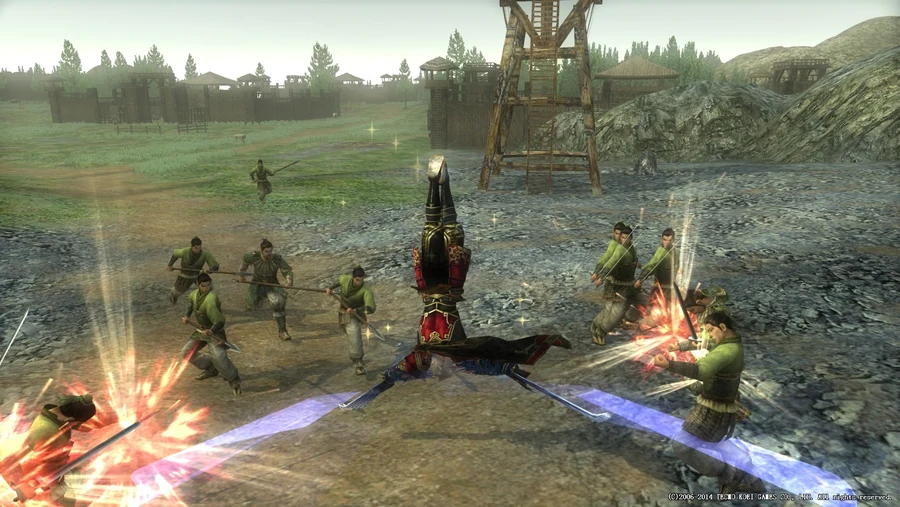
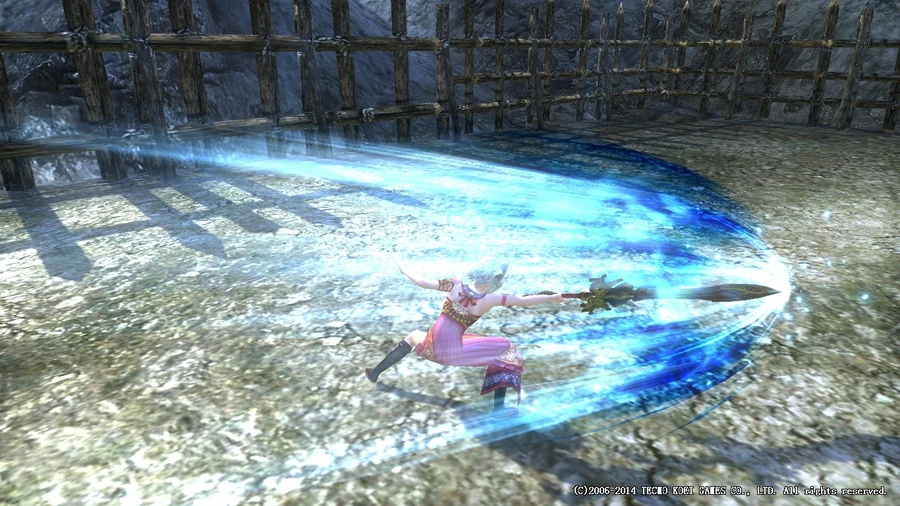
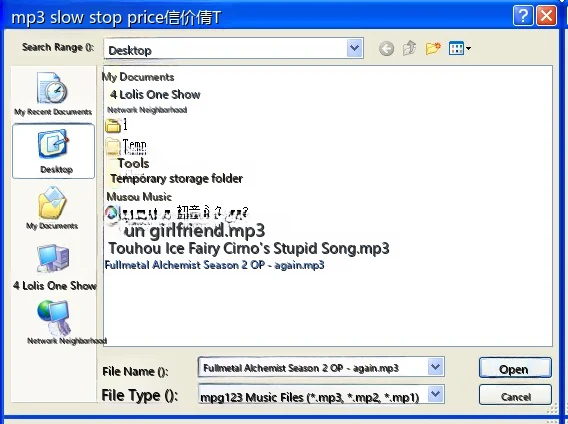
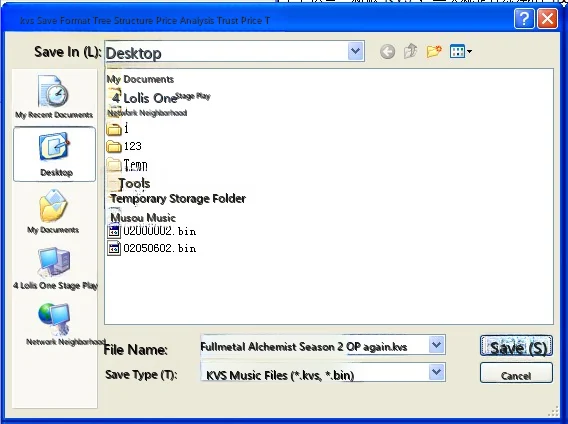
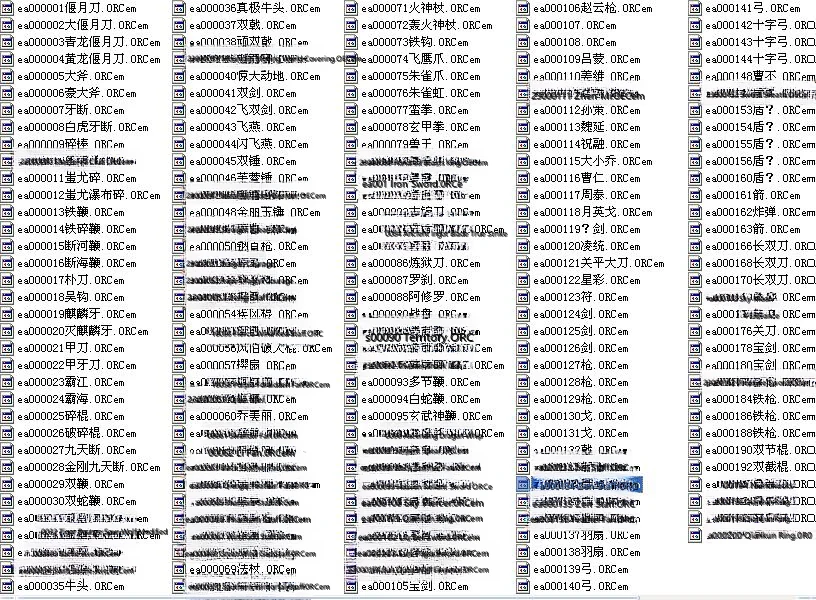
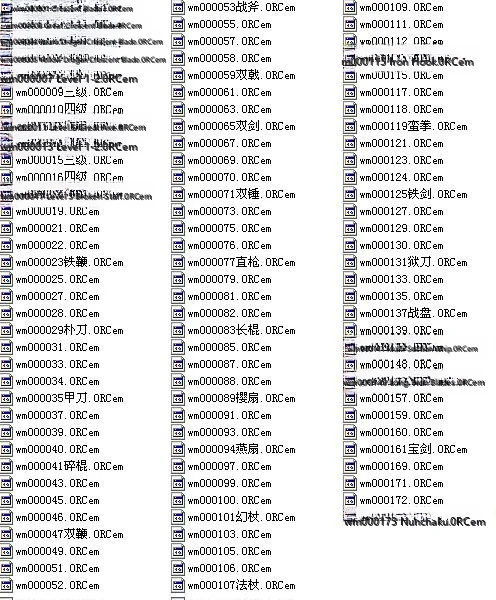
_files/2008112124cc6bdbd09241498938d49027dae4d8.jpg)